Sales tax and VAT software for Squarespace
Squarespace calculates US sales tax, EU and UK VAT, and GST automatically, but only in the regions where you already told it you are registered. It cannot exempt a customer, and registering and filing stay with you. Commenda covers the rest, across all 50 states and 70+ countries.
Trusted by global businesses

































Calculate tax everywhere you owe it
Squarespace calculates in the regions you added a registration for, and nowhere else. Commenda measures your orders against thresholds in all 50 states and 70+ countries, and notifies you at 80% of one.
Exempt the customers who are exempt
Squarespace states that exempting specific customers is not possible, on manual rates or automated ones. Commenda collects each certificate, validates it, and applies it automatically.
Register, file, and remit
Squarespace states you are responsible for making sure your business collects, files, and pays the correct taxes. Commenda registers you and files across all 50 states and 70+ countries.
Coverage comparison
What Squarespace handles, and what it hands back
Squarespace runs two tax setups, manual rates and automated rates, and you cannot use both at once. Its figures come from its own help centre on automated tax rates, manual tax rates, collecting taxes on orders, collecting VAT or GST, and the TaxJar extension, checked on July 30, 2026.
Calculating tax at checkout
- Squarespace
- Handled. Automated rates cover US sales tax, EU and UK VAT, and GST
- Commenda
- Calculated per transaction from maintained rates in 50 states and 70+ countries
Tax where you are not registered yet
- Squarespace
- Not handled. It charges nothing outside the regions you registered
- Commenda
- Exposure measured wherever you sell, before a registration exists
Knowing where you owe
- Squarespace
- Not handled. No threshold monitoring appears in its tax documentation
- Commenda
- Economic and physical thresholds in 50 states and 70+ countries, alerts at 80%
Exempting a specific customer
- Squarespace
- Not handled. Squarespace states individual customer exemptions are not possible
- Commenda
- Collected, validated, stored, and applied automatically where valid
Tax on a membership renewal
- Squarespace
- Partly. A renewal keeps the first order's rate until you reprice the product
- Commenda
- Recalculated each period against the rate in force for that period
Registering, filing, and remitting
- Squarespace
- Not handled. Squarespace states registering and filing are both yours
- Commenda
- Registered, filed, and remitted across all 50 states and 70+ countries
Filing through the TaxJar extension
- Squarespace
- Partly. US taxes only, a paid TaxJar plan, and it switches automated tax off
- Commenda
- One platform for US sales tax, EU VAT with OSS and IOSS, and GST
| Squarespace |  | |
|---|---|---|
| Calculating tax at checkout | Handled. Automated rates cover US sales tax, EU and UK VAT, and GST | Calculated per transaction from maintained rates in 50 states and 70+ countries |
| Tax where you are not registered yet | Not handled. It charges nothing outside the regions you registered | Exposure measured wherever you sell, before a registration exists |
| Knowing where you owe | Not handled. No threshold monitoring appears in its tax documentation | Economic and physical thresholds in 50 states and 70+ countries, alerts at 80% |
| Exempting a specific customer | Not handled. Squarespace states individual customer exemptions are not possible | Collected, validated, stored, and applied automatically where valid |
| Tax on a membership renewal | Partly. A renewal keeps the first order's rate until you reprice the product | Recalculated each period against the rate in force for that period |
| Registering, filing, and remitting | Not handled. Squarespace states registering and filing are both yours | Registered, filed, and remitted across all 50 states and 70+ countries |
| Filing through the TaxJar extension | Partly. US taxes only, a paid TaxJar plan, and it switches automated tax off | One platform for US sales tax, EU VAT with OSS and IOSS, and GST |
Calculate taxes globally on Squarespace using Commenda
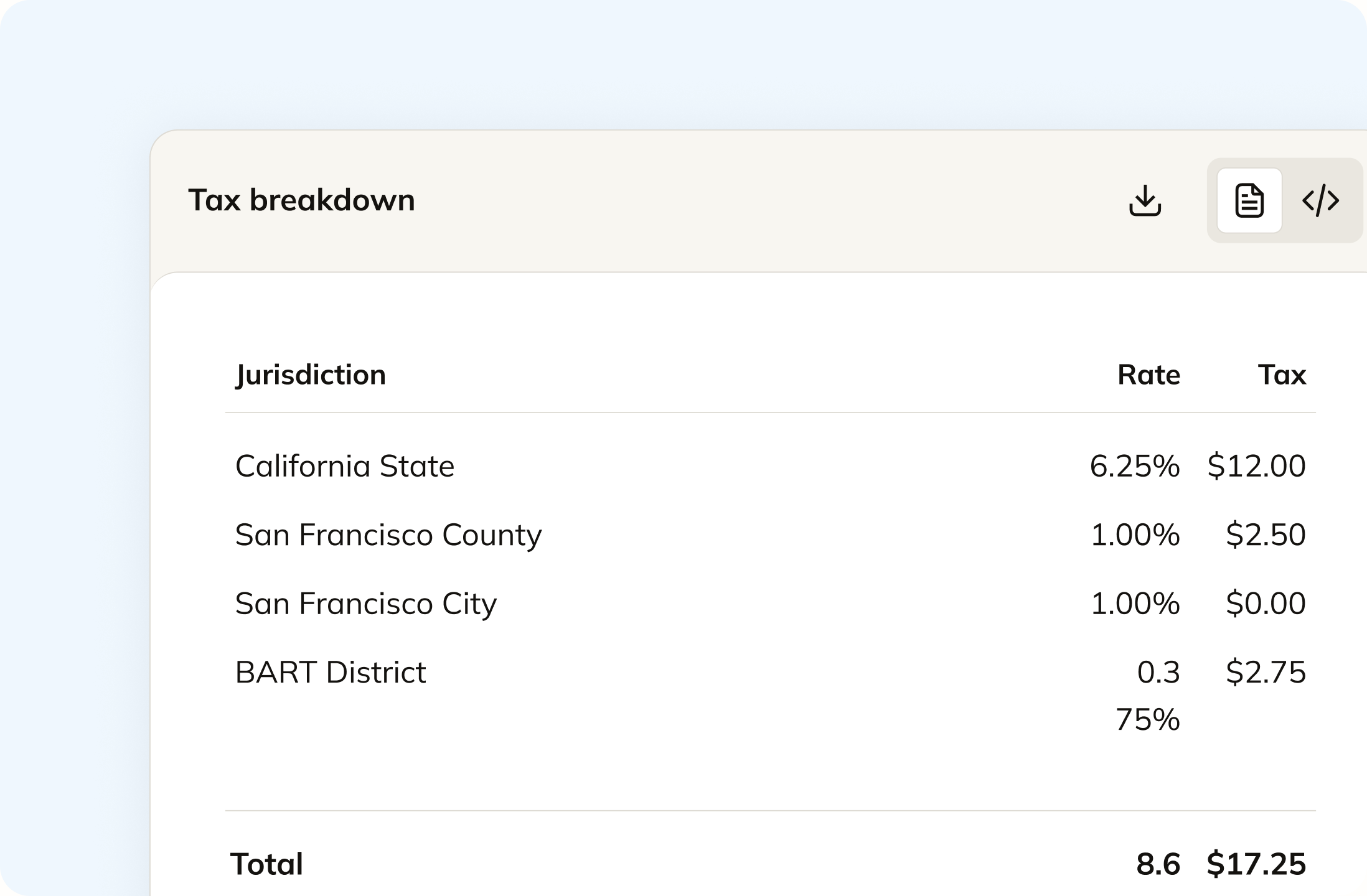
Squarespace charges nothing outside the regions you registered, and its own troubleshooting says a store will not charge sales tax when the customer's address falls outside them. Commenda calculates from maintained rates down to county, city, and district, with a product tax code on each line. Digital products, memberships, and shipping get treated the way each jurisdiction treats them.
Track your global exposure from Squarespace
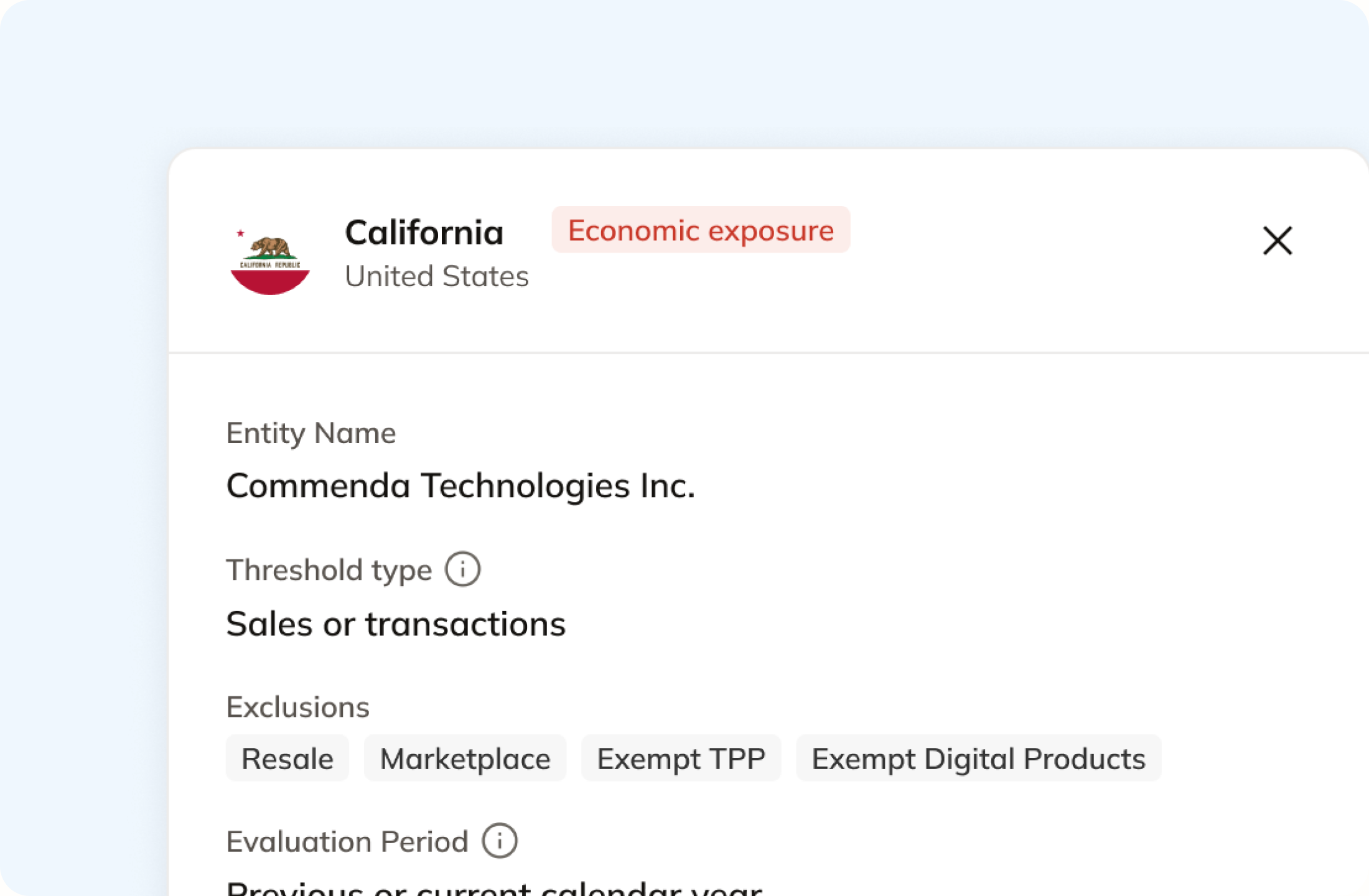
No threshold monitoring appears anywhere in Squarespace's tax documentation. Commenda measures your Squarespace orders against economic and physical thresholds in all 50 states and 70+ countries, and tells you at 80%, before you cross. A short questionnaire covers physical presence too, because inventory at a fulfillment center or a remote employee never shows up on an order.
Automatically remit transactions around the world
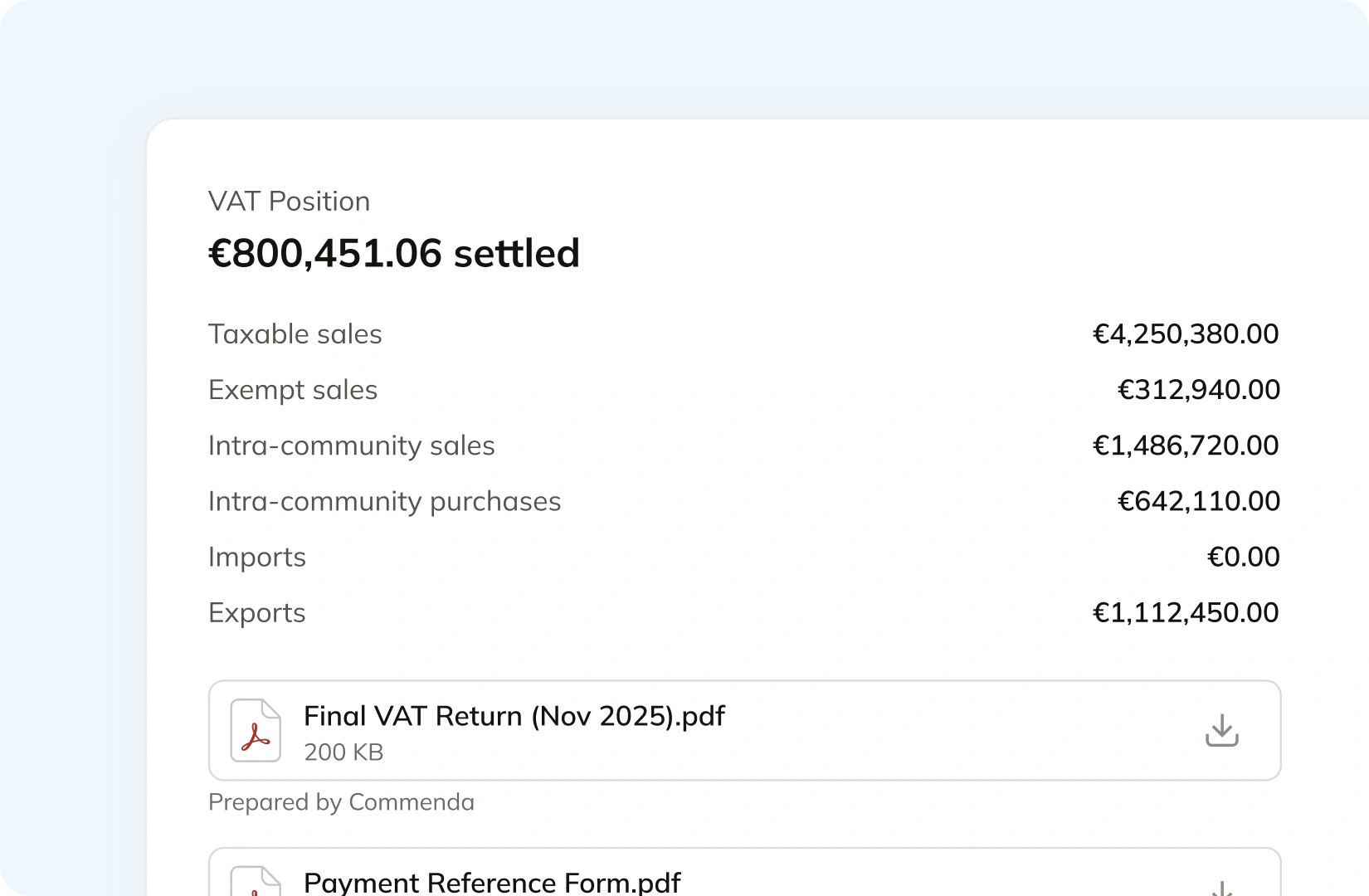
Squarespace exports a taxes tab carrying the amount, the rate, and a jurisdiction description per order line, and states that filing and paying are yours. Commenda builds the return from the same orders, so nothing gets exported or re-keyed. Returns go out across all 50 states, plus EU VAT with OSS and GST in APAC and Canada, with amendments where a period needs correcting.
Manage your customers and exemptions in one place
Squarespace states that exempting certain customers from sales tax is not possible, and its VAT guide says the same for VAT. Commenda collects certificates through a self-service portal that can carry your branding, validates each one on upload, stores it against the customer, and applies it in the states where it is valid. Expiries are tracked and chased.

Consolidation
Why Squarespace does not know your total exposure
Squarespace calculates well inside the boundary you drew for it. A return needs the sales outside that boundary too, the customers who should not have been charged, and the renewals still running on an old rate. Commenda covers those.
Registration is where the calculation starts
Squarespace's automated tax setup asks you to add the locations where you are registered, then shows a green Collecting message. Its troubleshooting lists a customer address outside your registered regions as a reason your store charged no tax, and it states plainly that Squarespace cannot help with registering and cannot offer tax advice. So the states you have not registered in yet are the ones nothing measures.
A membership renewal is taxed at the rate it started on
Squarespace states that subscription products renew using the tax rate from the original order, and that taxes are recalculated only when you reprice the subscription. Changing the renewal frequency or the product name does not update the rate, and neither does a rate change in the customer's state. On a Member Sites membership billed monthly for two years, that is a rate set once and carried for 24 periods.
A digital product order carries a postal code and not much else
Tax on Digital Products pricing plans and Member Sites memberships is based on the billing postal code tied to the member's payment method, per Squarespace's manual rates guide. Its accounting export excludes the billing address on digital products, because they do not collect that information. Physical products use the shipping address, and donations and gift cards are not taxed at all.
One ledger behind every channel
A Squarespace store is rarely the only place you sell. Every source connects to one ledger, across 100+ supported integrations. Each transaction carries its origin, its product tax code, and any tax already collected, so revenue a marketplace already taxed stays separate from revenue that still needs it. The result is one exposure figure per state, one return per period, and every line traceable back to the order it came from.
Cost of growth
What global indirect tax costs on Squarespace
Squarespace prices its automated tax feature per transaction and scales the rate by plan, so the first rows are real figures from its help centre. The rest is what each capability depends on, including three things it states are not possible at all.
| What you need | What Squarespace charges or requires | Source |
|---|---|---|
| Automated tax calculation | 0.15% per transaction on Business and Core, 0.10% on Plus and Commerce Basic, 0.05% on Advanced and Commerce Advanced | Automated tax rates |
| A ceiling on that fee | USD 0.99, EUR 0.99, GBP 0.79, CAD 1.49, or AUD 1.59 per transaction, capped by your store's payment currency | Automated tax rates |
| No fee on an order that ends up tax free | Not how it works. Squarespace states the fee can apply even if the calculated tax is 0.00, including during a US sales tax holiday | Automated tax rates |
| More than one default product tax code | Not available. Squarespace states you can only add one default product tax code at this time, and its codes come from Stripe's tax code list | Automated tax rates |
| A different rate for a different product | Automated taxes. Squarespace states it is not possible to set rates by product on manual taxes, and product tax codes do not apply there | Manual tax rates |
| A city or regional rate outside the US and Canada | Not available on manual taxes. Manual setup covers a country rate, Canadian provinces, and US states plus ZIP codes or ZIP ranges | Manual tax rates |
| Exempting one customer | Not available on either setup. Squarespace states it is not possible to exempt certain customers from paying sales tax, or VAT | Manual tax rates |
| A subscription renewal priced at today's rate | Not automatic. A renewal uses the rate from the original order, and taxes recalculate only when you change the subscription price | Automated tax rates |
| Electronic filing of a state return | The third-party TaxJar extension plus a paid TaxJar plan. It covers US sellers and US taxes only, and connecting it switches your automated taxes off | Using TaxJar |
| A billing address on a digital product order | Not collected. Squarespace's accounting export excludes the billing address for digital products, which do not collect that information | Accounting data |
Automated tax calculation
0.15% per transaction on Business and Core, 0.10% on Plus and Commerce Basic, 0.05% on Advanced and Commerce Advanced
Automated tax ratesA ceiling on that fee
USD 0.99, EUR 0.99, GBP 0.79, CAD 1.49, or AUD 1.59 per transaction, capped by your store's payment currency
Automated tax ratesNo fee on an order that ends up tax free
Not how it works. Squarespace states the fee can apply even if the calculated tax is 0.00, including during a US sales tax holiday
Automated tax ratesMore than one default product tax code
Not available. Squarespace states you can only add one default product tax code at this time, and its codes come from Stripe's tax code list
Automated tax ratesA different rate for a different product
Automated taxes. Squarespace states it is not possible to set rates by product on manual taxes, and product tax codes do not apply there
Manual tax ratesA city or regional rate outside the US and Canada
Not available on manual taxes. Manual setup covers a country rate, Canadian provinces, and US states plus ZIP codes or ZIP ranges
Manual tax ratesExempting one customer
Not available on either setup. Squarespace states it is not possible to exempt certain customers from paying sales tax, or VAT
Manual tax ratesA subscription renewal priced at today's rate
Not automatic. A renewal uses the rate from the original order, and taxes recalculate only when you change the subscription price
Automated tax ratesElectronic filing of a state return
The third-party TaxJar extension plus a paid TaxJar plan. It covers US sellers and US taxes only, and connecting it switches your automated taxes off
Using TaxJarA billing address on a digital product order
Not collected. Squarespace's accounting export excludes the billing address for digital products, which do not collect that information
Accounting data
Figures verified on July 30, 2026.
From the field
Trusted by businesses across the globe


“The platform works exactly the way I need it to. I have one team member who manages all of our exemption certificates, and that functionality has been particularly efficient for us. It allows him to handle everything seamlessly, making the handoff significantly easier.”
VP of Finance, TRX






Compare Commenda sales tax software with competitors
Squarespace stores usually shortlist us against the ecommerce tax tools, TaxJar and Avalara included. We compare them on coverage, ratings, and real pricing, and we say where each one wins.
More sales tax resources
Guides from the Commenda team on product taxability, subscription revenue, and multi-state filing.
Frequently asked questions
Custom integration support for your business
Every Squarespace store sells a different mix. We map your physical products, downloads, member areas, and service products to the right tax treatment in each jurisdiction, and set up the registrations you are missing. No engineering work on your side.
Indirect Tax
Monitor nexus exposure, register, file, and remit sales tax and VAT in one platform. Commenda keeps you compliant across 100+ jurisdictions.
Explore the product
