Filing a formation under a name that is already taken wastes filing fees and weeks of lead time. Contracting with an entity that is not in good standing costs even more. The West Virginia Secretary of State runs free official lookups that catch both problems early.
This guide shows how to run one in 2026. Start at the official West Virginia Business Entity Search portal, where viewing records costs nothing.
What Is a West Virginia Business Entity Search?
A West Virginia business entity search is a free public lookup of registration records for corporations, limited liability companies (LLCs), and other entities filed with the West Virginia Secretary of State (SOS). Results return entity name, type, city, and status. The Details view adds full address, registered organization number, creation date, and registered agent contact. The apps.wv.gov portal states there are no fees to view this information.
Why Run a West Virginia Business Entity Search?
Run a search to confirm a name is available, vet another company, or prove your own standing. The state publishes registration data so you act on facts, not guesses. Kris Warner is West Virginia’s 31st Secretary of State and Chief Business Registration Officer, elected November 5, 2024, per the SOS office page. He took office on January 13, 2025.
- Confirm a name is distinguishable before you file formation documents.
- Vet partners, vendors, and acquisition targets before you sign or invest.
- Verify your own entity’s standing for lenders, banks, and contracts.
Which Official Portal Should You Use for a West Virginia Business Search?
Both official portals are free. Use apps.wv.gov/sos/businessentitysearch to search by name and order certificates. Use the Business Organization Search at apps.sos.wv.gov for an Agent/Officer/Name mode, the `%` wildcard, and 55-county advanced filters. Pick by task, as the table below shows.
| Feature | Business Entity Search (apps.wv.gov) | Business Organization Search (apps.sos.wv.gov) | Source |
|---|---|---|---|
| URL | apps.wv.gov/sos/businessentitysearch | apps.sos.wv.gov/business/corporations | Both SOS portals |
| Search modes | Organization name | Organization name plus Agent/Officer/Name | apps.sos.wv.gov |
| Wildcard support | Name lookup only | `%` wildcard, example `%Fraternal%1234%` | apps.sos.wv.gov |
| Advanced/county filters | No | All 55 counties, org type, charter type, status, date ranges, RecordID | apps.sos.wv.gov searchadvanced.aspx |
| Details fields | Address, org number, creation date, agent contact | Same fields plus filters | apps.wv.gov |
| Certificate purchase | Yes, $10 per certificate | Search only | apps.wv.gov |
| Data stamp | “Search Data Current as of” plus build v3.3.0.0 | “Search Data current as of” time stamp | Both portals |
The portal titled “Business Entity Search and/or Request for Certificates of Existence” is the certificate-ordering tool, per apps.wv.gov. The SOS disclaims warranty on completeness, stating it makes “no representation or warranty as to the correctness or completeness of the information,” per apps.sos.wv.gov. Treat the “Data Current as of” stamp as the operative freshness signal.
How Do You Do a West Virginia Business Entity Search Step by Step?
Five steps take under five minutes, with no account and no fee to view. Open the portal, enter the name with a wildcard, review the results, open Details for the full record, and order a certificate only if you need proof. Each step is below.
Step 1: Open the official Secretary of State search portal
Go to the West Virginia Business Entity Search portal. Confirm the address ends in a wv.gov domain before you type anything. The page footer shows build v3.3.0.0 and a “Search Data Current as of” stamp, both freshness signals, per apps.wv.gov.
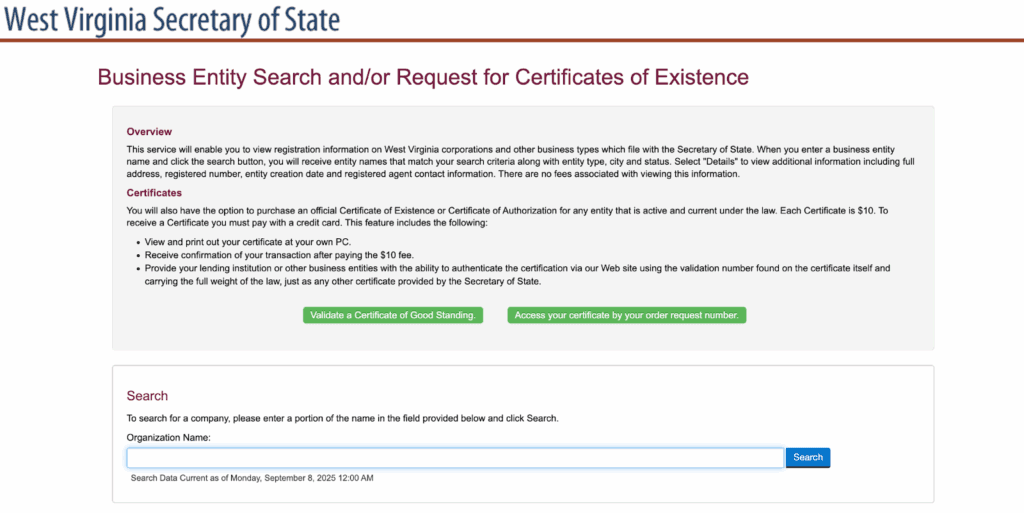
Step 2: Enter the business name (use the % wildcard)
Enter one or more key words from the name. On the Business Organization Search, use the `%` symbol as a wildcard. The official example searches `%Fraternal%1234%` to find “Fraternal Order Eagles 1234 ABCD, Inc.,” per apps.sos.wv.gov. The `%` wildcard works on that portal; apps.wv.gov takes a portion of the name. Results include registered trade names (doing-business-as, or DBA, names) filed with the State Tax Department.
Step 3: Review results and tell similar names apart
Results list entity name, type, city, and status together. LLC and corporation records sit in the same list. When “ABC LLC” and “ABC Corp” both appear, use the entity type, the city, the creation date, and the registered organization number to confirm the right record before you act.
Step 4: Open Details for the full record
Click Details to see the full address, registered organization number, entity creation date, and registered agent contact information, per apps.wv.gov. These four fields are the record you rely on for filings and due diligence.
Step 5: Order a Certificate of Existence if you need proof (optional)
Order a Certificate of Existence for $10 if a lender or counterparty wants proof of standing. See the certificate section below for the full process. Viewing the record itself stays free.
Streamline your global entity management in one place
Stay on top of filings, records, and governance across every jurisdiction
Can You Search by Entity Number in West Virginia?
No, the public search boxes are name-based, not number-based. The registered organization number appears in the Details view after a name search, per apps.wv.gov. That number is the identifier you use on annual reports, filings, and certificate orders. Find the entity by name, capture its number, then use the number downstream.
How Does the Registered Agent and Officer Search Work?
A registered agent is the person or company designated to receive legal and state notices for an entity. The Business Organization Search adds an Agent/Officer/Name tab, per apps.sos.wv.gov. Use it to find every entity a given agent represents, locate a service-of-process contact for a lawsuit, or trace entities tied to one principal. Open each result for status and address.
How Do Advanced Search and County Filtering Work?
The advanced page lets you combine any filters. By default all 55 counties return; you select counties only to narrow results, using the official Kanawha-and-Putnam example. Filters include organization type, charter type, status, and effective or termination date ranges, per the advanced search page. Scope due diligence to a locality or pull a county-level list this way.
One gotcha: the search remembers your selections between queries. Clear the filters before a fresh search, or stale county selections will silently limit your results.
How Do You Check If a Business Name Is Available in West Virginia?
Search the exact name plus `%` wildcard variations, including DBAs. If nothing matches, the name is likely available, though the SOS makes the final distinguishability call at filing and disclaims completeness, so absence of a result is not a guarantee. Test abbreviation variants such as “Corp” versus “Corporation.” Our company name checker speeds up the first pass.
An availability result does not hold the name. Reserve it through the SOS before filing to lock it in. Confirm the current reservation fee on the SOS fee schedule at the time you file, then start formation with the West Virginia business registration guide.
What Do the Entity Status Designations Mean?
Status tells you whether an entity can legally operate and buy certificates. Only entities active and current under the law qualify for a Certificate of Existence, per sos.wv.gov. The Business Organization Search filters records by active or inactive status. The verified statuses appear below.
| Status | Meaning | Eligible for a certificate | Source |
|---|---|---|---|
| Active | Entity is current under the law and can operate | Yes | sos.wv.gov certificates page |
| Inactive | Entity is not current; certificates are blocked | No | apps.sos.wv.gov advanced search |
Confirm the exact label in live search results, since status wording drives whether a certificate can issue at all.
Which Business Entity Types Appear in West Virginia Search Results?
Domestic and foreign corporations, LLCs, partnerships, nonprofits, and professional entities all appear in one list. The advanced search recognizes 20+ organization types and a Domestic or Foreign charter flag, per the advanced search page. The common types are below.
| Entity type | Typical use | Source |
|---|---|---|
| LLC | Flexible management with limited liability | apps.sos.wv.gov |
| Corporation | Stock issuance and growth financing | apps.sos.wv.gov |
| Limited Liability Partnership (LLP) | Professional service firms | apps.sos.wv.gov |
| Limited Partnership (LP) | Investment structures with general and limited partners | apps.sos.wv.gov |
| Nonprofit Corporation | Charitable, educational, or religious purposes | apps.sos.wv.gov |
| Professional LLC (PLLC) | Licensed professionals such as attorneys and doctors | apps.sos.wv.gov |
Nonprofits that solicit also appear in the separate SOS Charitable Organizations registry. Search results include registered trade names (DBAs) filed with the State Tax Department, per apps.sos.wv.gov.
Do Foreign (Out-of-State) Entities Show Up in a West Virginia Search?
Yes, out-of-state entities qualified to do business in West Virginia appear in the same search alongside domestic ones, with type and status indicators. The advanced search flags each record as Domestic or Foreign charter type, per the advanced search page. Foreign qualification is how a company formed elsewhere registers to operate here. Foreign entities order a Certificate of Authorization, covered below.
How Do You Verify Good Standing and Get a Certificate of Existence?
Order a Certificate of Existence from apps.wv.gov for $10 by credit card, then print it immediately from your own PC. After payment you get a transaction confirmation and a validation number that lenders authenticate online, carrying full legal weight, per apps.wv.gov. The fee and turnaround tiers are below.
| Service level | Fee | Turnaround | Source |
|---|---|---|---|
| Standard | $10.00 per certificate | 5–10 business days | sos.wv.gov certificates page |
| 24-hour expedite | +$25.00 | 24 hours | sos.wv.gov certificates page |
| 2-hour expedite | +$250.00 | 2 hours | sos.wv.gov certificates page |
| 1-hour expedite | +$500.00 | 1 hour | sos.wv.gov certificates page |
Online orders require a credit card; in-person orders also accept cash, check, or money order, per the SOS certificates page. A company operating only under a DBA cannot get a certificate. The certificate confirms registration and current annual report filing, not tax, unemployment insurance, or workers’ compensation compliance. Retrieve a paid certificate by its order request number, and note that apps.sos.wv.gov lists a second ordering entry point for the same product.
What Is a Certificate of Authorization and When Do Foreign Entities Need One?
The Certificate of Authorization is the foreign-entity equivalent of the Certificate of Existence. It proves an out-of-state company is qualified and current to do business in West Virginia. It carries the same $10 fee, the same ordering portal, and the same active-and-current eligibility requirement, per sos.wv.gov. Lenders, state contract bids, and registrations in other states often ask for it. Domestic entities order Existence; foreign entities order Authorization.
Is a Certificate of Existence the Same as a Certificate of Good Standing?
Yes in practice. West Virginia’s official document names are Certificate of Existence for domestic entities and Certificate of Authorization for foreign entities, per sos.wv.gov. “Certificate of Good Standing” is the cross-state colloquial term. The WV portal itself offers to “Validate a Certificate of Good Standing,” so the state uses the terms interchangeably. Our West Virginia certificate of good standing guide covers the ordering steps.
What Should You Do After Your West Virginia Entity Search?
Founders move to name reservation and formation. Existing entities move to annual filings and maintenance. State any fee only after you confirm it against the current WV SOS fee schedule. The three paths are below.
For new businesses: reserve the name and file formation documents
Reserve the cleared name, then file through the SOS Online Business Registration. File Articles of Organization for an LLC, then register for state taxes with the West Virginia State Tax Division. The West Virginia LLC formation guide walks through the filing sequence.
For existing businesses: stay in good standing
File your Online Annual Report on time, update agent, officer, or address changes, and register or withdraw trade names as needed. Reinstate promptly if status has lapsed. For large-scale due diligence, use the Business Entity List Service or Bulk Data Service. Track every deadline with our compliance calendar.
Does the entity search show West Virginia business licenses?
No, the SOS search shows registration records, not licenses. The business registration certificate comes from the West Virginia State Tax Division, and industry licenses come from their own agencies. Kris Warner oversees the WV One Stop Business Center, with offices in Charleston, Clarksburg, and Martinsburg, per sos.wv.gov. Our West Virginia business license guide covers the adjacent licensing steps.
How We Keep Your West Virginia Entity in Good Standing
The search tells you today’s status. Staying Active requires tracked annual reports, agent updates, and deadlines you cannot miss. Commenda’s entity management platform tracks every filing and deadline across all your entities and states, and Commenda incorporation handles formation once your name search clears. Book a demo to get a free compliance health check on your West Virginia entities.
About the author

Ishwar is a serial entrepreneur and Y Combinator alum who has founded multiple venture-backed companies across global markets. Based in Bangalore, he brings a founder’s perspective to the complexities of international operations, with deep expertise in transfer pricing and cross-border structuring.
Disclaimer: Commenda and its affiliates do not provide tax, accounting, or legal advice. This material has been prepared for informational purposes only, and is not intended to provide or be relied on for tax, accounting, or legal advice. You should consult your own tax, accounting, and legal advisors before engaging in any related activities or transactions.