You need to confirm a Montana company is real and in good standing before you sign a contract, wire a deposit, or take on a vendor. Or you have a business name and need to know it is free before you file. Both questions share one answer.
The Montana Secretary of State (SOS) runs a free public search of every registered business in the state. It lives at biz.sosmt.gov. This guide shows how to run it, read the results, and act on what you find. It is current for 2026.
What Is a Montana Business Entity Search?
A Montana business entity search is the free, official lookup of the Montana Secretary of State business database. It returns an entity’s status, registered agent, formation date, and filing history. You run it at biz.sosmt.gov. Use it to verify a company before a deal, or to confirm a name is available before you file formation documents.
Do not confuse the SOS search with the broader Montana Business Portal at mt.gov. The SOS search covers entity records. The Montana Business Portal handles state tax accounts, licensing, and workforce registration. First-timers often land on the wrong site. For company records and name checks, stay on biz.sosmt.gov.
| Montana entity search fact | Detail | Source |
|---|---|---|
| Official search portal | https://biz.sosmt.gov/search/business | Montana Secretary of State |
| Cost to search | Free | Montana Secretary of State |
| Domestic LLC (Limited Liability Company) formation | $35.00 (Articles of Organization) | Montana SOS fee schedule |
| Certificate of Existence (good standing proof) | $5.00 | Montana SOS fee schedule |
| Annual report deadline | April 15 each year | Montana Secretary of State |
| Business Services help line | (406) 444-3665 | Montana Secretary of State |
How Do You Perform a Montana Business Entity Search?
Run a Montana Secretary of State business search in four steps. Open the portal, enter a business name or filing number, review the results table, then open the entity detail panel. Searching is free and needs no login. A login is required only when you file. Call Business Services at (406) 444-3665 for help.
Step 1: Open the search portal
Go to biz.sosmt.gov. Basic searches are free and require no account.
Step 2: Search by name or business ID
Type the business name and choose “starts with” or “contains.” Search without designators like “LLC” or “Inc.,” because the system matches the registered name. To find one specific record, enter its filing or business ID number in the same box. Use the Advanced tab to filter by entity type, status, registration date, or county.
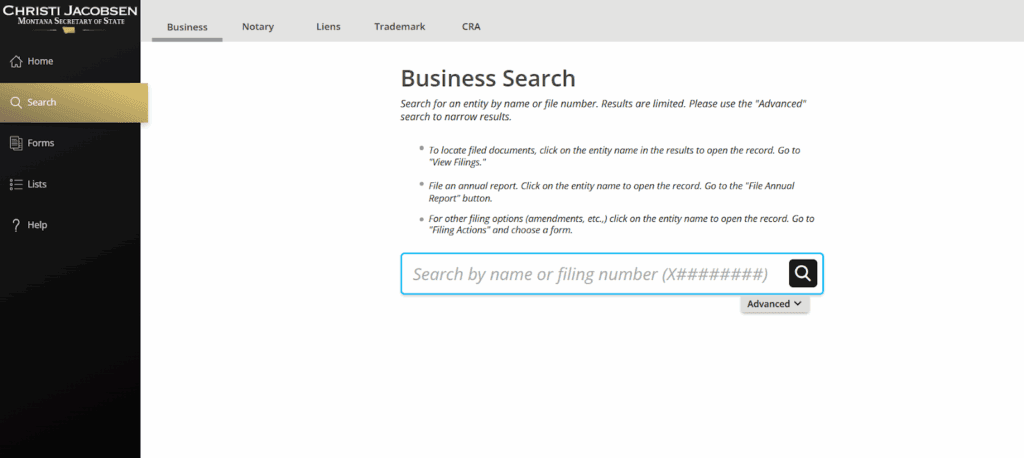
Step 3: Review the results table
The results table lists each match with its status, entity type, registration date, and registered agent. Both active and inactive entities appear. Check the status column before you rely on any record.
Step 4: Open the entity detail panel
Select a business name to open its detail panel. It shows the filing number, entity type, formation date, principal address, registered agent, and filing actions.
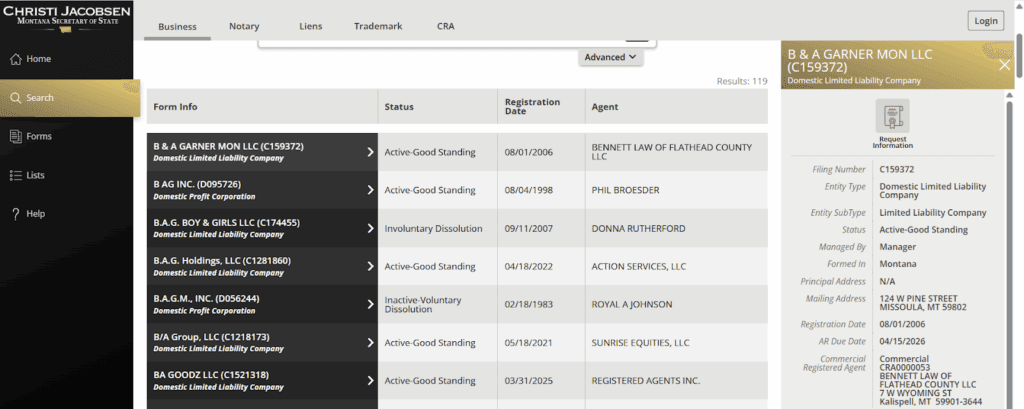
How Do You View a Montana Entity’s Filing History and Documents?
Open the entity’s record and view its filings panel to see the full document history. Formation documents appear as “Initial Filing” entries and download free, confirmed by the Montana SOS help center. The history also shows amendments, annual reports, and registered agent changes.
Reviewers use this timeline for due diligence. Gaps in annual reports, a recent agent change, or a late amendment all show up here. It is the closest public record to a company’s real filing behavior over time.
How Do You Check If a Business Name Is Taken in Montana?
Search your proposed name without designators using the “contains” option, then check both active entities and assumed business names. Montana blocks a name that is not “distinguishable on the records” from an existing name, under Mont. Code Ann. § 35-8-103 for LLCs. If the name is free, reserve it for $10.00 for a nonrenewable 120 days, per the Montana SOS fee schedule.
Corporations follow the same standard under Mont. Code Ann. § 35-2-305. The 120-day reservation cannot be renewed, per Mont. Code Ann. § 35-8-104. A name can also be taken by a registered assumed business name, covered in the next section, so include those in your check. Commenda’s company name checker screens availability before you file.
What Are Assumed Business Names (DBAs) and How Do You Search Them?
An assumed business name (ABN), also called a DBA or “doing business as,” is a registered trade name, not a separate legal entity. Sole proprietors and existing entities register ABNs with the Montana Secretary of State for $20.00, per the SOS fee schedule. They appear in the same biz.sosmt.gov results, tagged with their own registration type.
An ABN gives no liability shield and no separate legal existence. The registration lasts 5 years and renews for another 5, under Mont. Code Ann. § 30-13-206. Montana rejects a conflicting ABN under the same distinguishable standard, per Mont. Code Ann. § 30-13-202. This is why a real name check must include ABNs, and why some names in your results belong to trade names rather than formal entities.
Which Business Entity Types Can You Search in Montana?
The search covers every entity registered with the Montana Secretary of State, from LLCs to assumed business names. Each type has its own formation filing and fee. The table below lists the common Montana types, how they form, the verified fee where the SOS publishes one, and how each shows up in results.
| Entity type | Formation filing | Filing fee | How it appears in search | Source |
|---|---|---|---|---|
| Domestic LLC (Limited Liability Company) | Articles of Organization | $35.00 | Listed by name and status | Montana SOS fee schedule |
| Professional LLC (PLLC) | Articles of Organization | See SOS fee schedule | Listed like an LLC | Montana SOS fee schedule |
| Domestic for-profit corporation | Articles of Incorporation | $35.00 | Listed by name and status | Montana SOS fee schedule |
| Nonprofit corporation | Articles of Incorporation | See SOS fee schedule | Labeled nonprofit | Montana SOS fee schedule |
| Foreign profit corporation | Foreign Registration Statement | $70.00 | Labeled foreign, shows home state | Montana SOS fee schedule |
| Foreign nonprofit corporation | Certificate of Authority | $15.00 | Labeled foreign nonprofit | Montana SOS fee schedule |
| LLP (Limited Liability Partnership) | Statement of registration | See SOS fee schedule | Listed by name | Montana SOS fee schedule |
| LP (Limited Partnership) | Certificate of limited partnership | See SOS fee schedule | Listed by name | Montana SOS fee schedule |
| Series LLC | Articles of Organization | See SOS fee schedule | Master LLC only (see below) | Montana SOS fee schedule |
| Business trust | Registration filing | See SOS fee schedule | Listed by name | Montana SOS fee schedule |
| Assumed business name (ABN/DBA) | Registration of Assumed Business Name | $20.00 | Tagged as assumed business name | Montana SOS fee schedule |
How Do Series LLCs Appear in Montana Search Results?
The master LLC is the registered record, so a Montana search returns the parent filing, not each internal series. Search by the master LLC’s name to find it. The individual series are generally organized inside the master LLC’s operating agreement, which is not a public SOS filing. Confirm any specific series structure on the entity’s own record.
What Do Montana Business Entity Status Designations Mean?
Status tells you whether an entity may legally operate in Montana. “Active Good Standing” means it can. Dissolved and forfeited statuses mean it cannot until it fixes the problem. The table below explains the common designations on the Montana Secretary of State portal and what each means for you.
| Status | What it means | Can it operate? | Path back | Source |
|---|---|---|---|---|
| Active Good Standing | Current on all filings and fees | Yes | Not applicable | Montana SOS business search |
| Administratively Dissolved | State dissolved it for missed annual reports or fees | No | Reinstatement through the SOS | Montana SOS business search |
| Voluntarily Dissolved | Owners closed it on purpose | No | Not applicable; planned closure | Montana SOS business search |
| Forfeited | Charter lost for a compliance failure | No | Corrective filing to regain the charter | Montana SOS business search |
Reinstatement exists for administratively dissolved entities. The current order and fees are on the Montana SOS fee schedule. Confirm the exact status label on the live portal, since a state can adjust its terminology over time.
How Do Foreign Corporations Register and Appear in Montana Searches?
An out-of-state corporation must register with the Montana Secretary of State before it does business in Montana. It files a Foreign Registration Statement for $70.00, per the SOS fee schedule, and cannot maintain a lawsuit in Montana courts until it registers, under Mont. Code Ann. § 35-14-1502. Foreign entities then appear in the same search, labeled by type with a home-state field.
The statement must list the corporation’s name, home jurisdiction, principal office, Montana registered agent, and officers, under Mont. Code Ann. § 35-14-1503. In the detail panel, a foreign entity shows its home state, while a domestic one shows Montana. This matters two ways. For vendor due diligence, an unregistered foreign company is not authorized here. For name checks, use the entity-type or state filter to isolate domestic conflicts.
How Do You Get a Montana Certificate of Good Standing?
Montana issues a Certificate of Existence as its proof of good standing. Find the entity in the search, open its record, and order the certificate through the portal’s filing actions for $5.00, per the Montana SOS fee schedule. Searching is always free. Certificates and certified copies are not. The entity must be current on its filings to qualify.
Banks, lenders, and other states request a Certificate of Existence when you open accounts, borrow, or register in a new state. If the entity is behind on annual reports, bring it current before you order the certificate.
What Is a Montana Registered Agent and How Do You Change Yours?
A registered agent is the person or company that receives legal and state documents for a business. Montana requires every registered entity to keep a registered agent with a physical Montana address, and that agent shows in every search result. To change yours, log in to the biz.sosmt.gov filing portal, open your entity, and file the change through filing actions.
The change form, fee, and processing time are listed on the Montana SOS fee schedule and the live portal, so confirm the current form name before you file. Note that a registered agent address is the official address of record. It is often not the company’s real operating address, which matters when you research where a company is actually based.
What Should You Do After Your Montana Entity Search?
Your next step depends on whether you are forming a new entity or maintaining an existing one. New filers register or reserve their name. Existing owners keep annual reports and amendments current. Both happen in the same biz.sosmt.gov portal you just searched.
For new businesses
File your Articles of Organization or Articles of Incorporation through the portal, using the fees in the entity types table above. If you are not ready to file, reserve the name first for $10.00. Then apply for a free Employer Identification Number (EIN) from the IRS for banking and tax filings.
For existing businesses
File your annual report by April 15 each year. It costs $0.00 on time and $35.00 late, per the Montana SOS fee schedule. File amendments through filing actions. Track every deadline with Commenda’s compliance calendar so your status never lapses.
Why Do Out-of-State Owners Form Montana LLCs?
Montana has no general state sales tax, according to the Montana Department of Revenue. That built a niche of non-residents forming Montana LLCs to title vehicles and RVs without paying sales tax at purchase. It is why so many single-purpose Montana LLCs turn up in search results. Your home state may treat the arrangement as tax evasion, so get advice before you copy it.
How Commenda Simplifies Montana Entity Compliance
Commenda handles Montana formation end to end, from the name check through registration with the Secretary of State. Commenda’s incorporation service files your Articles of Organization or Incorporation and provides registered agent service with a Montana address. Commenda’s entity management platform then tracks annual reports and amendments, so your status never slips out of good standing.
You get certainty that every Montana filing is done, on time, without watching the April 15 deadline yourself. Book a demo for a free compliance-status review of your Montana entities.