You need to confirm a company is really registered in Alabama before you sign a contract, invest, or claim a name. An Alabama business entity search settles it in minutes. It tells you whether a business exists, who its registered agent is, and whether its status is current.
The free search lives at the Alabama Secretary of State site, on the Business Entity Records page. One 2026 fact trips up most guides: Alabama no longer requires an annual report filed with the Secretary of State. The section below covers exactly what changed.
What Is the Alabama Business Entity Search?
The Alabama business entity search is the free public lookup of every registered Alabama entity, run by the Secretary of State (SOS). It confirms a company’s legal status, entity ID, type, and registered agent. What confuses people is the two-system setup: lookups are free, but certificates and filings cost money through a separate portal.
| Task | System | Cost | Source |
|---|---|---|---|
| Name or entity lookup | sos.alabama.gov (Government Records → Business Entity Records) | Free | Alabama SOS |
| Certificates, certified copies, name reservation, formations, foreign registration, UCC filings | Alabama Interactive portal (alabamainteractive.org/sos) | Paid, per service | Alabama Interactive |
The paid portal is run by Alabama Interactive, LLC, a third-party vendor under Alabama Department of Finance contract MA 999 17000000171, per the Alabama Interactive SOS portal. Uniform Commercial Code (UCC) lien searches also run there.
Reach the SOS Business Services Division here:
- Phone: 334-242-5324
- Address: 770 Washington Avenue, Suite 580, Montgomery, AL 36104
- Technical or portal support: (866) 353-3468 or support@alabamainteractive.org
The office runs lean. Per the Alabama SOS, its Business Entity Division has 12 employees, fields about 500 information requests a day, and maintains roughly 250,000 entity filings.
How Do You Do a Business Entity Search in Alabama?
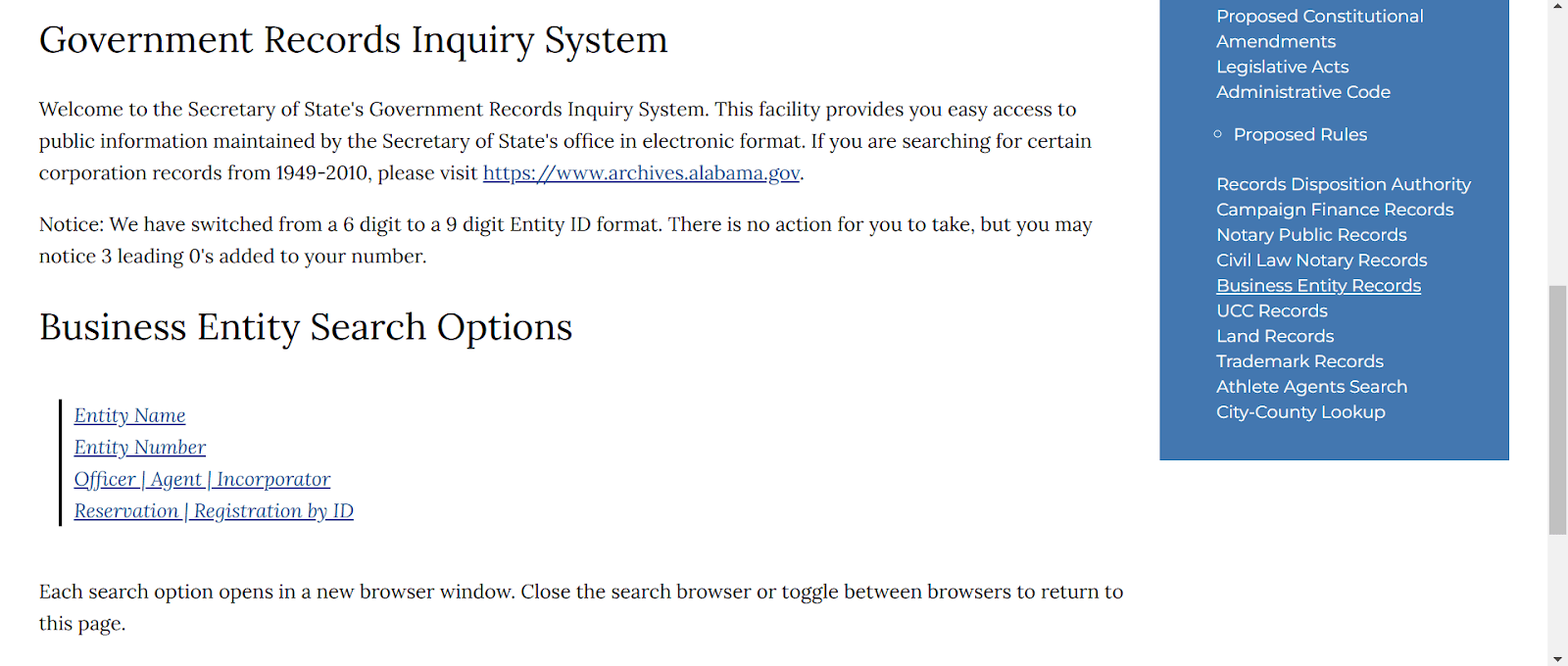
Go to the Business Entity Records page, pick a search type, enter your term, and open the record. The Alabama SOS system offers five search methods: Entity Name, Entity Number, Officer/Agent/Incorporator, Date, and Reservation/Registration by ID, per the Alabama SOS Business Entity Records page. Each option opens the live lookup tool in a new window.
The search is free, public, and works from any country with no US account, so founders abroad can verify an Alabama counterparty before they wire a dollar. Note the SOS switched Entity IDs from a 6-digit to a 9-digit format, padding legacy numbers with three leading zeros, per the Alabama SOS. Corporation records from 1949 to 2010 are not in the live system and must be requested from the Alabama Department of Archives and History, per the SOS.
How Do You Search by Business Name?
The business name search is the default. Use an exact match when you know the registered name letter for letter. Use a partial match (“contains” or “starts with”) when spelling is uncertain or you want every entity sharing a keyword. That flexibility handles most lookups on the Alabama SOS site.
Three tips save time. Common names return long lists, so narrow by entity ID or agent. Try abbreviation variants, like “Inc” versus “Incorporated” or “&” versus “and.” Watch for inactive lookalikes: a near-identical name can be a dissolved entity, not the company you want.
How Do You Search by Entity ID or Filing Number?
Search by Entity Number when you already have the ID from a contract, a prior filing, or an earlier search. It returns the one exact record with zero ambiguity. Every registered Alabama entity carries a unique Entity ID assigned by the Secretary of State, now in the 9-digit format. This is the fastest route for an Alabama business filing number lookup.
How Do You Search by Registered Agent or Officer Name?
Select the Officer/Agent/Incorporator option and enter the individual’s name. The search returns every entity tied to that person. Use it for due diligence on a counterparty’s principals or to find all companies a single registered agent serves. The agent’s name and address are public in the record, at no cost.
How Do You Search by Date?
Pick the Date method to return entities by their formation or filing date range. Use it to find recently formed Alabama entities or to confirm when a counterparty registered. Enter the date range, and the search lists every entity that matches, per the Alabama SOS Business Entity Records page. It is useful for monitoring newly registered competitors or pinning down a company’s exact registration timeline.
How Do You Search by Reservation or Registration ID?
Pick Reservation/Registration by ID to look up a pending name reservation or registration record by its ID number. Use it after you reserve a name through the portal and before you file formation documents, to confirm the reservation is on record. It targets one specific filing, so it returns that record directly rather than a list, per the Alabama SOS Business Entity Records page.
Streamline your global entity management in one place
Stay on top of filings, records, and governance across every jurisdiction
What Do Alabama Business Entity Search Results Show?
The results list shows each entity’s name, entity ID, type, status, city, and formation date. Clicking a record opens the full detail page with the registered agent, addresses, and filing history. The status field tells you whether the company is live before you read any further.
| Detail-page field | What it means | Why it matters |
|---|---|---|
| Registered agent name and address | Who accepts legal and government mail | Tells you where to serve notice and whom to vet |
| Principal office address | The entity’s main business location | Confirms where it actually operates |
| Formation or qualification date | When it registered in Alabama | Shows entity age and history |
| Entity type | Corporation, limited liability company (LLC), partnership, or nonprofit | Sets the legal and tax rules |
| Filing history | Amendments, dissolutions, past filings | Reveals ownership or structure changes |
| Status | Current legal standing | Confirms the entity is active before you transact |
Alabama’s status labels differ from other states’. Here is what each one means, per the Alabama SOS:
| Status | Meaning |
|---|---|
| Exists | Alabama’s label for an active, compliant entity (other states say “Active” or “Good Standing”) |
| Dissolved | A domestic entity that has ended |
| Withdrawn | A foreign entity that has exited Alabama |
| Merged | An entity absorbed into another |
What Business Structures Does Alabama Recognize?
Alabama recognizes corporations, LLCs, limited partnerships (LPs), limited liability partnerships (LLPs), and nonprofits. Each files a different formation document with the Secretary of State. Getting the document name right matters, because Alabama’s terms differ from those of other states.
| Structure | Formation document | Key trait | Source |
|---|---|---|---|
| Corporation | Articles of Incorporation (loosely, a certificate of incorporation) | Separate legal and tax entity with limited liability | Alabama SOS |
| LLC | Certificate of Formation | Limited liability with flexible pass-through taxation | Alabama Limited Liability Company Law of 2014 |
| LP | Certificate of Limited Partnership | General partners manage and bear liability; limited partners do not | Alabama SOS |
| LLP | Statement of qualification filed with the SOS | Partners gain liability protection | Alabama SOS |
| Nonprofit | Nonprofit formation documents filed with the SOS | May seek federal tax-exempt status separately | Alabama SOS |
People search “Articles of Organization Alabama LLC,” but Alabama’s official LLC document is the Certificate of Formation under the Alabama Limited Liability Company Law of 2014. Filing is now done directly with the SOS online, replacing the older county Probate Judge routing.
How Do You Check Business Name Availability in Alabama?
Run a partial-match entity search first. If nothing conflicts, reserve the name through the Alabama Interactive portal before you file. Alabama also requires a designator in the name: an LLC needs “Limited Liability Company” or “LLC,” and a corporation needs “Corporation,” “Incorporated,” “Company,” or an abbreviation of one.
Name reservation is a paid application through the portal that holds the name before formation. A Name Reservation Filing carries a $25.00 statutory fee, totaling $28.00 for non-subscribers or $27.00 for yearly subscribers, per the Alabama Interactive portal. To pre-screen a name across states fast, run it through Commenda’s company name checker before you reserve.
A trade name (“doing business as,” or DBA) is registered with the Secretary of State separately from the entity. A DBA is not a legal entity, so it may not appear as one in entity search results. You register and search trade names through the SOS.
Does Alabama Require an Annual Report Filing?
No. Corporations authorized to transact business in Alabama are no longer required by law to file an annual report with the Secretary of State, per the Alabama SOS Business Entities page. HB 230 (Act 2024-213) removed the requirement. The annual Business Privilege Tax (BPT) return, filed with the Alabama Department of Revenue (ADOR), is now the only recurring state filing.
| Change | Detail | Source |
|---|---|---|
| SOS annual report eliminated | HB 230 (Act 2024-213) signed May 7, 2024, effective Oct 1, 2024, repealing Ala. Code §10A-2A-16.11 | Alabama SOS newsroom |
| The report existed only briefly | Act 2022-252 shifted annual reports to the SOS effective Jan 1, 2024 ($10 fee, corporations only), an unintended change | Alabama SOS newsroom |
| BPT stays with the Department of Revenue | Authorized under Ala. Code §§40-14A-21 to -29, minimum $100, maximum $15,000, at $0.25 to $1.75 per $1,000 of net worth | Alabama Department of Revenue |
| Small entities are exempt | No BPT due and no return required when calculated tax is $100 or less, for tax years beginning after Dec 31, 2023 (Act 2022-252) | Alabama Department of Revenue |
Governor Kay Ivey signed the underlying relief bill, HB 391 (Act 2022-252), on April 6, 2022. The state projected it would help about 230,000 small businesses and save roughly $23 million a year once fully phased in, per the Governor’s office. Keep SOS compliance and ADOR tax compliance separate: the SOS annual report is gone, but the DOR tax filing may still apply.
How Do You Get a Certificate of Good Standing in Alabama?
Alabama does not issue a “Certificate of Good Standing.” It issues a Certificate of Existence, the exact equivalent, ordered online through the Alabama Interactive portal. You need one for bank accounts, financing, foreign qualification in other states, and merger-and-acquisition (M&A) due diligence.
| Method | Fee | Source |
|---|---|---|
| Online, immediate PDF | $28.00 (non-subscriber; $25.00 statutory fee plus portal charge) | Alabama Interactive eCertificate |
| Standard mail (24 to 48 hours) | $25.00 | Alabama SOS Certificate of Existence form |
Online certificates are available to download for 15 days only, after which they are not re-sent, per Alabama Interactive. Certified copies of formation documents cost $2.00 per page plus a $10.00 certification charge, per the Alabama SOS fee schedule.
How Does Foreign Qualification Work in Alabama?
An out-of-state entity transacting business in Alabama must file a foreign registration with the Secretary of State. Once registered, the foreign entity appears in the same entity search, labeled by its home jurisdiction. To find one, run a name search and look for the foreign entity type. When the company exits Alabama, it files a Certificate of Withdrawal.
Foreign registration runs through the Alabama Interactive portal and carries a $150.00 statutory fee, totaling $156.00 online, per the Alabama Interactive portal. A certificate of existence from the company’s home state is historically required. If you are a non-US company evaluating a US entity, this is the filing that puts you on the Alabama record.
How Do You Register a New Business in Alabama in 2026?
Pick a structure, clear the name, file the formation document with the Secretary of State, register with the Alabama Department of Revenue, and get your local business license. Formation is done online through the Alabama Interactive portal, where current filing fees are listed. A business license is separate from entity registration.
- Choose your structure: LLC, corporation, LP, LLP, or nonprofit.
- Clear and, if needed, reserve the name through the portal.
- File your formation document with the SOS online.
- Register with the Alabama Department of Revenue (ADOR) for tax accounts.
- Obtain your local business or privilege license.
Two clarifications. A new entity must file its Initial Business Privilege Tax Return (Form BPT-IN) within two and a half months of forming or qualifying, per the Alabama Department of Revenue. And a “business license search” points to county probate offices or ADOR, not the SOS entity search, because Alabama privilege licenses are issued locally.
Forming an Alabama entity from abroad? Commenda’s incorporation service handles US formation end to end.
How We Help With Alabama Entity Management
Managing Alabama entities means tracking formation documents, registered agent details, and status so nothing lapses. Commenda’s entity management platform keeps all of it in one place, with a business-info tab per entity and downloadable formation documents. Forming a new Alabama entity? Commenda’s incorporation service handles US formation for founders here and abroad. Its compliance calendar auto-generates every applicable filing and deadline once an entity is onboarded.
Book a demo to see every entity’s status, filings, and deadlines in one dashboard.
About the author

Ishwar is a serial entrepreneur and Y Combinator alum who has founded multiple venture-backed companies across global markets. Based in Bangalore, he brings a founder’s perspective to the complexities of international operations, with deep expertise in transfer pricing and cross-border structuring.
Disclaimer: Commenda and its affiliates do not provide tax, accounting, or legal advice. This material has been prepared for informational purposes only, and is not intended to provide or be relied on for tax, accounting, or legal advice. You should consult your own tax, accounting, and legal advisors before engaging in any related activities or transactions.