Every North Dakota business entity search runs through FirstStop, the free online portal operated by the North Dakota Secretary of State (SOS). You need no account to search. Start at the FirstStop business search page. Results reflect records already filed with the state, so a filing made hours or days ago may not appear yet.
FirstStop replaced the old standalone search page in January 2019, per the ND SOS biennial report. Search, name reservation, formation, annual reports, and document orders now run through one system. Reach it from the ND SOS business records search page or go straight to the search tool.
What Is the North Dakota Business Entity Search?
The North Dakota business entity search is FirstStop’s public lookup of every entity on file with the Secretary of State. It is free, and searching needs no login. The same portal also handles name reservation, formation, annual reports, and certificate orders. An account is required only for transactions, like filing a formation, submitting an annual report, or ordering documents.
| Detail | Value | Source |
|---|---|---|
| Portal | FirstStop (firststop.sos.nd.gov) | ND SOS business records search |
| Operator | North Dakota Secretary of State | ND SOS |
| Cost to search | Free | FirstStop (loads unauthenticated) |
| Account to search | Not required | FirstStop |
| Account to file or order documents | Required | FirstStop |
| Search inputs | Business name or SOS Control ID | FirstStop business search |
| SOS Control ID format | ###-##### | FirstStop search placeholder |
| Coverage | Domestic and foreign, active and inactive | ND SOS |
| Launched | January 2019 | ND SOS biennial report 2017-2019 |
FirstStop is the official free tool. Many private sites repackage the same public data or push formation upsells, so search through the state portal instead. For the broader setup path, see the North Dakota business registration guide.
How Do You Search a Business Name in North Dakota?
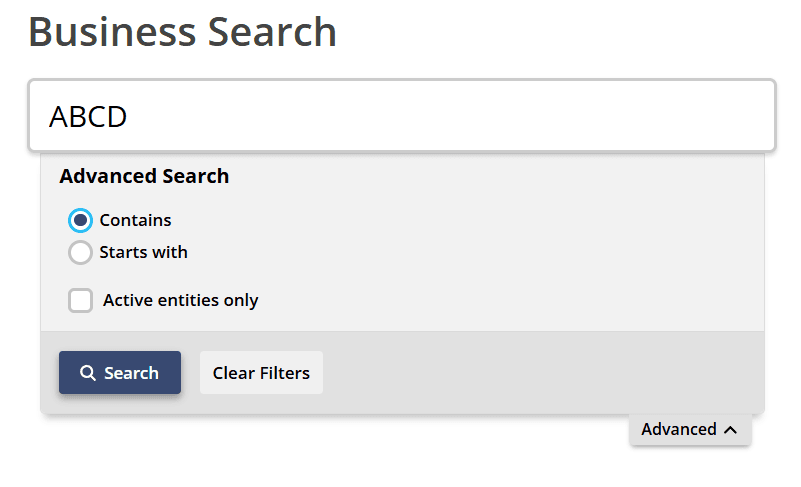
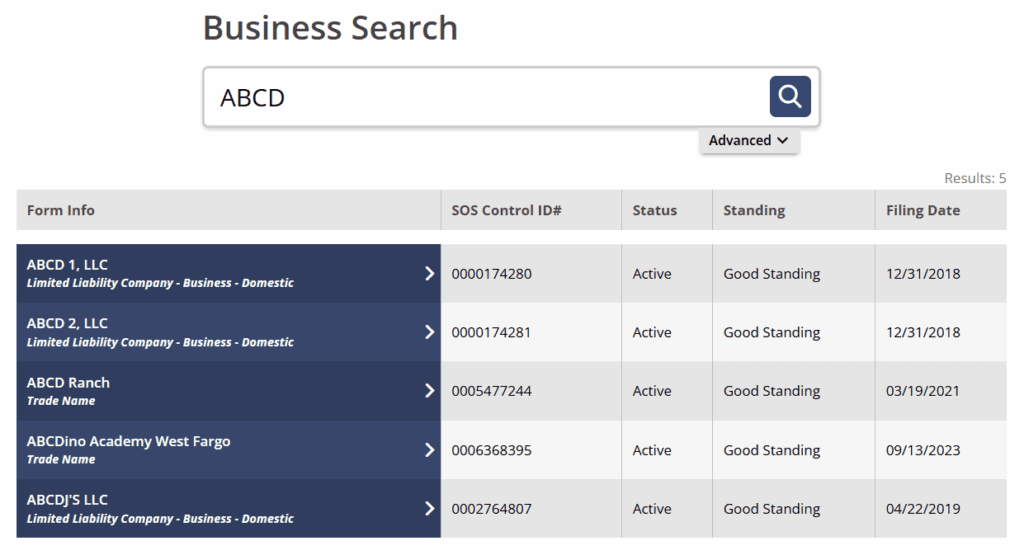
Open the FirstStop business search, type the entity name, then open the Advanced panel to match “Contains” or “Starts With” and check “Active entities only” to hide inactive records. Click a result to open its side panel for full detail. The search returns results in seconds with no account, per the FirstStop portal.
- Open the FirstStop business search from sos.nd.gov or go direct.
- Enter the entity name.
- Use the Advanced panel to pick “Contains” or “Starts With” and check “Active entities only.”
- Open the side panel for full detail.
How Do You Search by Entity Number (SOS Control ID)?
Search by the SOS Control ID, North Dakota’s fixed, unique identifier for each entity. FirstStop labels the field “SOS Control ID#” and accepts the format ###-##### (three digits, a hyphen, then five digits), per the FirstStop search placeholder. Searching by the ID avoids name-collision ambiguity, and it is the identifier you cite in legal documents and due diligence.
The Control ID stays the same across every annual report and amendment, so it reliably pulls the right record when names look alike. A business name can change or be shared across variants, but the Control ID does not move.
What Information Does a FirstStop Search Result Show?
A FirstStop result shows the business name, entity type, SOS Control ID, status, standing, and initial filing date. Clicking the entity opens a side panel with the registered agent, addresses, duration, and full filing history, plus a separate registered-agent standing line. FirstStop does not disclose owners or members, per the FirstStop entity detail panel.
| Field | What it tells you |
|---|---|
| Business name | The legal registered name |
| Entity type | Filing type, e.g. Domestic Limited Liability Company (LLC) |
| SOS Control ID | Unique state identifier, format ###-##### |
| Status | Legal existence (active, inactive, dissolved) |
| Standing | Compliance condition, plus a separate Standing-RA line for the agent |
| Initial filing date | When the entity first registered |
| Registered agent | Name and North Dakota (ND) street address (side panel) |
| Addresses | Principal and mailing addresses (side panel) |
| Duration | Perpetual or fixed term (side panel) |
| Filing history | Every document filed over the entity’s life (side panel) |
Source: FirstStop entity detail panel (firststop.sos.nd.gov).
What Do Status and Standing Mean in North Dakota Search Results?
Status and standing are independent fields. Status is the entity’s legal existence. Standing is its compliance condition. An entity can be active in status yet not in good standing, for example after a missed annual report but before dissolution. Read both fields before you rely on a result for vetting a vendor or an acquisition target.
| Status | Meaning |
|---|---|
| Active | Registered and authorized to do business in ND |
| Inactive/Expired | Registration lapsed after missed periodic filings |
| Inactive/Involuntary | State inactivated it for non-compliance or a lapsed agent |
| Inactive/Voluntary | Owners chose to dissolve, withdraw, or cease |
| Inactive/Converted Out | Changed structure or moved to another jurisdiction |
| Inactive/Merged | Merged into another entity and lost its identity |
| Dissolved | Formally ended; cannot operate unless reinstated |
Source: FirstStop status labels (firststop.sos.nd.gov).
Standing tracks whether reports and fees are current. A missed annual report is what flips Good Standing to Not Good Standing (sometimes shown as forfeited). The consequences differ by entity type under the North Dakota Century Code (NDCC).
| Standing | What it means | What happens if left uncured |
|---|---|---|
| Good Standing | Reports and fees current; eligible to order a Certificate of Good Standing | Entity stays active |
| Not Good Standing | Missed annual report or fees; cannot obtain a certificate | LLC: involuntary termination 6 months after the November 15 due date, per NDCC chapter 10-32.1; corporation: involuntary dissolution typically 6 to 12 months after the August 1 due date, per ND SOS |
A terminated LLC has one year from termination to reinstate by filing the past-due report plus statutory, penalty, and reinstatement fees, per NDCC 10-32.1-91. Dissolved means the entity legally ended. Inactive usually means it lapsed or was administratively dissolved and may still be curable.
Streamline your global entity management in one place
Stay on top of filings, records, and governance across every jurisdiction
How Do You Look Up a Registered Agent in North Dakota?
Open the entity’s side panel to see the registered agent’s name and North Dakota street address. Every corporation, LLC, and non-general partnership must keep an agent at a physical ND address, with no P.O. boxes accepted, per ND SOS maintain registration guidance. A missing or lapsed agent triggers Inactive/Involuntary status.
The detail panel carries a separate registered-agent standing line, so a “Delinquent” Standing-RA flags a problem even when overall status looks fine. Verify the agent during vendor, partner, and acquisition due diligence, since the agent is where service of process lands.
How Do You Check If a Business Name Is Available in North Dakota?
Search the proposed name with “Contains,” then apply the distinguishable-name standard. Two caveats come first. Results reflect filed data, so a just-filed or reserved name may not appear yet. Only the Secretary of State confirms availability when you file. A clear search result is not a guarantee.
The distinguishable-name standard is codified in North Dakota Administrative Code chapter 72-03-02, effective January 1, 2026. Required designators like “LLC” are mandatory, and restricted terms like “bank” need approval. You can pre-screen a name with the Commenda company name checker before you file.
Should You Reserve a Name or Register a Trade Name (DBA)?
Name reservation holds an available name before you form the entity. A trade name, also called a doing-business-as (DBA) name, registers a different operating name for an existing business and grants exclusive rights to it in North Dakota. They solve different problems, and you file each one separately through FirstStop.
| Name reservation | Trade name (DBA) | |
|---|---|---|
| Purpose | Holds an available name before formation | Registers an operating name for an existing business |
| Who files | Anyone planning to form | An existing registered business |
| Fee | Filing fee applies (confirm current amount with ND SOS) | $25 registration, plus $10 if a Consent to Use Business Name form is needed |
| Renewal | One-time hold before you form | Renew every 5 years |
| When to use | You are not filing immediately | You operate under a different name |
Source: ND SOS register a business; trade name under NDCC chapter 47-25.
Which Entity Types Appear in a North Dakota Business Search?
North Dakota registers a broad set of entity types, including several tied to its agricultural economy. LLCs, corporations, nonprofits, and partnership structures all appear, along with ND-specific cooperatives and farm entities. Foreign (out-of-state) entities qualified in North Dakota surface too. Sole proprietorships and general partnerships appear only when they register a trade name.
| Entity type | Formation document | Search note |
|---|---|---|
| LLC, including PLLC and Farming/Ranching and Authorized Livestock Farm LLCs | Articles of Organization | Highest-volume lookup; PLLC needs the professional license |
| Corporation and Professional Corporation (PC) | Articles of Incorporation | PC requires the underlying professional license |
| Nonprofit corporation | Articles of Incorporation | SOS status is separate from Internal Revenue Service (IRS) 501(c)(3) status |
| LP, LLP, LLLP | State registration or statement | Limited partnership, limited liability partnership, limited liability limited partnership |
| Cooperative, farm/ranch corporation | Varies | North Dakota-specific structures |
| Foreign entity | Certificate of Authority | Shows the home jurisdiction |
| Sole proprietorship, general partnership | Trade name registration only | Appears only with a filed DBA |
Source: ND SOS business structures.
When Are North Dakota Annual Reports Due?
North Dakota annual report due dates vary by entity type under the Secretary of State’s filing calendar. LLCs file by November 15, domestic corporations by August 1, and foreign corporations by May 15. A missed report is what flips Good Standing to Not Good Standing, so the deadline matters for keeping an entity searchable as compliant.
| Entity type | Annual report deadline | Fee | Source |
|---|---|---|---|
| LLC and PLLC (domestic and foreign) | November 15 | $50 | ND SOS; NDCC 10-32.1-92 |
| Domestic business or professional corporation | August 1 | $25 | ND SOS corporation |
| Foreign business or professional corporation | May 15 | $25 | ND SOS; NDCC 10-19.1-146 |
| LP, LLP, LLLP, PLLP, cooperative | March 31 | Cooperative $20 | ND SOS maintain registration |
| Farm/Ranch LLC and corporation, authorized livestock | April 15 | Varies | ND SOS maintain registration |
An LLC’s first annual report is not due in its formation year, it is due the following year, per NDCC 10-32.1-89. The LLC late fee is an additional $50 after the statutory date, per NDCC 10-32.1-92. Deadlines are confirmed on the ND SOS maintain registration page.
How Do You Register a Foreign LLC in North Dakota?
An out-of-state LLC registers through FirstStop by filing a Certificate of Authority application. This step is called foreign qualification. Once qualified, the entity appears in the same FirstStop search with its home jurisdiction shown, right alongside domestic entities. A foreign LLC must also file its North Dakota annual report by November 15 each year, per ND SOS.
| Requirement | Detail | Source |
|---|---|---|
| Application | Certificate of Authority filed through FirstStop | ND SOS |
| Home-state proof | Certificate of good standing or equivalent from the home jurisdiction | ND SOS |
| Registered agent | Agent at a physical North Dakota street address, no P.O. boxes | ND SOS maintain registration |
| Annual report | Foreign corporation by May 15; foreign LLC by November 15 | ND SOS |
If you operate across state lines, the process is similar in neighboring states. Compare the South Dakota business entity search, the Montana business entity search, and the Minnesota business entity search.
How Do You Get a Certificate of Good Standing in North Dakota?
Request a Certificate of Good Standing from the entity’s FirstStop detail page or the SOS Business Services Division. Only entities in good standing can order one. Lenders, licensing boards, and other states require it for financing and foreign qualification. The same portal issues certified copies of Articles, which prove formation rather than current compliance.
| Document | Fee | Typical use | Source |
|---|---|---|---|
| Certificate of Good Standing (Certificate of Fact) | $15 certificate plus $5 records search, $20 total | Financing, foreign qualification, bank accounts | NDCC chapter 10-01.1 |
| Certified copy of Articles of Incorporation or Organization | Per the same statutory schedule | Proof of formation | NDCC chapter 10-01.1 |
Source: ND SOS Business Services Division, reachable at (701) 328-2900 or 800-352-0867.
Why Does a North Dakota Search Return No Results?
A no-result usually means one of four things: a spelling variation, searching a DBA instead of the legal name, a sole proprietorship with no trade name, or processing lag on a filing made hours or days ago. Never treat a no-result as proof a name is available. Only the state confirms availability when you file.
For the opposite problem, too many results, narrow the search with the SOS Control ID or the “Active entities only” filter. If you cannot log in to file, that is an NDLogin or PIN issue, not a search failure, since the public search needs no login. The state’s own disclaimer warns that portions of its online information “may be incorrect or out of date.” When you find an active entity in good standing, capture its SOS Control ID and filing date for your records.
How We Help After Your North Dakota Business Search
A single state search is step one. If you operate across states or plan to expand, Commenda’s entity management platform centralizes your North Dakota filings, registered-agent details, formation documents, and deadline tracking in one place, with a virtual mailroom for government notices. It auto-generates jurisdiction-specific filing obligations from each entity’s type and fiscal year, so annual reports never flip good standing to forfeited.
Forming a new entity? Start with Commenda incorporation. Track every due date with the Commenda compliance calendar, pre-screen names with the Commenda company name checker, and check broader rules in the North Dakota business license guide.
Book a demo to get a free entity compliance health check across every state you operate in.
About the author

Ishwar is a serial entrepreneur and Y Combinator alum who has founded multiple venture-backed companies across global markets. Based in Bangalore, he brings a founder’s perspective to the complexities of international operations, with deep expertise in transfer pricing and cross-border structuring.
Disclaimer: Commenda and its affiliates do not provide tax, accounting, or legal advice. This material has been prepared for informational purposes only, and is not intended to provide or be relied on for tax, accounting, or legal advice. You should consult your own tax, accounting, and legal advisors before engaging in any related activities or transactions.