Verifying a Minnesota business before you sign, invest, or file starts with one free tool. This guide shows how to run a Minnesota business entity search, read the results, and act on what you find.
What Is the Minnesota Business Entity Search?
The Minnesota business entity search is the free public lookup tool run by the Office of the Minnesota Secretary of State on the Minnesota Business & Lien System (MBLS) portal at mblsportal.sos.mn.gov. It covers active and inactive entities, their status, registered agent, and filing history. The search needs no account; filings do.
The office is led by Secretary of State Steve Simon, Minnesota’s 22nd Secretary of State, sworn in on January 5, 2015. The search itself is free, but any filing requires an online account, and the Secretary of State warns that filings and orders are final once submitted.
| Detail | Value | Source | ||
|---|---|---|---|---|
| Operator | Office of the Minnesota Secretary of State (Steve Simon) | MN SOS | ||
| Portal | mblsportal.sos.mn.gov/Business/Search | MN SOS | ||
| Cost to search | Free, no account required | MN SOS | ||
| Records covered | Active and inactive entities, status, registered agent, filing history | MN SOS | ||
| Annual renewal deadline | December 31 each year | Minn. Stat. \On-time renewal fee (domestic LLC) | $0 | MN SOS fee schedule |
How Do You Perform a Minnesota Business Entity Search Step by Step?
You run a Minnesota business entity search in four steps on the MBLS portal, and it takes under two minutes. Open the portal, enter a name and scope, read the results table, then open an entity’s Details page. No login is needed to search, per the Minnesota Secretary of State.
Step 1: Open the MBLS Search Portal
Go directly to mblsportal.sos.mn.gov/Business/Search. Use this portal rather than older sos.state.mn.us links, which can route you through access screens and cause confusion about the current tool.
Step 2: Enter a Business Name and Choose a Search Scope
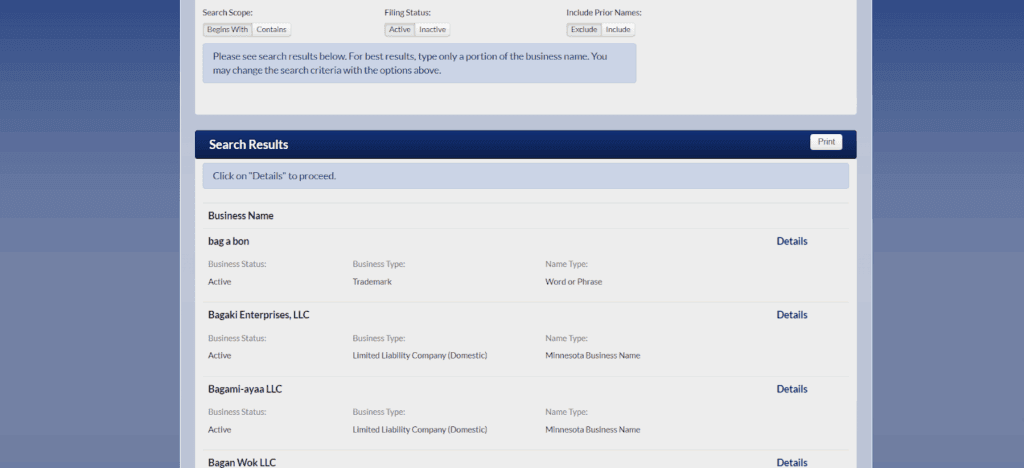
Type the business name and pick a scope. “Contains” finds your term anywhere in the name; “Begins With” matches only names that start with the term, per the Minnesota SOS search guide. You can also filter by filing status, Active or Inactive, to narrow the list.
Step 3: Read the Results Table and Name Types
The results table shows the business name, entity type, name type, and a Details link. The name type field matters: “current legal” is the entity’s registered name, “former legal” is a prior registered name, and “assumed” is a DBA (doing business as) filed on top of a legal name. Check both legal and assumed names so you do not miss a business operating under a trade name.
Step 4: Open the Details Page
The Details page shows entity type, file number, status, registered agent, principal address, renewal dates, and filing history. The filing history lists every document submitted to the state, including amendments, renewals, and administrative actions taken by the Secretary of State.
When Should You Use the “Include Prior Names” Option?
Use “Include Prior Names” whenever a business may have changed names or operates under an assumed name, and always during name-availability and due-diligence research. The filter defaults to “Exclude,” which searches only the current legal name; setting it to “Include” expands results to former and assumed names, per the Minnesota SOS search guide.
How Do You Search a Minnesota Business by File Number or Officer Name?
File number search is supported: enter the number in the File Number field for an exact match. Officer and agent name search is not supported. The MBLS portal offers only Business Name and File Number searches, with no officer or agent name field, per the Minnesota SOS search guide.
To research a person’s role, open any entity’s Details page and read the registered agent listed there. For broader officer research, request records directly from the Minnesota Secretary of State, since the public search tool does not index individuals.
Streamline your global entity management in one place
Stay on top of filings, records, and governance across every jurisdiction
How Do You Check If a Business Name Is Available in Minnesota?
Search with “Contains” scope, set “Include Prior Names” to Include, and confirm no identical or deceptively similar name already exists. Minnesota requires a new name to be distinguishable from existing ones, per the Minnesota SOS search guide. An LLC name must also carry a designator: “Limited Liability Company,” “LLC,” or “L.L.C.”
If a search returns nothing for a name you expect, drop the designator, try the most unique word only, and check assumed names. Commenda’s free company name checker screens name availability before you commit to formation.
How Do You Reserve a Business Name in Minnesota?
File a name reservation with the Minnesota Secretary of State to hold an available name for 12 months, renewable for additional 12-month periods. An original name reservation costs $35 by mail or $55 online, per the Minnesota SOS business filing fee schedule. Reserving makes sense when your formation documents are not ready yet but you want to lock the name.
What Do Minnesota Entity Statuses Mean: Active, Inactive, Dissolved, Statutorily Dissolved?
Active means the entity has filed all required renewals and maintains compliance with state requirements. Every other status means the entity cannot legally transact until it is restored. In Minnesota, missing the December 31 annual renewal deadline triggers administrative dissolution (corporations) or administrative termination (LLCs), per Minn. Stat. \u00a7 322C.0208.
| Status | Meaning | Can it be reinstated? | Source |
|---|---|---|---|
| Active | Renewals current, in good standing | N/A | MN SOS |
| Inactive | No longer authorized to transact | Depends on cause | MN SOS |
| Administratively/statutorily dissolved (corporation) | Missed the Dec. 31 renewal | Yes, retroactively | Minn. Stat. \u00a7 302A.821 |
| Administratively terminated (domestic LLC) | Missed the Dec. 31 renewal | Yes, retroactively | Minn. Stat. \u00a7 322C.0705 |
| Revoked (foreign entity) | Authority to transact withdrawn | Yes, by refiling renewal | Minn. Stat. \u00a7 322C.0208 |
When an entity is dissolved or terminated for non-renewal, the Secretary of State automatically files a name reservation on its behalf, protecting the name for a period before it becomes available to others, per Minn. Stat. \u00a7 5.35.
How Do You Reinstate a Statutorily Dissolved Minnesota Entity?
File the single delinquent annual renewal and pay the reinstatement fee with the Minnesota Secretary of State; reinstatement is retroactive to the dissolution date, per Minn. Stat. \u00a7 322C.0705. The current fee is $65 by mail or $85 online, per the Minnesota SOS fee schedule. An entity inactive for more than six years cannot reinstate online and must file by mail. Voluntary dissolution follows a separate formal wind-up path.
How Do You Verify a Minnesota Business Is in Good Standing?
Check the status on the Details page, then order a Certificate of Good Standing from the Secretary of State as formal proof. The certificate costs $5 by mail or in person and $15 online, per the Minnesota SOS business filing fee schedule. On the Details screen, click the “Order Certificate” button; the certificate is emailed within 10 to 15 minutes of payment, per the Minnesota SOS ordering guide.
Banks, lenders, other states, and M&A counterparties routinely require this certificate before opening accounts, extending financing, or approving foreign qualification.
How Do You Find a Registered Agent in Minnesota?
Every entity’s registered agent or registered office address appears on its Details page in the entity search. The registered agent receives legal process and official state correspondence on the entity’s behalf, and Minnesota requires a physical in-state address. This is how you identify who to serve for a lawsuit or confirm during due diligence.
Address confidentiality is available through Minnesota’s Safe at Home program for eligible individuals, which can affect how a personal address appears in public records.
What Business Entity Types Appear in Minnesota Search Results?
The database covers LLCs, domestic and foreign corporations, limited liability partnerships (LLPs), limited partnerships (LPs), nonprofit corporations, cooperative associations, and assumed names. Sole proprietorships without an assumed name filing do not appear. Every registered type must file an annual renewal after its first filing year, per Minn. Stat. \u00a7 5.34.
| Type | Key trait | Renewal obligation | Source |
|---|---|---|---|
| LLC | Liability protection, flexible tax treatment | Annual renewal by Dec. 31 | Minn. Stat. \u00a7 322C.0208 |
| Corporation (domestic/foreign) | Separate legal entity, shareholders | Annual renewal by Dec. 31 | Minn. Stat. \u00a7 302A.821 |
| LLP | Partner liability protection | Annual renewal by Dec. 31 | Minn. Stat. \u00a7 5.34 |
| LP | General and limited partners | Annual renewal by Dec. 31 | Minn. Stat. \u00a7 5.34 |
| Nonprofit corporation | Charitable/educational purpose | Annual renewal by Dec. 31 | Minn. Stat. \u00a7 5.34 |
| Cooperative association | Member-owned | Annual renewal by Dec. 31 | Minn. Stat. \u00a7 5.34 |
How Do You Form an LLC in Minnesota After Your Search?
After clearing your name, file Articles of Organization with the Minnesota Secretary of State online or by mail, appoint a registered agent with a Minnesota address, then get a free Employer Identification Number (EIN) from the IRS. Corporations file Articles of Incorporation instead and receive a certificate of incorporation on filing.
- Confirm the name is available and, if needed, reserve it.
- Appoint a registered agent with a Minnesota street address.
- File Articles of Organization (LLC) or Articles of Incorporation (corporation).
- Apply for a free EIN from the IRS.
Commenda’s incorporation service handles formation filings and registered agent setup across every state you enter.
How Do You Register a Foreign Business in Minnesota?
An out-of-state entity registers with the Minnesota Secretary of State by filing for a Certificate of Authority to transact business, supported by a certificate of good standing from its home state. Foreign qualification is the process of registering an entity formed elsewhere to operate legally in a new state. It is required once the entity transacts business in Minnesota.
What Are Minnesota’s Annual Renewal Requirements?
Minnesota entities must file an annual renewal with the Secretary of State by December 31 each year; on-time renewal for an active domestic LLC is $0, per the Minnesota SOS fee schedule. Missing the deadline triggers administrative dissolution or termination, per Minn. Stat. \u00a7 322C.0208.
| Item | Fee / Deadline | Source |
|---|---|---|
| Annual renewal (domestic LLC/corp, on time) | $0; due December 31 | MN SOS fee schedule; Minn. Stat. \u00a7 322C.0208 |
| Name reservation (original) | $35 mail / $55 online; holds name 12 months | MN SOS fee schedule |
| Certificate of Good Standing | $5 mail/in-person / $15 online | MN SOS fee schedule |
| Reinstatement after administrative dissolution | $65 mail / $85 online | MN SOS fee schedule |
| Formation filing (Articles) | Filing fee per fee schedule | MN SOS fee schedule |
Commenda’s compliance calendar tracks the December 31 deadline alongside filings in every jurisdiction you operate in.
How Do You Use the Minnesota Entity Search for Due Diligence?
Before signing a contract or partnership, confirm the counterparty’s status is Active, pull the registered agent and principal address, and scan the filing history for amendments or administrative actions. A quick check protects against transacting with a dissolved or non-compliant entity.
- Confirm the status reads Active on the Details page.
- Record the registered agent and principal address.
- Review the filing history for amendments and administrative actions.
- Order a Certificate of Good Standing if you need formal proof.
How Commenda Helps With Minnesota Entity Compliance
Commenda’s entity management platform tracks your Minnesota annual renewal deadlines, registered agent details, and good-standing status alongside every other jurisdiction you operate in, so nothing statutorily dissolves by surprise. Need to form the entity first? Commenda’s incorporation service files Articles of Organization or Incorporation and appoints your registered agent. The platform connects to 100+ ERPs, APIs, and custom integrations, giving finance and legal one source of truth.
Book a demo to get a free multi-state compliance status review across all your entities.
About the author

Ishwar is a serial entrepreneur and Y Combinator alum who has founded multiple venture-backed companies across global markets. Based in Bangalore, he brings a founder’s perspective to the complexities of international operations, with deep expertise in transfer pricing and cross-border structuring.
Disclaimer: Commenda and its affiliates do not provide tax, accounting, or legal advice. This material has been prepared for informational purposes only, and is not intended to provide or be relied on for tax, accounting, or legal advice. You should consult your own tax, accounting, and legal advisors before engaging in any related activities or transactions.