You need to confirm a Kentucky business is real, active, and in good standing before you form it, partner with it, or send it money. The free official tool for that is the Kentucky Secretary of State’s FastTrack Business Search and Profile database, which lets you look up every entity registered in the Commonwealth in about a minute.
This guide shows you how to run the search, read the results, check good standing, and take the right next step, whether you are forming a new entity or vetting an existing one.
What Is the Kentucky Business Entity Search?
The Kentucky business entity search is the Secretary of State’s free FastTrack “Business Search and Profile” database of every entity registered with the state. The current Secretary of State (SOS) is Michael G. Adams, Kentucky’s 86th, inaugurated January 6, 2020 and reelected in 2023, per the Secretary of State’s official biography.
As the office puts it on its business homepage, the Secretary of State is “Kentucky’s Chief Business Official” and oversees “the nearly 370,000 entities that have filed to do business in the Commonwealth” (source: sos.ky.gov business page). Filings run through the office’s business filings division; current SOS forms head this the “Office of Business Services,” while older references call it the “Division of Business Services.”
How Do You Search for a Business Entity in Kentucky?
Go to the FastTrack search page, pick a search-by mode, and enter the core name without designators. The live tool’s “I want to Search By” dropdown offers exactly three modes, per the FastTrack search page: Business Name or Organization Number, City Name of the principal office, and Zip Codes of the principal office.
A “Show active entities only” checkbox is on by default; uncheck it to surface dissolved, revoked, and withdrawn entities, per the FastTrack search page. An Advanced Search panel adds industry, county, and employee-count filters, also on the FastTrack search page.
Step 1: Open the FastTrack portal
Navigate to sosbes.sos.ky.gov/BusSearchNProfile/search.aspx, the Secretary of State’s official entity search.
Step 2: Choose a search-by mode and enter your term
Pick Business Name or Organization Number, City Name, or Zip Codes, then type your term.
Step 3: Drop the designators
Enter the core name only, without “LLC” or “Corp,” for broader results.
Step 4: Use partial names
Partial-name searches work and return similar entities, which helps when you are unsure of exact spelling.
For search or filing questions, the Business Filings Division answers at (502) 564-3490, per the Business Filings contact page.
What Do the Search Results Show?
Results list Company Name, Organization Number, Status, Company Type, and State of Formation, with active entities in green and inactive in red. The organization number is assigned at formation, appears as a results column and on the entity profile page, and is itself a search-by option in the dropdown.
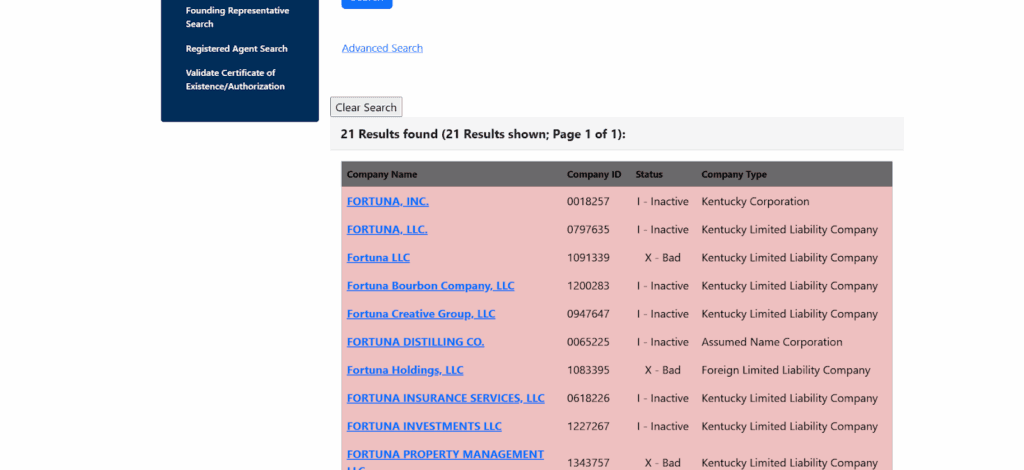
The profile page shows the registered agent, principal office, current officers from the latest annual report, founding officers, and filing history. Scanned document images are available for filings made on or after September 15, 2004, with older filings added as they are digitized, per the SOS Online Services page. That same index offers three dedicated lookups, by current officer name, by founding officer or initial director name, and by registered agent name.
Streamline your global entity management in one place
Stay on top of filings, records, and governance across every jurisdiction
What Do Kentucky Business Entity Statuses Mean?
Status tells you whether the entity may legally operate. Domestic entities that miss the June 30 annual report deadline are administratively dissolved, and foreign entities that miss it have their certificate of authority revoked, per the SOS Annual Reports page. The seven statuses you will encounter:
| Status | What it means | Source |
|---|---|---|
| Active / Good Standing | Current on filings and authorized to operate | SOS Annual Reports page |
| Administrative Dissolution | Domestic entity dissolved for missing annual reports or fees | SOS Annual Reports page |
| Forfeited | Legal standing lost for non-compliance, typically unpaid taxes | Kentucky SOS |
| Revoked | Foreign entity’s certificate of authority revoked by the state | SOS Annual Reports page |
| Withdrawn | Foreign entity voluntarily ceased Kentucky operations | Kentucky SOS |
| Inactive | Entity discontinued operations but did not formally dissolve | Kentucky SOS |
| Pending | Recent filing not yet fully processed | Kentucky SOS |
If a status confuses you, read it against these official definitions before judging a partner, competitor, or acquisition target.
Which Business Entity Types Appear in the Kentucky Database?
The database holds LLCs, corporations, professional LLCs (PLLCs), limited partnerships (LPs), limited liability partnerships (LLPs), professional service corporations (PSCs), and nonprofits, each requiring a name designator. The governing Kentucky Revised Statutes (KRS) chapters:
| Entity type | Required designator | Statute |
|---|---|---|
| Limited Liability Company (LLC) | “LLC,” “L.L.C.,” or “Limited Liability Company” | KRS Chapter 275 |
| Corporation | “Corporation,” “Incorporated,” “Company,” or “Corp.” | KRS Chapter 271B |
| Nonprofit corporation | Corporate designator | KRS Chapter 273 |
| Limited Partnership / LLP | “LP,” “L.P.,” or “LLP” | KRS Chapter 362 |
An S-corporation is not a Kentucky entity type; it is a federal tax election (IRS Form 2553) made by a corporation or LLC, so “S-corp” never appears as a Company Type in the search.
What Is the Difference Between a Domestic and Foreign Entity in Kentucky?
Domestic entities are formed in Kentucky, and foreign entities are formed elsewhere and registered to do business in Kentucky; the results’ State of Formation field is how you tell them apart. A foreign entity appears in the database only after obtaining a certificate of authority.
Failure to file annual reports costs a foreign entity that authority, per the SOS Annual Reports page. The foreign counterpart of the certificate of existence is the certificate of authorization, per the SOS Business Records page.
How Do You Check If a Business Name Is Available in Kentucky?
Run a preliminary entity search first, but only a formal name reservation confirms availability. You reserve a name by filing form RES under KRS 14A.3-020 for a $15 fee, which holds the name for 120 days and is renewable within 30 days of expiration, per the Secretary of State’s name reservation form (RES, 04/26 revision).
The name must be distinguishable from any name of record under KRS 14A.3-010, so punctuation and designators alone do not make a name unique. Reserving an entity name is not the same as trademark protection, which is a separate filing. Commenda’s company name checker gives you a fast first read before you file.
How Do You Get a Kentucky Certificate of Existence?
Kentucky’s official document is the certificate of existence, which is what other states call a certificate of good standing, and anyone can order one online, by mail, or by fax for $10, per the SOS Business Records page. The page uses the exact phrase “certificate of existence or authorization,” confirming the terminology.
How do you check good standing for free?
The search’s status field is free; the paid certificate is the sealed, conclusive proof that banks, lenders, and other states require. Here is the SOS fee schedule for the documents most searchers need:
| Item | Fee | Source |
|---|---|---|
| Certificate of existence or authorization | $10.00 | SOS Business Records page |
| Plain copies (up to 5 pages) | $5.00 | SOS Business Records page |
| Certified copies (up to 5 pages) | $10.00 | SOS Business Records page |
| Each additional page | $0.50 | SOS Business Records page |
| Annual report | $15.00 | SOS Fees page |
| Articles of Organization (LLC) | $40.00 | SOS Fees page |
| Name reservation (form RES) | $15.00 | SOS name reservation form |
How Do You Keep a Kentucky Entity in Good Standing?
File the annual report between January 1 and June 30 each year with the $15 fee, and confirm your registered agent and principal office on it, per the SOS Annual Reports page. Miss the June 30 deadline and a domestic entity is administratively dissolved, while a foreign entity has its authority revoked.
Reinstatement requires letters of good standing from the Kentucky Department of Revenue and, for profit companies, the Division of Unemployment Insurance, per the SOS Annual Reports page. Commenda’s compliance calendar tracks the June 30 deadline and your other filings by entity so nothing slips.
What Should You Do After Your Kentucky Entity Search?
Your next move depends on whether you are forming a new business or vetting an existing one.
For new businesses
- Reserve the name, then form the entity through the FastTrack portal.
- Register for taxes and licenses through the Kentucky One Stop Business Portal.
- Plan for the Limited Liability Entity Tax (LLET), which applies to LLCs and corporations with a $175 annual minimum, per the Kentucky Department of Revenue.
- Remember the SOS search is not a business license lookup; licenses run through One Stop and local governments.
For existing businesses
- Verify your standing and file amendments if addresses or agents are outdated.
- Monitor your own record for unauthorized changes.
- Run due diligence on partners, vendors, and acquisition targets.
How Commenda Simplifies Kentucky Entity Compliance
The search tells you an entity’s status, but someone still has to file the annual report by June 30, maintain the registered agent, and track deadlines in every state you operate in. That is the work that reopens the laptop at 8pm.
Commenda handles it on one platform, from formation through every ongoing filing. Our entity management keeps your registered agent, annual reports, and standing current across states, and our incorporation service forms new Kentucky entities end to end. Book a demo to get a free compliance-status review of your registered entities.
About the author

Ishwar is a serial entrepreneur and Y Combinator alum who has founded multiple venture-backed companies across global markets. Based in Bangalore, he brings a founder’s perspective to the complexities of international operations, with deep expertise in transfer pricing and cross-border structuring.
Disclaimer: Commenda and its affiliates do not provide tax, accounting, or legal advice. This material has been prepared for informational purposes only, and is not intended to provide or be relied on for tax, accounting, or legal advice. You should consult your own tax, accounting, and legal advisors before engaging in any related activities or transactions.