An invalid or inactive CUIT means rejected invoices, denied input VAT (Value-Added Tax) credits, and audit exposure. The check is free, online, and takes minutes through the Constancia de Inscripción tool published by ARCA, Argentina’s tax and customs authority. “Constancia de Inscripción” means proof of registration: a downloadable PDF certificate ARCA returns for any CUIT you look up.
Argentina’s federal tax authority AFIP (Administración Federal de Ingresos Públicos) became ARCA (Agencia de Recaudación y Control Aduanero) in 2024. If you searched “AFIP CUIT verification,” you are in the right place. Old bookmarks, saved links, and invoices referencing AFIP still work, and the legacy afip.gob.ar domain now serves ARCA-branded content.
What Is a CUIT Number in Argentina?
The CUIT (Clave Única de Identificación Tributaria) is Argentina’s 11-digit tax registration number for entities and self-employed individuals, and it functions as the VAT ID. ARCA, formerly AFIP, issues and manages it. Businesses, freelancers, and foreign companies with a registered presence in Argentina all need one.
A CUIT shows up at every tax touchpoint:
- Paper invoices (facturas) and electronic invoices
- Business registration documents
- Customs clearance paperwork
- Every filing submitted to ARCA
Verifying a CUIT before a transaction confirms the identifier is valid and active before money moves.
Did AFIP Become ARCA? What Changed for CUIT Verification?
Yes. Decreto 953/2024 dissolved AFIP and created ARCA as its legal successor (continuadora jurídica, Arts. 6-7), published in the Boletín Oficial on October 25, 2024, per the official decree. The Constancia de Inscripción lookup carried over unchanged.
ARCA kept AFIP’s two operating arms. DGI (Dirección General Impositiva) handles domestic taxes including VAT, and DGA (Dirección General de Aduanas) handles customs. Both were retained under Article 4 of the decree, which is why nothing about CUIT verification changed for the reader.
| Element | Under AFIP | Under ARCA | Source |
|---|---|---|---|
| Authority name | AFIP | ARCA | Decreto 953/2024, Boletín Oficial, Oct 25 2024 |
| Signed / effective | N/A | Signed Oct 24 2024, effective same day | Decreto 953/2024 text (Infoleg) |
| Domestic taxes | DGI | DGI (retained) | Decreto 953/2024, Art. 4 |
| Customs | DGA | DGA (retained) | Decreto 953/2024, Art. 4 |
| Verification tool | Constancia de Inscripción | Constancia de Inscripción (unchanged) | ARCA Constancia tool |
Old bookmarks, saved links, and invoices that still reference AFIP remain valid. The legacy afip.gob.ar domain now serves ARCA-branded content, so the verification tool lives at the same address.
What Is the CUIT Number Format?
A CUIT is 11 digits in NN-NNNNNNNN-N form: a two-digit type prefix, an eight-digit body (derived from the DNI for individuals), and one check digit. The prefix tells you whether the holder is an individual or a legal entity. For example, 30-12345678-1 is a company CUIT.
| Prefix | Assigned to | Source |
|---|---|---|
| 20, 23, 24, 27 | Individuals (persona física); assigned randomly and gender-neutral | Resolución Conjunta 5007/2021 (AFIP-ANSES), published Jun 10 2021 |
| 30, 33, 34 | Legal entities (persona jurídica) | AFIP RG 4991/2021, published May 17 2021 |
Common CUIT entry errors are missing digits, typos, an outdated identifier, or the wrong prefix. Any one of them returns an invalid result.
Why Do Some Sources Say CUIT Prefixes Encode Gender?
Historically prefix 20 meant male and 27 female, with 23 and 24 as overflow. Resolución Conjunta 5007/2021 (AFIP-ANSES), published June 10, 2021, ended that: individual prefixes 20, 23, 24, and 27 are now assigned at random and are generic and non-binary as to sex and gender. The change took legal effect 180 days after publication, so pre-2021 numbers still largely follow the old pattern.
State this plainly because outdated gender-coded prefix guidance still circulates online. Per the text of Resolución 5007/2021, you cannot read sex from a modern individual prefix.
Simplify global indirect tax compliance across every market
Book a demo to automate your filings
How Do You Validate a CUIT Check Digit?
Multiply the first 10 digits by the fixed weights 5, 4, 3, 2, 7, 6, 5, 4, 3, 2, sum the products, take the result modulo 11, and subtract from 11 to get the check digit. This is Argentina’s published modulo-11 CUIT specification. It lets developers and spreadsheet users catch typos offline before hitting the portal.
| Step | Action |
|---|---|
| 1 | Line up the first 10 digits, left to right |
| 2 | Multiply them by weights 5, 4, 3, 2, 7, 6, 5, 4, 3, 2 |
| 3 | Sum the 10 products |
| 4 | Compute sum mod 11 |
| 5 | Check digit = 11 − (sum mod 11) |
A passing checksum proves the number is structurally valid, meaning it is not a typo. Only the ARCA lookup proves the CUIT is active and belongs to the claimed party.
Worked Example: Validating 30-12345678-1
Run the digits 3, 0, 1, 2, 3, 4, 5, 6, 7, 8 against the weights 5, 4, 3, 2, 7, 6, 5, 4, 3, 2.
| Digit | Weight | Product |
|---|---|---|
| 3 | 5 | 15 |
| 0 | 4 | 0 |
| 1 | 3 | 3 |
| 2 | 2 | 4 |
| 3 | 7 | 21 |
| 4 | 6 | 24 |
| 5 | 5 | 25 |
| 6 | 4 | 24 |
| 7 | 3 | 21 |
| 8 | 2 | 16 |
The products sum to 153. 153 mod 11 is 10. 11 − 10 equals 1. The computed check digit is 1, matching the final digit of 30-12345678-1, so the number is structurally valid.
What Are the Check-Digit Edge Cases?
Two edge cases change the result. If sum mod 11 equals 0, the result is 11 and the check digit is 0. If sum mod 11 equals 1, the result is 10 and no single-digit check digit exists, so the number is invalid as computed. Per the published CUIT specification, ARCA historically resolved the second case at assignment by issuing a different prefix (23 for individuals) and recomputing.
That rule applies at number assignment, not at verification. A valid issued CUIT never carries a check digit of 10. When you verify, simply treat any computed 10 as an invalid number.
How Do You Verify a CUIT on the ARCA Portal?
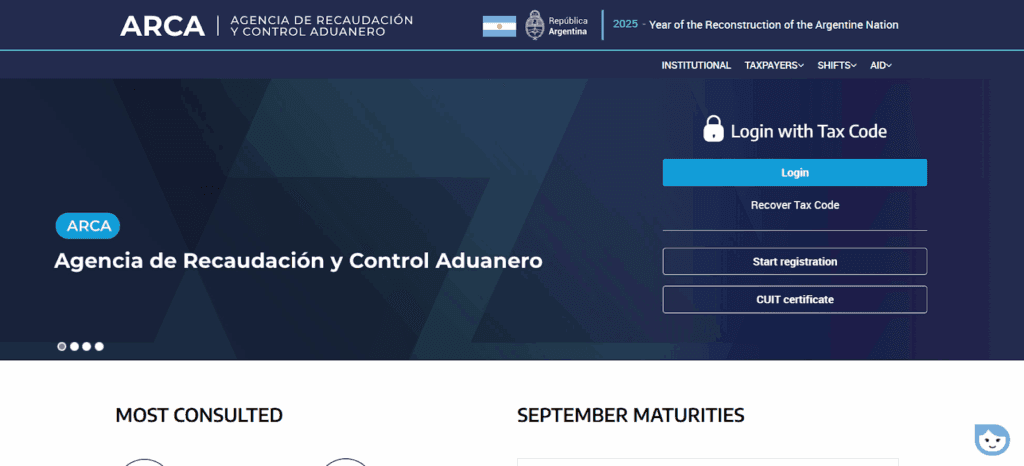
Open ARCA’s Constancia de Inscripción tool, enter the 11-digit CUIT, complete the security check, and click “Consultar.” The lookup is free, official, and needs no login. The endpoint remains on the legacy afip.gob.ar domain now serving ARCA content, and it is also reachable from the argentina.gob.ar/arca portal.
What Fields Does the Constancia Return?
The Constancia returns the registered name (razón social), registration status in the `estadoClave` field, person type, fiscal address, registered activity codes, and tax regimes (IVA / VAT, Ganancias / income tax, and Monotributo). For simplified-regime taxpayers, the `datosMonotributo` block is populated.
These field names come from ARCA’s web service manual WS_SR_constancia_inscripcion, Versión 3.7, July 2025. Match the returned razón social against your counterparty, and read the regime fields to confirm whether their invoices carry recoverable VAT.
Why Should You Download the Constancia PDF?
Download and date-stamp the Constancia PDF every time you verify, because it is your audit-trail evidence that the CUIT was active and the regime was as claimed at transaction time. If a supplier’s CUIT is later cancelled or flagged, that dated PDF is what defends your input VAT credit in a dispute or ARCA audit.
File the PDF with the invoice, and re-pull it on each periodic re-verification. A fresh certificate at the moment of transaction is far stronger evidence than a screenshot taken months earlier.
How Do You Check If a CUIT Is Active?
The Constancia shows status directly in the `estadoClave` field. Active means the taxpayer is authorized for VAT operations. Inactive signals closure or deregistration. Suspended or blocked is a stop sign before onboarding a supplier.
| Status | What it means | Action |
|---|---|---|
| Active (ACTIVO) | Registered and authorized for VAT operations | Safe to invoice; keep the Constancia on file |
| Inactive | Closure, deregistration, or lapsed activity | Request updated records before transacting |
| Suspended / blocked | Flagged by ARCA | Do not onboard until resolved |
Source: ARCA WS constancia manual, Versión 3.7 (2025).
What Is the Base de Contribuyentes No Confiables?
It is ARCA’s public registry of taxpayers flagged for apocryphal invoices (facturas apócrifas) and fraudulent operations. A CUIT can be active yet still listed, so this is a separate screening step from the active/inactive lookup.
Screen this registry at three moments: onboarding a new supplier, running periodic vendor due diligence, and before claiming input credits on large invoices. A hit means the counterparty’s invoices may be rejected as apocryphal, taking your VAT credit with them.
What Is the Difference Between CUIT, CUIL, CDI, and DNI?
CUIT identifies taxpayers with economic activity and is the VAT ID. CUIL identifies employees for labor and social security. CDI covers people who need an ID without taxable activity. DNI is the national identity number the CUIT/CUIL body is derived from. Readers routinely confuse them.
| Identifier | Who gets it | Purpose | Source |
|---|---|---|---|
| CUIT | Taxpayers with economic activity | Tax registration / VAT ID | ARCA |
| CUIL | Employees and workers | Labor and social security | ANSES |
| CDI | People needing an ID without taxable activity | Identification only | ARCA |
| DNI | All individuals | National identity; CUIT/CUIL body derives from it | RENAPER |
Does an Active CUIT Mean the Supplier Is VAT-Registered?
No. Monotributistas hold a valid, active CUIT but are not registered for standard IVA (Impuesto al Valor Agregado). They pay one consolidated simplified tax and issue Factura C, so the buyer generally cannot claim input VAT credit from them.
The signal is in the data: the Constancia’s `datosMonotributo` block (per WS_SR_constancia_inscripcion v3.7) populates for Monotributistas, while a Responsable Inscripto shows standard IVA regime registration. The regime, not active status alone, is what protects your VAT claim.
Which Invoice Type Can a Verified CUIT Issue?
The counterparty’s registration status determines the factura letter, and the letter determines input-credit eligibility. A Responsable Inscripto issues Factura A with itemized VAT; a Monotributista cannot.
| Invoice | Issued by / to | VAT treatment | Input credit | Source |
|---|---|---|---|---|
| Factura A | Between Responsables Inscriptos | VAT itemized separately | Claimable | ARCA facturación regime |
| Factura B | To final consumers or exempt parties | VAT included, not discriminated | Not claimable | ARCA facturación regime |
| Factura C | Monotributistas / exempt sellers | No VAT discriminated | Not claimable | ARCA facturación regime |
| Factura E | Exports | Export treatment | N/A | ARCA facturación regime |
ARCA validates the issuer’s CUIT when authorizing each e-invoice, so a wrong or inactive CUIT can cause a rejected electronic invoice. Verifying the counterparty first tells you which letter they can legally issue.
Why Does a CUIT Lookup Return Invalid or No Records?
Three causes account for most failed lookups: a CUIT that is unassigned or too new, an inactive or suspended taxpayer, and a formatting error. The portal message usually tells you which one you hit.
| Message | Likely cause | Fix |
|---|---|---|
| CUIT no registrado | Not yet assigned or too new | Allow a few business days after registration; confirm with ARCA |
| CUIT inactivo | Suspended, deregistered, or closed | Contact the taxpayer and request updated records |
| Formato inválido | Wrong digit count or format | Enter 11 digits as NN-NNNNNNNN-N |
Source: ARCA Constancia de Inscripción tool.
How Can You Automate Bulk CUIT Verification?
Manual portal lookups do not scale past a handful of vendors. They are one-at-a-time, gated by a security check, and give no monitoring once a supplier is onboarded. Finance teams run CSV batch checks for vendor lists and API validation for continuous monitoring, since a CUIT valid at onboarding can later be suspended.
Commenda’s Global Tax ID Verification tool checks tax IDs across countries and connects through 100+ ERP, API, and custom integrations, so verification lives inside your systems rather than a spreadsheet.
How We Help With Argentina VAT ID Verification
Commenda’s global indirect tax software handles VAT registration, filing, and ongoing compliance across jurisdictions, so supplier CUIT verification and Argentina’s VAT obligations stop living in spreadsheets. It connects through 100+ ERP, API, and custom integrations and uses the Global Tax ID Verification tool to confirm CUITs where your vendor data already lives.
Expanding across the region? Commenda covers the same ground for Brazil CNPJ verification, Mexico RFC verification, Colombia VAT verification, and Chile VAT verification, plus the broader Argentina corporate tax guide for how CUIT accuracy feeds your filings.
Book a demo to see supplier CUIT verification running inside your ERP: book a demo call.
About the author

Sam is a seasoned expert in sales tax, leading Commenda's effort to build the worlds most comprehensive database of global tax rules and business regulations. At Silverhaze Partners, he worked in early-stage venture capital, where he saw firsthand how tax complexity and regulatory friction hold back startups from scaling internationally. That experience now powers his work at Commenda-bringing clarity, precision, and real-world insight to one of the most frustrating parts of doing business globally.
Disclaimer: Commenda and its affiliates do not provide tax, accounting, or legal advice. This material has been prepared for informational purposes only, and is not intended to provide or be relied on for tax, accounting, or legal advice. You should consult your own tax, accounting, and legal advisors before engaging in any related activities or transactions.