Sales tax software for Square
Square runs an automatic US tax calculator and adds a state to your tax enrollments the moment you open a location there. Its own documentation says that enrollment does not constitute registration with any tax authority. Commenda gets the permit, measures every location and shipment against both nexus tests, and files across all 50 states and 70+ countries.
Trusted by global businesses

































Register where Square only enrolls you
Square states that a tax enrollment retrieves the applicable rate but does not constitute registration with any tax authority. Commenda gets you the permit, in all 50 states and 70+ countries.
Cover the physical nexus each location creates
A counter, a pop-up, or a mobile cart is physical presence, and physical nexus has no revenue threshold to cross. Commenda tracks your locations alongside economic thresholds and notifies you at 80%.
File and remit, which Square leaves to you
Square's disclaimer makes configuring, charging, collecting, and remitting solely your responsibility. Commenda files across all 50 states and 70+ countries from your Square data.
Coverage comparison
What Square handles, and what it hands back
Square's figures come from its own help centre and developer documentation: sales tax settings, tax rules, tax reports, automatic tax application, and locations, checked on July 30, 2026.
Registrations for collecting tax
- Square
- Not handled. A tax enrollment is not a registration with any tax authority
- Commenda
- Permits in all 50 states, EU VAT with OSS and IOSS, and GST across APAC and Canada
Filing and remitting what you collected
- Square
- Not handled. Its disclaimer makes collecting and remitting solely your responsibility
- Commenda
- Filed in all 50 states and 70+ countries, with remittance tracked per jurisdiction
Rates at the counter
- Square
- Partly. You enter the rate and pick which locations it applies to
- Commenda
- State, county, city, and district rates resolved for every location you sell from
Rates on shipments
- Square
- Partly. Generated automatically, but only for the states you have enrolled
- Commenda
- Destination rates on every shipment, with the ship-to state recorded on each transaction
Rates outside the United States
- Square
- Not handled. One flat rate per country, entered by hand with your own tax name
- Commenda
- VAT and GST across 70+ countries, including EU VAT with OSS and IOSS
Knowing where you owe
- Square
- Not handled. Its tax report groups by your rate names, not by jurisdiction
- Commenda
- Economic and physical thresholds in 50 states and 70+ countries, with alerts at 80%
Item taxability and exemptions
- Square
- Partly. A non-taxable toggle per item, and rules on price, quantity, and fulfillment
- Commenda
- Product tax codes resolved per state, with certificates collected, validated, and applied
| Square |  | |
|---|---|---|
| Registrations for collecting tax | Not handled. A tax enrollment is not a registration with any tax authority | Permits in all 50 states, EU VAT with OSS and IOSS, and GST across APAC and Canada |
| Filing and remitting what you collected | Not handled. Its disclaimer makes collecting and remitting solely your responsibility | Filed in all 50 states and 70+ countries, with remittance tracked per jurisdiction |
| Rates at the counter | Partly. You enter the rate and pick which locations it applies to | State, county, city, and district rates resolved for every location you sell from |
| Rates on shipments | Partly. Generated automatically, but only for the states you have enrolled | Destination rates on every shipment, with the ship-to state recorded on each transaction |
| Rates outside the United States | Not handled. One flat rate per country, entered by hand with your own tax name | VAT and GST across 70+ countries, including EU VAT with OSS and IOSS |
| Knowing where you owe | Not handled. Its tax report groups by your rate names, not by jurisdiction | Economic and physical thresholds in 50 states and 70+ countries, with alerts at 80% |
| Item taxability and exemptions | Partly. A non-taxable toggle per item, and rules on price, quantity, and fulfillment | Product tax codes resolved per state, with certificates collected, validated, and applied |
Calculate taxes globally on Square using Commenda
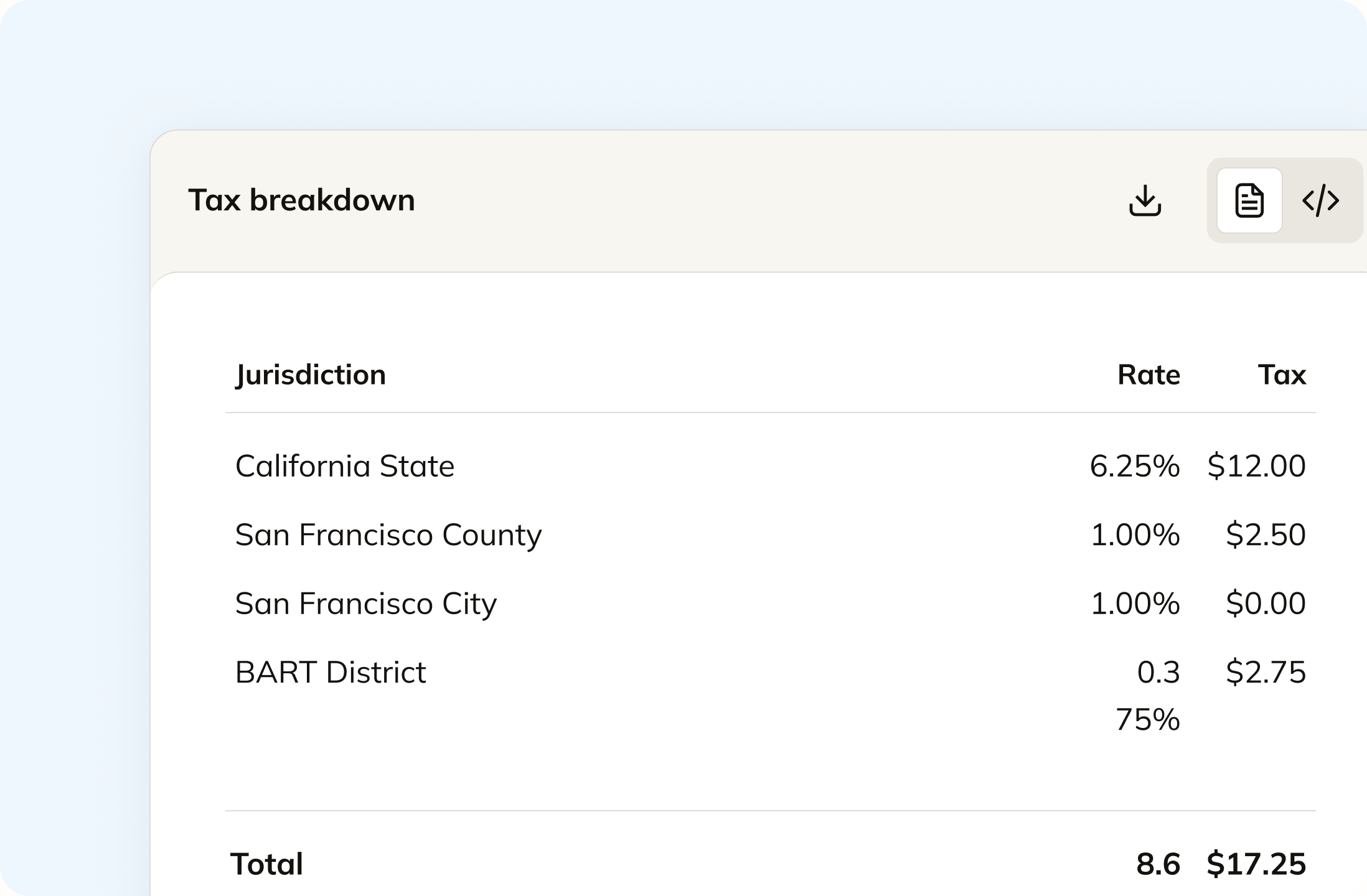
A sale at the counter is taxed where the counter is. A shipment is taxed where it lands. Square treats those as two separate setups, one you type in per location and one it generates per order. Commenda resolves both from the same rules, and every line shows the state, county, city, and district rate that produced the total.
Track your global exposure from Square
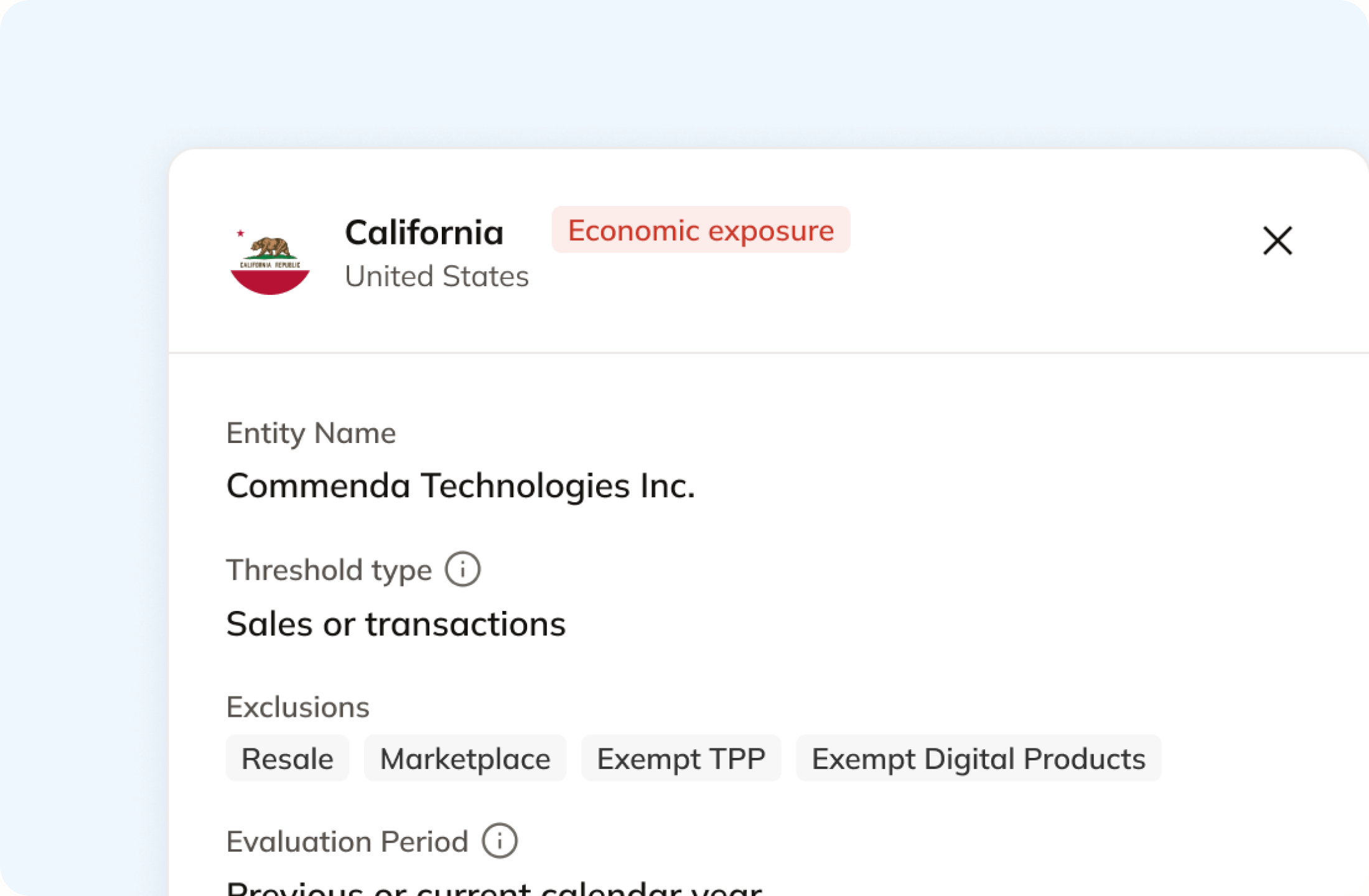
Square supports up to 300 locations on one account, including mobile carts, pop-ups, and virtual storefronts. Each physical one is presence in its state at any revenue, with no threshold to cross first. Commenda tracks locations, staff, and inventory alongside economic thresholds in all 50 states and 70+ countries, and notifies you at 80% of a registration threshold.
Automatically remit transactions around the world
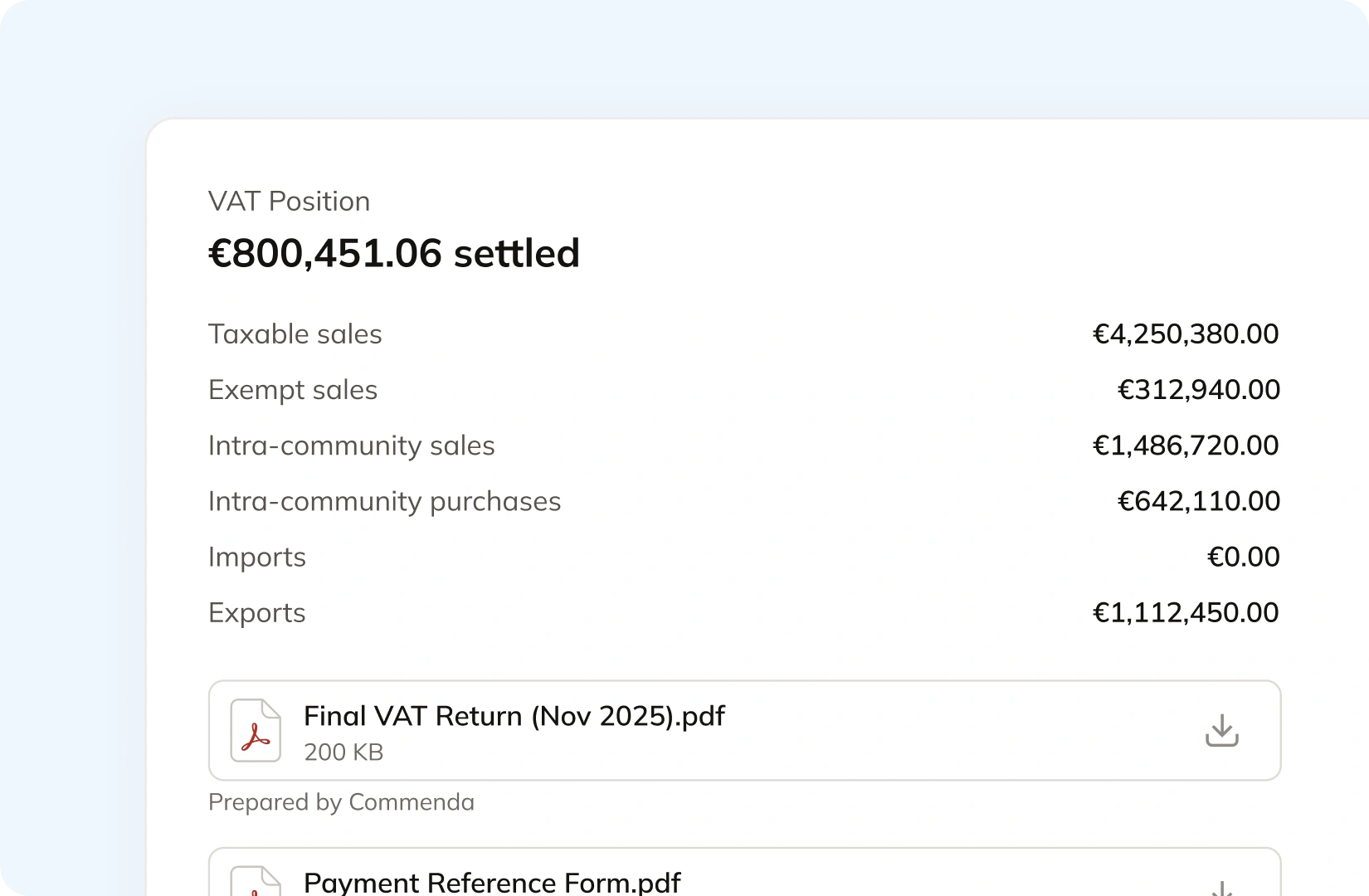
Square's tax report shows taxable and non-taxable sales grouped by the rate names you created. Commenda builds the return itself from the same transactions, so nothing gets exported or re-keyed. Returns go out across all 50 states on each state's required frequency, plus EU VAT with OSS and GST in APAC and Canada, with amendments where a period needs correcting.
Manage your customers and exemptions in one place
Square's documented exemption tools are a non-taxable toggle on the item and rules keyed to item price, quantity, and fulfillment method. A wholesale or institutional buyer needs a certificate on file instead. Commenda collects them through a self-service portal, validates each one on upload, stores it against the customer, and applies it automatically in the states where it is valid.
Consolidation
Why does Square not know your total exposure?
Square puts the right number on the receipt before you have registered anywhere, and it mixes origin-sourced counter sales with destination-sourced shipments inside one account. Filing one return means knowing which states your locations already committed you to, and which channel each dollar came from.
Square's tax enrollment stops short of registration
Square's documentation is direct about this. It states that tax enrollment retrieves the applicable tax rate but does not constitute registration with any tax authority, and it tells you to ask an advisor which registrations you need. Square also adds an enrollment on its own when you create a point of sale location in a new state. So the receipt looks right from day one, in a state where you have filed nothing.
One Square account, several sourcing rules
A counter sale is taxed where the counter is, at the rate you typed in for that location. That part is simpler than ecommerce and worth saying plainly. A Square Online shipment is taxed by where it lands, from a rate Square generates. Delivery, pickup, and QR code orders each carry their own setting, including an option not to collect tax at all, and international shipments use one flat rate per country. Four sourcing behaviours, one account. Our sales tax rate calculator shows what the correct combined rate is for any address.
Multi-location sellers have nexus by definition
Physical presence creates nexus at any revenue, so a threshold argument never comes into it. Every staffed counter is presence, and so is stock in a stockroom, an office you lease from the lease start date, and a single employee in the state. Closing a location does not end the obligation either, because trailing nexus can run through the end of the following year. Our state-by-state nexus guide sets out both tests.
One ledger behind every channel
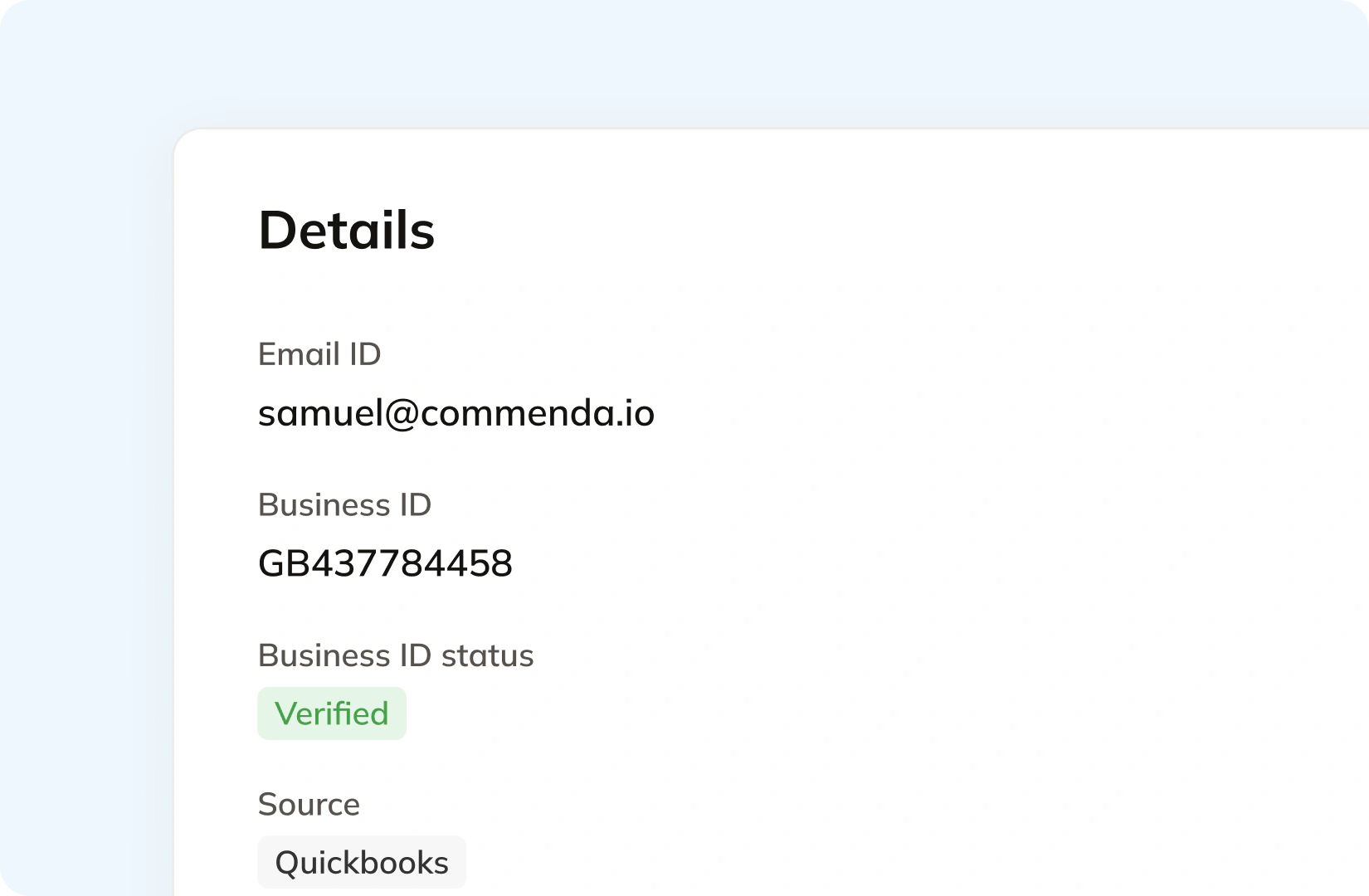
Square is rarely the whole picture. A marketplace, a wholesale invoice, and an accounting ledger sit alongside it, and tax a marketplace already collected is not yours to file again. Every source connects to one ledger across 100+ supported integrations, tagged by ship-to state, with the origin system on each transaction. The result is one exposure figure per state and one return per period. See how Commenda handles global indirect tax.
What it takes
What does global indirect tax take in Square?
Square's tax settings are not a line on its price sheet. Its plan pricing is per location, which is the same unit tax obligations arrive in. What Square does publish is what each job requires of you, and how much of it is a field you fill in yourself.
| What you need | What Square requires | Source |
|---|---|---|
| Automatic US tax rates on an order | A tax enrollment for the state. Square states the enrollment retrieves the rate during the order process but does not constitute registration with any tax authority | Sales tax settings |
| A tax rate at the counter | A name and a rate you enter yourself, the locations it applies to, and a choice between all current and future taxable items or a list you pick | Sales tax settings |
| A rate on an international shipment | One country tax rate per country, entered as a percentage with your own customer-facing tax name. There is no reduced-rate or per-item treatment behind it | Sales tax settings |
| Reduced or zero tax on food, clothing, or a wholesale order | A conditional rule keyed to fulfillment method, item price, total price, or item quantity, applied to the locations and categories you choose. Item modifiers cannot carry a rule | Tax rules |
| A single item treated as untaxed | A Non-taxable item toggle on the item record, set item by item or through bulk actions in your item library | Online tax troubleshooting |
| A number to file your return from | Reports, then Accounting, then Sales taxes, which reports taxable and non-taxable sales by tax rate. Renaming a rate makes it a separate line in reporting | Tax reports |
| A second, third, or fourth location | $49 per location per month on Square Plus and $149 on Square Premium, applied to each location you run. Square Free is $0. Up to 300 locations per seller account | Square pricing |
| Selling outside the United States on Square | One of the eight countries where Square processes payments: Australia, Canada, France, Ireland, Japan, Spain, the United Kingdom, and the United States | International development |
| Filing or remitting anything | You. Square's disclaimer states it is solely your responsibility to accurately configure, charge, collect, and remit applicable taxes on your orders | Sales tax settings |
Automatic US tax rates on an order
A tax enrollment for the state. Square states the enrollment retrieves the rate during the order process but does not constitute registration with any tax authority
Sales tax settingsA tax rate at the counter
A name and a rate you enter yourself, the locations it applies to, and a choice between all current and future taxable items or a list you pick
Sales tax settingsA rate on an international shipment
One country tax rate per country, entered as a percentage with your own customer-facing tax name. There is no reduced-rate or per-item treatment behind it
Sales tax settingsReduced or zero tax on food, clothing, or a wholesale order
A conditional rule keyed to fulfillment method, item price, total price, or item quantity, applied to the locations and categories you choose. Item modifiers cannot carry a rule
Tax rulesA single item treated as untaxed
A Non-taxable item toggle on the item record, set item by item or through bulk actions in your item library
Online tax troubleshootingA number to file your return from
Reports, then Accounting, then Sales taxes, which reports taxable and non-taxable sales by tax rate. Renaming a rate makes it a separate line in reporting
Tax reportsA second, third, or fourth location
$49 per location per month on Square Plus and $149 on Square Premium, applied to each location you run. Square Free is $0. Up to 300 locations per seller account
Square pricingSelling outside the United States on Square
One of the eight countries where Square processes payments: Australia, Canada, France, Ireland, Japan, Spain, the United Kingdom, and the United States
International developmentFiling or remitting anything
You. Square's disclaimer states it is solely your responsibility to accurately configure, charge, collect, and remit applicable taxes on your orders
Sales tax settings
Figures verified on July 30, 2026.
From the field
Trusted by businesses across the globe


“The platform works exactly the way I need it to. I have one team member who manages all of our exemption certificates, and that functionality has been particularly efficient for us. It allows him to handle everything seamlessly, making the handoff significantly easier.”
VP of Finance, TRX






Compare Commenda sales tax software with competitors
Square sellers usually end up comparing a compliance platform against Avalara or Vertex. We compare the alternatives on coverage, ratings, and real pricing, and we say where each one wins.
More sales tax resources
Guides from the Commenda team on item taxability, rate calculation, and state registrations.
Frequently asked questions
No. Square's own disclaimer states that it is solely your responsibility to accurately configure, charge, collect, and remit applicable taxes on your orders, and that Square cannot offer tax advice or consulting services. What you get instead is a report. Reports, then Accounting, then Sales taxes shows taxable and non-taxable sales grouped by the tax rates you created, filterable by location and date. Renaming a rate makes it a separate line in that report. Commenda files across all 50 states on each state's required frequency, tracks remittance per jurisdiction, and files amended returns where a period needs correcting.
No, and Square says so in one sentence: tax enrollment retrieves the applicable tax rate based on your inputs during the order process, but does not constitute registration with any tax authority. Square sets your enrollments from your Square locations, and if you create a point of sale location in a state, that state appears under your tax enrollments automatically. So the receipt is correct and the filing obligation is unmet. Registration is a separate application to that state's revenue department. Commenda runs an exposure analysis first, then sequences registrations by liability size rather than blanket-registering you everywhere.
Yes, and the counter is the simpler half. An in-person sale is taxed where the sale happens, at the rate you entered for that location, so one rate covers it. Shipping is different. Square's automatic calculator charges US sales tax based on the tax enrollments on your account and where you fulfil the order, which means a state you have not enrolled gets no tax. Delivery, pickup, and QR code orders each have their own setting, including an option not to collect tax. Commenda applies the right treatment per transaction and records the ship-to state on every one.
Yes. Physical presence creates nexus regardless of revenue, so there is no threshold to reach first. A staffed counter is presence, and so is inventory in a stockroom, an office you lease from the lease start date, and a single employee working from that state whether full-time, part-time, or contract. Square supports up to 300 locations on one account, including mobile and pop-up ones, and each physical location in a new state is a new obligation. Commenda captures your locations, staff, and inventory alongside economic thresholds in all 50 states.
Not in that form. Square's documented tools are a Non-taxable item toggle on the item record, and conditional tax rules you build yourself. A rule can key off fulfillment method, item price, total price, or item quantity, and it applies to the locations and categories you select. Item modifiers cannot carry a rule. None of that is a per-state taxability library, so a grocery rule that is right in one state stays wrong in the next. Commenda's product catalog covers tangible goods, digital goods, software, and services, resolves the correct treatment per state, and tracks the niche layers that sit on top, prepared food among them.
Not straight away. Trailing nexus is the period after your physical presence in a state ends when the state still considers you to have a filing obligation, often through the end of the following year. Closing a store or losing your only in-state employee does not end the duty on the day it happens. Deregistering too early creates a gap that a later audit reads as unfiled periods. Commenda tracks trailing-nexus windows per state and closes the registration when the window actually ends.
Square processes payments in Australia, Canada, France, Ireland, Japan, Spain, the United Kingdom, and the United States. Outside those, the only payment methods available to a Square seller are external payments and cash. On tax, Square handles international shipments as one country tax rate you enter as a percentage with your own customer-facing tax name, so there is no reduced-rate or per-item treatment behind it. Commenda covers VAT, GST, and sales tax across 70+ countries from one platform, including EU VAT with OSS and IOSS, with registrations and filings in each.
Often, yes. Where you remitted tax that was not actually owed, several states allow a refund or credit claim within their lookback window. Over-collection usually traces back to a rate or a taxability decision set once and left alone, which is easy to do when the rate lives on a tax record you typed in yourself. Commenda re-maps the affected categories to the correct classification first, corrects it going forward, and then assesses what is recoverable for prior periods.
Custom integration support for your business
Every Square account is set up differently, from how many locations you run to which items carry which rate. We map how yours works, including your tax rules and which channels already apply tax, and build the integration to match.
Indirect Tax
Monitor nexus exposure, register, file, and remit sales tax and VAT in one platform. Commenda keeps you compliant across 100+ jurisdictions.
Explore the product
