Sales tax and VAT software for SAP Business One
Business One builds a tax code from the jurisdictions you set up and pulls it from the ship-to address. Its US rate service is free, and it fetches from a provider you subscribe to yourself. Nothing in it registers you, watches a threshold, or files. Commenda covers all three, across 50 states and 70+ countries.
Trusted by global businesses

































Calculate on rates nobody has to type
Business One's US rate feed is free, and it fetches from a third-party provider you subscribe to yourself. Commenda maintains the rates for every US jurisdiction, and for VAT and GST across 70+ countries, with no separate contract.
Monitor your global exposure
A tax code follows the ship-to address on the document. Commenda measures the same sales against economic and physical thresholds in all 50 states and 70+ countries, and notifies you at 80% of a registration threshold.
Turn the monthly report into a filed return
Business One summarises tax collected and paid each month by jurisdiction or by tax code. Commenda turns the same transactions into filed returns across all 50 states.
Coverage comparison
What Business One handles, and what it leaves you
Business One's tax behaviour depends on your localization, and on whether the US rate service is switched on. SAP's figures come from its guides on managing sales and purchasing tax in the US localization and using Tax Service, plus its Help Portal pages on Tax as a Service and tax code determination, checked on July 30, 2026.
Registering to collect tax
- SAP Business One
- Not handled. A jurisdiction is a record you create before a tax code can use it
- Commenda
- Permits in all 50 states, EU VAT with OSS and IOSS, and GST across APAC and Canada
Knowing where you owe
- SAP Business One
- Not handled. The tax code follows the ship-to address, not a threshold
- Commenda
- Economic and physical thresholds in 50 states and 70+ countries, with alerts before you cross
Keeping US rates current
- SAP Business One
- Partly. A free service fetches them, from a provider you subscribe to yourself
- Commenda
- Maintained for every US jurisdiction, with no separate contract
Filing your US sales tax returns
- SAP Business One
- Not handled. You get a monthly tax report by jurisdiction or by tax code
- Commenda
- Filed in all 50 states, amendments included
Tax outside the United States
- SAP Business One
- Partly. Canada ships two jurisdictions and pre-delivered codes. The rate service is US only
- Commenda
- Filed across 70+ countries from one platform
Remitting what you collected
- SAP Business One
- Not documented. SAP's US tax guide covers reporting, not payment
- Commenda
- Tracked per jurisdiction, every filing
Exemption certificates
- SAP Business One
- Not handled. Exemption is a 0% tax code, or a flag you set yourself
- Commenda
- Collected, validated, stored, and applied automatically where valid
| SAP Business One |  | |
|---|---|---|
| Registering to collect tax | Not handled. A jurisdiction is a record you create before a tax code can use it | Permits in all 50 states, EU VAT with OSS and IOSS, and GST across APAC and Canada |
| Knowing where you owe | Not handled. The tax code follows the ship-to address, not a threshold | Economic and physical thresholds in 50 states and 70+ countries, with alerts before you cross |
| Keeping US rates current | Partly. A free service fetches them, from a provider you subscribe to yourself | Maintained for every US jurisdiction, with no separate contract |
| Filing your US sales tax returns | Not handled. You get a monthly tax report by jurisdiction or by tax code | Filed in all 50 states, amendments included |
| Tax outside the United States | Partly. Canada ships two jurisdictions and pre-delivered codes. The rate service is US only | Filed across 70+ countries from one platform |
| Remitting what you collected | Not documented. SAP's US tax guide covers reporting, not payment | Tracked per jurisdiction, every filing |
| Exemption certificates | Not handled. Exemption is a 0% tax code, or a flag you set yourself | Collected, validated, stored, and applied automatically where valid |
Calculate taxes globally on SAP Business One using Commenda
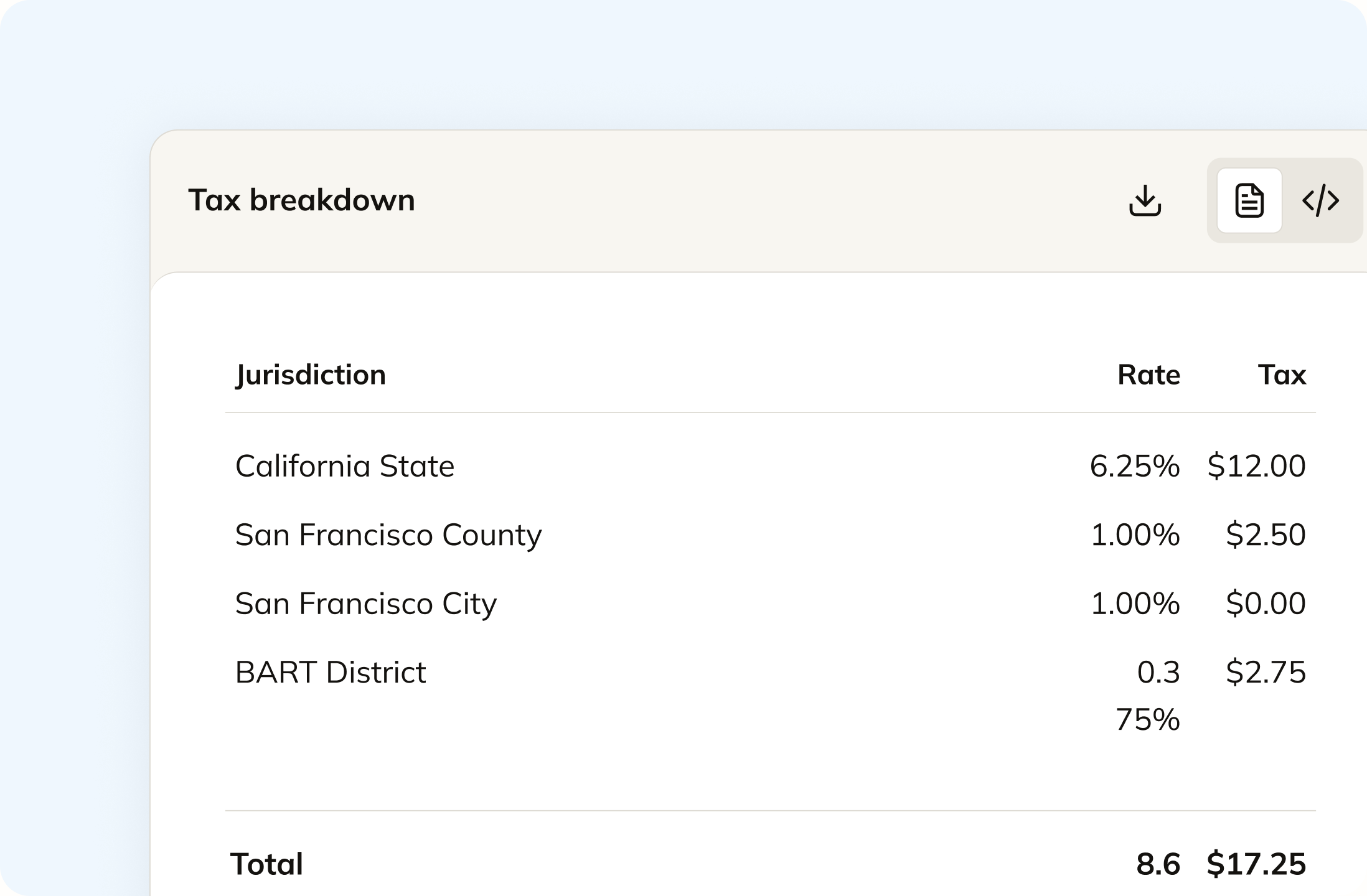
In SAP Business One a tax code is a set of jurisdictions you defined, and the sales document pulls it from the ship-to address on the customer. It is only right if the code is right. Commenda calculates the rate for that address directly and shows the state, county, city, and district split behind the total, so the figure on the invoice is the figure on the return.
Track your global exposure from SAP Business One
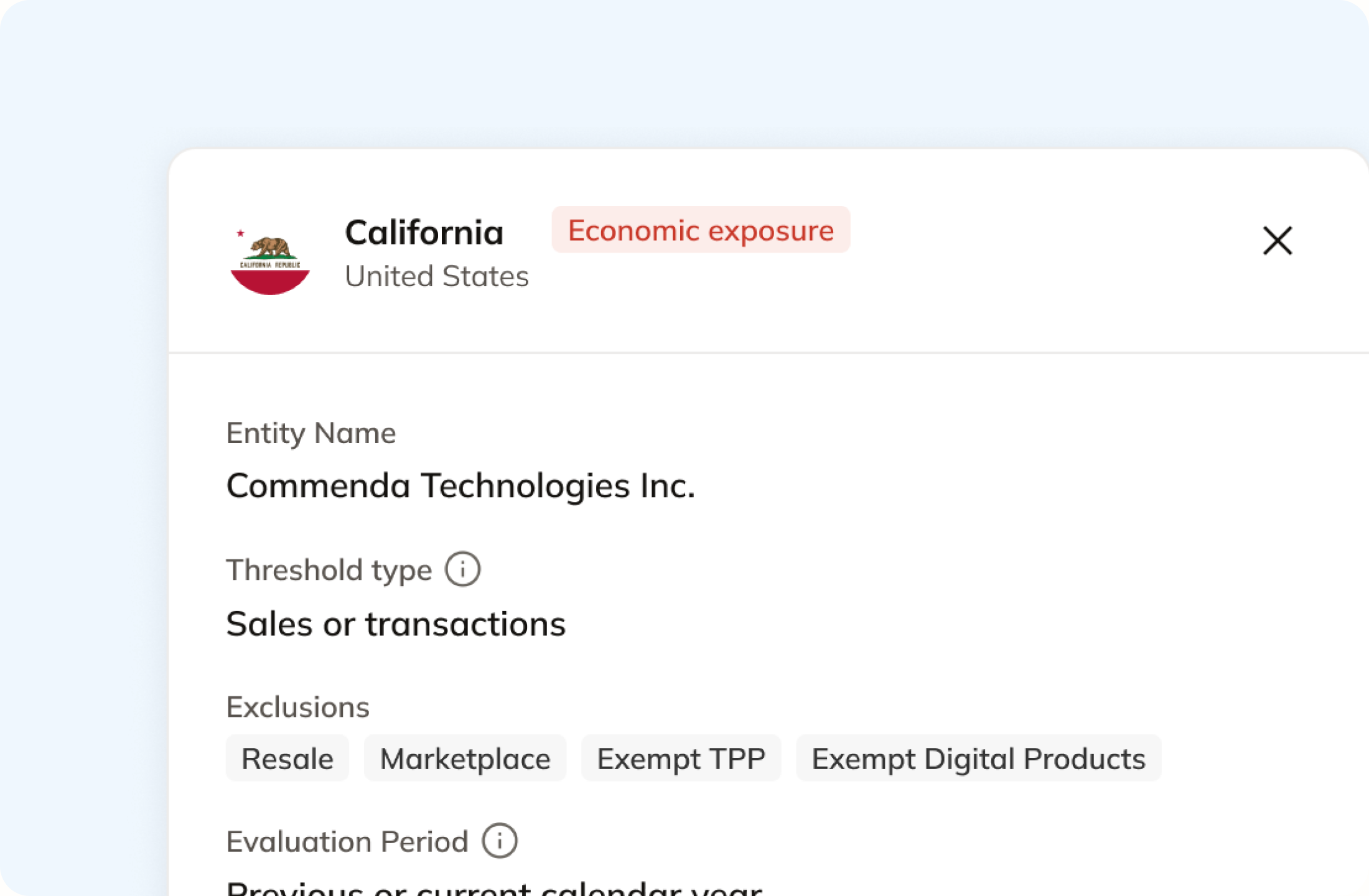
Business One applies tax where a tax code exists, so a sale into a state you never created jurisdictions for is taxed at zero and counted nowhere. Commenda measures the same transactions against economic and physical thresholds in all 50 states and 70+ countries, and tells you at 80%, before you cross. A short questionnaire covers physical presence, because a warehouse or a remote employee never appears on an invoice.
Automatically remit transactions around the world
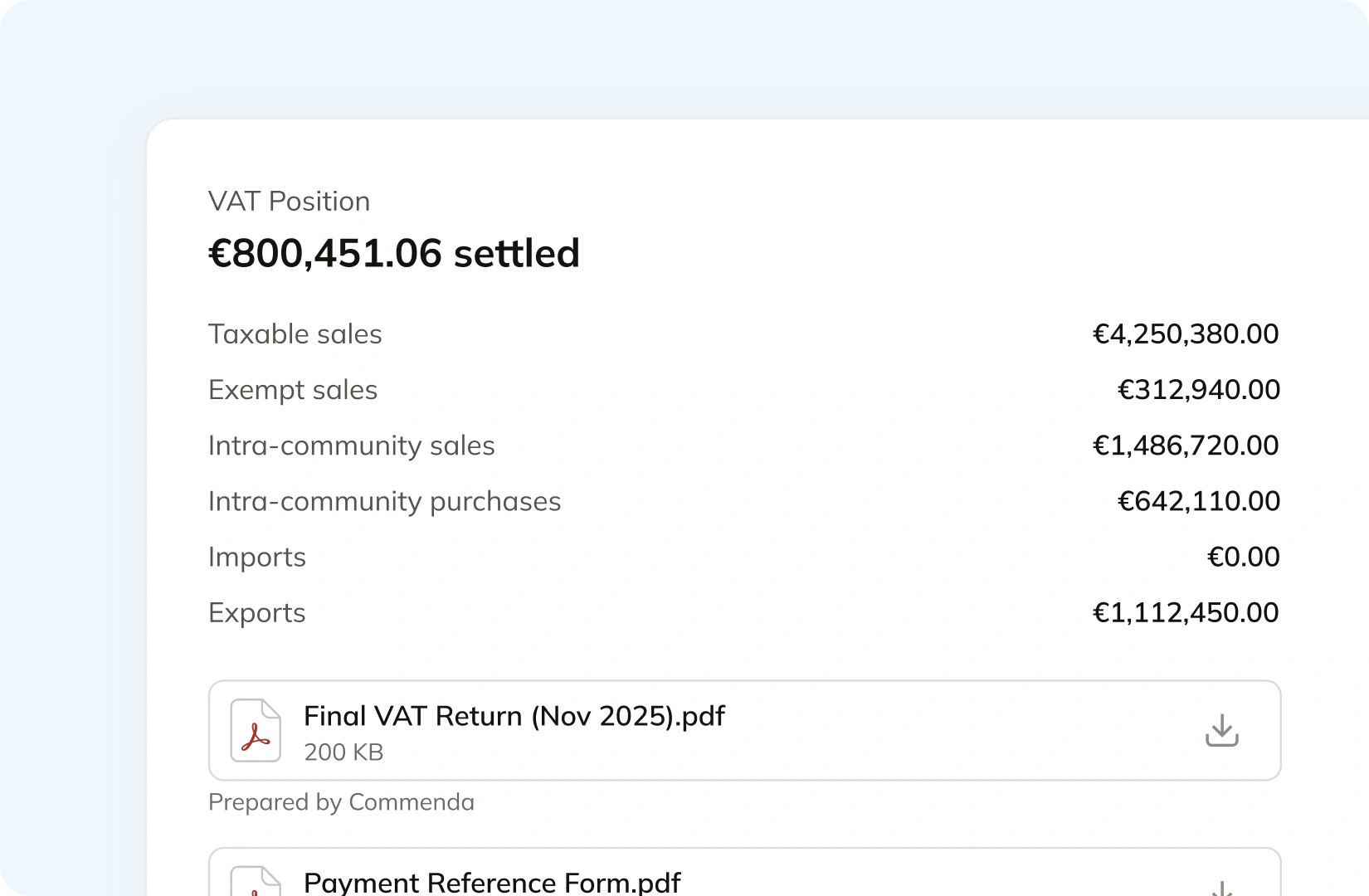
SAP's tax report summarises tax collected and paid each month, by jurisdiction or by tax code, with drill-down to the transactions. Getting from there to a filed return is work your finance team still does. Commenda builds the return from the same transactions and files it across all 50 states, plus EU VAT with OSS and GST in APAC and Canada, with amendments where a period needs correcting.
Manage your customers and exemptions in one place
SAP gives you four ways to make a sale exempt in Business One: a tax code set to 0%, a flag on the item, a tax status on the business partner, or a single row marked not tax liable. SAP also warns that the one you choose changes whether the amount lands in the taxable or non-taxable column of your tax report. Commenda holds the certificate behind the decision, validates it at upload, applies it where it is valid, and chases expiries.
Consolidation
Why the tax report is not your exposure
Business One holds the books for a growing company, and tax is a handful of tables inside it. Filing one return means knowing which rates are still right, which states you crossed, and which sales were already taxed somewhere else. Commenda solves that.
The ERP often sits downstream of the revenue
We have scoped Business One shops whose previous tax provider pulled sales from Amazon and Walmart and never from the ERP at all. Invoice records were created back into Business One after the fact, which makes the ERP the destination rather than the source. Its tax report can be complete and still not be your exposure figure, because the numbers arrived already filed.
State-level detail is not enough to reconcile a marketplace order
In the same engagement the filed figure came out lower than the marketplace had actually collected, because the calculation worked at state level and missed item-level detail. Nobody resolved it for months. Commenda reads each order at line level with its own product tax code, so what a marketplace collected and what you still owe are two separate numbers rather than one rounded one. Our nexus threshold guide sets out which of those sales count toward a registration in each state.
Tax codes accumulate, and nothing tells you when one goes stale
SAP notes that a Business One tax code cannot be deleted, only set inactive, and that the sum of its jurisdiction rates is the total rate applied. Rates change. If the rate service is not switched on, every county and city percentage is a number a person typed, and it will keep being applied until somebody notices. A partner usually configured it, and a small finance team inherits it.
One figure per state, wherever the sale started
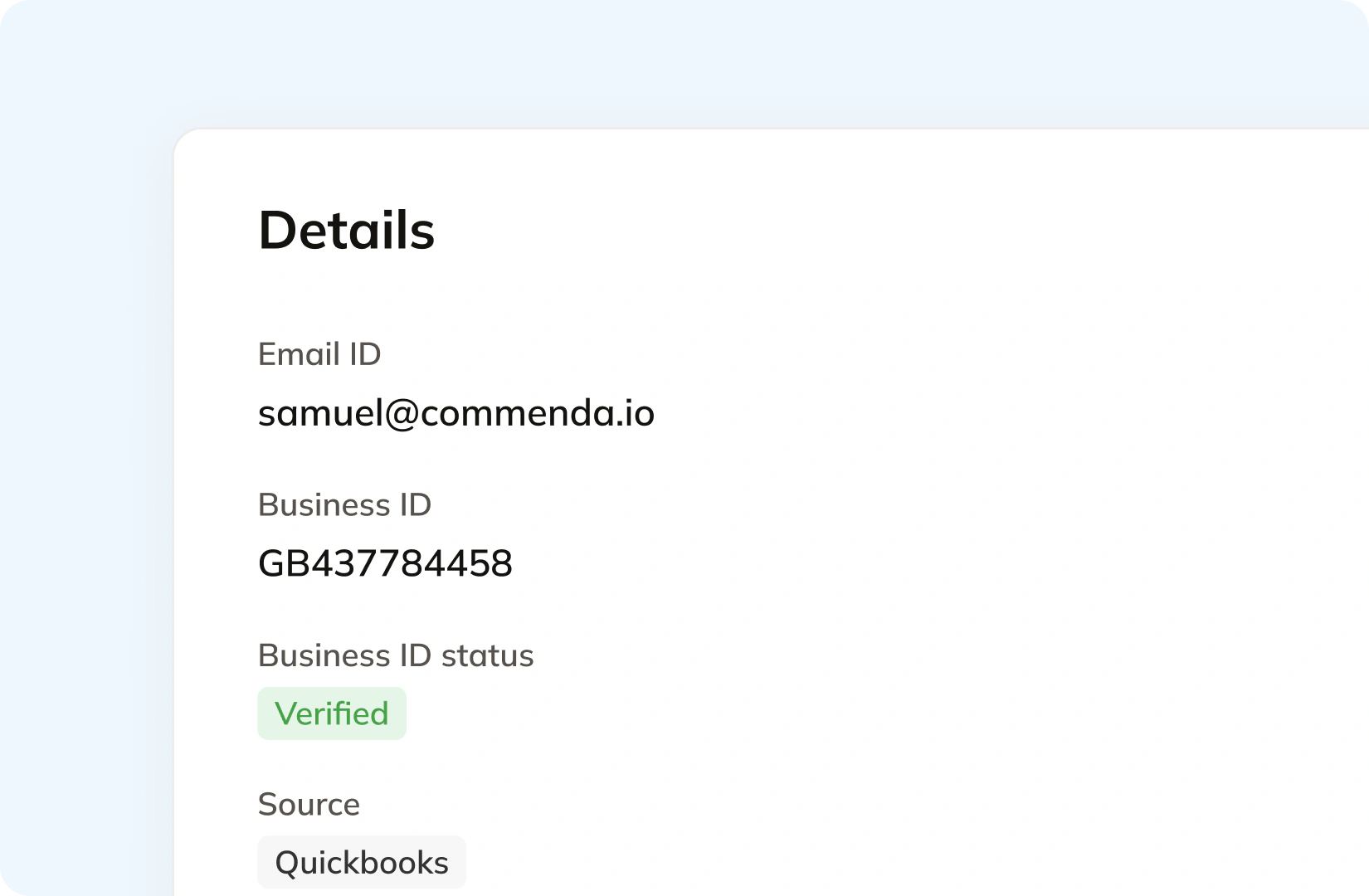
Business One is rarely the only place revenue lands. A storefront, a marketplace, and a billing platform each need reading in their own right. Commenda connects to each and consolidates into one ledger tagged by ship-to state, with the origin visible on every transaction, so tax a marketplace already collected never gets filed twice. 100+ integrations are supported, alongside a REST API and a mapped monthly CSV for anything a connector does not reach, and one dashboard holds the result.
Who owns what
Who does each tax job in Business One
SAP publishes no Business One list price and asks you to request a quote, so there are no dollar figures here. The more useful question for a small finance team is who does each job. SAP's own documentation answers it, and the answer is usually you.
| The job | Who does it in SAP Business One |
|---|---|
| Setting up the tax jurisdictions | You. A new company database creates three, City, County, and State, and you create the others the company needs before a tax code can use them |
| State-level rates | SAP. Rates for the State jurisdiction are assigned automatically |
| County and city rates | You, unless the rate service is on. Otherwise each jurisdiction rate is a number somebody enters, and the tax code total is the sum of them |
| Keeping those rates current | A provider you subscribe to. Tax Service is free in the US localization, and its provider tab is Avalara Rates by Address, with credentials you register for separately |
| Tax on a customer outside the US | Tax Code Determination. SAP states that Tax Service only works with domestic US business partners |
| Caps like South Carolina's USD 300 maximum | You. It is a flat tax amount on the jurisdiction, and SAP states Tax Service does not support minimum, maximum, or flat tax amounts |
| Tax when the connection is down | Tax Code Determination again. SAP states Tax Service relies on an internet connection and Business One falls back without one |
| Making a customer exempt | You. Create a tax code at 0%, or flag the item, the business partner, or the single document row, and SAP notes each choice reports differently |
| The registration, the return, and the payment | You, or somebody you hire. Business One gives you a monthly tax report by jurisdiction or by tax code, with drill-down to the transactions |
| What SAP charges for any of this | No published figure. SAP's Business One pricing section asks you to request a quote |
Setting up the tax jurisdictions
You. A new company database creates three, City, County, and State, and you create the others the company needs before a tax code can use them
State-level rates
SAP. Rates for the State jurisdiction are assigned automatically
County and city rates
You, unless the rate service is on. Otherwise each jurisdiction rate is a number somebody enters, and the tax code total is the sum of them
Keeping those rates current
A provider you subscribe to. Tax Service is free in the US localization, and its provider tab is Avalara Rates by Address, with credentials you register for separately
Tax on a customer outside the US
Tax Code Determination. SAP states that Tax Service only works with domestic US business partners
Caps like South Carolina's USD 300 maximum
You. It is a flat tax amount on the jurisdiction, and SAP states Tax Service does not support minimum, maximum, or flat tax amounts
Tax when the connection is down
Tax Code Determination again. SAP states Tax Service relies on an internet connection and Business One falls back without one
Making a customer exempt
You. Create a tax code at 0%, or flag the item, the business partner, or the single document row, and SAP notes each choice reports differently
The registration, the return, and the payment
You, or somebody you hire. Business One gives you a monthly tax report by jurisdiction or by tax code, with drill-down to the transactions
What SAP charges for any of this
No published figure. SAP's Business One pricing section asks you to request a quote
Figures verified on July 30, 2026 against US tax guide, Tax Service guide and SAP Business One.
From the field
Trusted by businesses across the globe


“The platform works exactly the way I need it to. I have one team member who manages all of our exemption certificates, and that functionality has been particularly efficient for us. It allows him to handle everything seamlessly, making the handoff significantly easier.”
VP of Finance, TRX






Compare Commenda sales tax software with competitors
Avalara is the provider behind Business One's own US rate service, so most teams here already pay for it. We compare the alternatives on coverage, ratings, and real pricing, and we say where each one wins.
More sales tax resources
Guides from the Commenda team on registration, resale certificates, and late-filing penalties.
Frequently asked questions
Custom integration support for your business
Every Business One installation was configured by a partner, and those choices exist for good reasons. We map how yours works, including your tax codes and which channels feed it, and build the integration to match.
Indirect Tax
Monitor nexus exposure, register, file, and remit sales tax and VAT in one platform. Commenda keeps you compliant across 100+ jurisdictions.
Explore the product
