Before you form, buy from, or partner with a Missouri company, verify it exists and stands in good standing. The Missouri Secretary of State (SOS) runs a free business entity search built for exactly that. Start at sos.mo.gov/business, and you can confirm any registered entity in minutes.
This guide serves entrepreneurs, investors, and legal teams who need certainty in 2026. Denny Hoskins, CPA, serves as Missouri Secretary of State, confirmed on the official SOS business page. The guide covers the search, name checks, agents, statuses, good standing, and how to file once your name is clear.
What Is the Missouri Business Entity Search?
The Missouri business entity search is a free, no-login database from the Missouri Secretary of State, available 24/7. It lists every registered entity, domestic and foreign. Each record shows the charter number, status, formation date, registered agent, filing history, and principal office address. The tool goes offline for occasional scheduled maintenance windows posted on sos.mo.gov.
| Field in a result | What it tells you | Source |
|---|---|---|
| Charter number | The unique ID the SOS assigns at registration | SOS Business Search |
| Status | Active, forfeited, dissolved, cancelled, merged, or withdrawn | SOS Business Search |
| Formation date | When the entity first registered | SOS Business Search |
| Registered agent | The official contact for legal service | SOS Business Search |
| Filing history | Documents on record for the entity | SOS Business Search |
| Principal office address | The entity’s main business address on file | SOS Business Search |
What Types of Business Entities Can You Search in Missouri?
You can search limited liability companies (LLCs), corporations (both C corp and S corp), limited partnerships (LPs), limited liability partnerships (LLPs), and professional entities such as P.A., P.C., and PLLC. Coverage includes domestic and foreign (out-of-state) entities. Sole proprietorships and general partnerships do not register as entities, so they never appear.
| Entity type | Formation document | Governing law | Notes | Source |
|---|---|---|---|---|
| LLC | Articles of Organization | Chapter 347 RSMo | Files no annual report | SOS / revisor.mo.gov |
| Corporation (C/S) | Articles of Incorporation | Chapter 351 RSMo | Same document for C and S corp; S is an IRS election; files a registration report | SOS / revisor.mo.gov |
| Limited partnership (LP) | Certificate of Limited Partnership | Chapter 359 RSMo | General partners manage; limited partners invest | SOS / revisor.mo.gov |
| Limited liability partnership (LLP) | Statement of qualification | Chapter 358 RSMo | Common for law and accounting firms | SOS / revisor.mo.gov |
| Professional entity (P.A., P.C., PLLC) | Varies by structure | Chapter 356 RSMo | Licensed professionals only | SOS / revisor.mo.gov |
RSMo means the Revised Statutes of Missouri, the state’s official code. Articles of Incorporation are sometimes called a Certificate of Incorporation; in Missouri the SOS title is Articles of Incorporation.
Sole proprietorships and general partnerships register no entity with the SOS, so an entity-name search misses them. Missouri fictitious name registrations, also called a DBA (doing business as), are filed with the SOS and are searchable. The next section covers how.
How Do You Search a Missouri Fictitious Name (DBA)?
Sole proprietors, general partnerships, and entities operating under another name must register a fictitious name (DBA) with the Missouri SOS, and those registrations are searchable through the business search. File the Registration of Fictitious Name for $7.00, per the SOS Schedule of Fees.
A fictitious name registration is valid for five years and must be renewed in the six-month window before it expires, per the SOS fictitious name FAQ. After expiration you file a new registration, not a renewal. A fictitious name grants no exclusive rights to the name. To find a trade name the entity search misses, run a Business Name search on the DBA itself.
How Do You Perform a Missouri Business Entity Search?
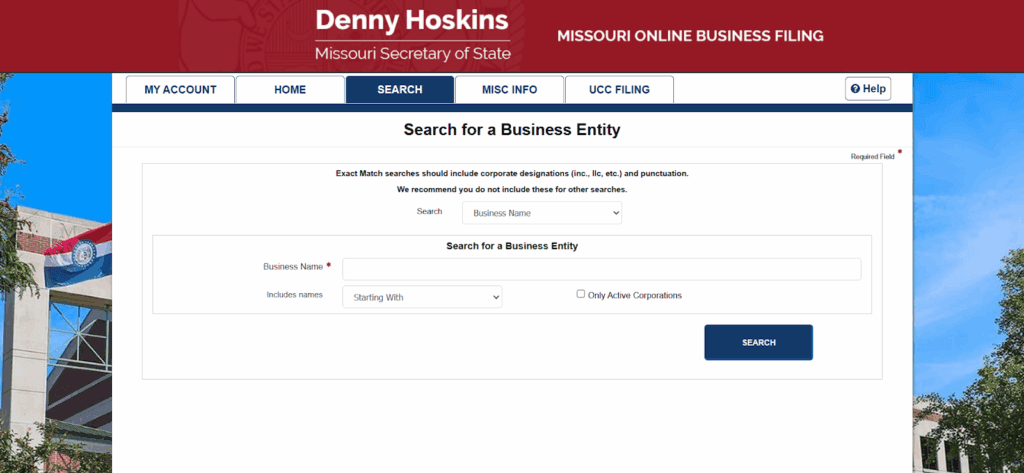
Open the SOS Business Search, pick one of four search types (Business Name, Registered Agent, Name Availability, Charter Number), apply a match modifier (Starting With, All Words, Any Word, Exact Match), run the query, then click the blue entity name for full details. A checkbox limits results to active entities only.
Step 1: Open the SOS Business Search
Reach the tool from the SOS business page or go directly to the Missouri Business Search. No account or login is required. If the tool errors or a record looks wrong, call the SOS Business Services toll-free line at (866) 223-6535 for help. It is a help line, not a search channel.
Step 2: Choose a search type and enter your terms
Select Business Name, Registered Agent, Name Availability, or Charter Number from the dropdown. Type your terms, then pick a match modifier. Searches ignore punctuation and are not case-sensitive, so “ABC Company, LLC” and “ABC Company LLC” return the same results. Start broad with the first word or two.
Step 3: Review the results table
The results table shows Business Name, Charter Number, Type, Status, Created Date, and Registered Agent Name. Check the active-only box to hide inactive records. Recent online filings can lag briefly in the index, so wait a few hours if a just-filed entity is missing.
Step 4: Open the entity detail page
Click any business name in blue text. The detail page lists the principal office address, registered agent, and tabs for filings and officers, with documents available to view.
How do you view filings and get certified copies?
The detail page’s Filings tab lists the full filing history with free document views and downloads. A certified copy is a separate paid request. It costs $10.00 flat online, or $10.00 plus 50 cents per page on paper, per the SOS Schedule of Fees.
Streamline your global entity management in one place
Stay on top of filings, records, and governance across every jurisdiction
How Do You Check If a Business Name Is Available in Missouri?
Use the Name Availability search type, enter your proposed name, and read the results. No exact match does not guarantee approval, because Missouri requires names to be distinguishable, not merely non-identical. To hold a clear name, file an Application for Reservation of Name for $25.00, which lasts 60 days and is renewable twice to 180 days, per the SOS Schedule of Fees.
Name availability is not name reservation and is not trademark clearance. SOS clearance says nothing about federal or state trademark rights, which you check separately. For a quick first pass before you file, run your idea through Commenda’s company name checker.
How Do You Search a Missouri Business by Charter Number?
Select Charter Number as the search type and enter the number for an exact-entity lookup. A charter number is the unique ID the SOS assigns each entity at registration. Use it when you already have the number from a filing, a contract, or a prior search, because it skips the name ambiguity that trips up common business names.
When several similar names match a search, compare charter numbers to resolve which entity you are actually looking at before you review its filings. The charter number is the cleanest disambiguator the record offers.
How Do You Find the Registered Agent for a Missouri Company?
Every Missouri entity must maintain a registered agent, also called a statutory agent in other states, shown in both the results table and the detail page. The Registered Agent search type reverse-lists every entity an agent serves. Under the SOS Corporations FAQ, an agent is a Missouri resident whose office matches the registered office, or a company authorized to transact business in the state.
A registered-agent search proves service relationships, not ownership or directorship. Do not read agent data as owner data. The reverse lookup confirms who accepts legal service for a company before you sign or lend, nothing more.
What Do Missouri Business Entity Statuses Mean?
The status column tells you whether an entity is authorized to operate before you sign, lend, or invest. Both domestic and foreign entities carry these labels, so a foreign registration is normal, not a red flag. The table below defines each status shown in the live SOS search.
| Status | What it means | What it signals to a counterparty | Source |
|---|---|---|---|
| Active | Registered and in good standing | Safe to transact | SOS Business Search |
| Forfeited | Lost good standing for non-compliance | Not authorized; needs corrective filing | SOS Business Search |
| Voluntarily Dissolved | Owners closed the entity | Operations have ended | SOS Business Search |
| Administratively Dissolved | SOS dissolved it for unfiled reports or fees | Serious lapse; reinstatement required | SOS Business Search |
| Cancelled | Registration ended by action or choice | No longer operational | SOS Business Search |
| Merged | Combined into another surviving entity | Successor entity holds the obligations | SOS Business Search |
| Withdrawn | Foreign entity ended its Missouri registration | No longer qualified in Missouri | SOS Business Search |
Forfeited means the entity failed to maintain a registered agent or file a required report. It is not authorized to operate until cured. The cure path is covered in the reinstatement section below.
How Do You Get a Missouri Certificate of Good Standing?
The free search shows status, which is informal; a Certificate of Good Standing is a purchasable official SOS document that costs $10.00, per the SOS Schedule of Fees. Banks, lenders, and foreign qualification in other states usually require it. Order it online or by mail through the SOS; confirm the current ordering path on sos.mo.gov.
International readers using a Missouri certificate abroad typically also need an apostille from the Missouri SOS. The apostille authenticates the document for use in another country. Verify the current apostille fee and process on sos.mo.gov before you rely on specific numbers, since authentication fees change.
How Do You Use the Missouri Search for Business Due Diligence?
The search verifies legal existence, status, formation date, registered agent, and principal office address before vendor onboarding, partner deals, investment, or litigation. It confirms the counterparty is a real, authorized entity. Run it early, before money or signatures change hands.
Know the limits of the free tool. It shows no beneficial owners, no financials, and no Employer Identification Number (EIN). Officers appear only where reported. It shows filing history but never flags upcoming deadlines or sends reminders. For know your customer (KYC) and procurement, teams need a dated record of the official register, not a screenshot, which is why a timestamped pull matters. Commenda’s entity management platform centralizes registrations, agent details, and standing across every entity you touch.
How Do You Register a Business in Missouri After Your Search?
Once your name is clear, file your formation document with the SOS, then get an EIN from the IRS. An LLC files Articles of Organization; a corporation files Articles of Incorporation. Both a C corp and an S corp file the same Articles of Incorporation, because S status is a federal IRS Form 2553 election, not a separate Missouri filing.
| Filing | Fee | Source |
|---|---|---|
| LLC Articles of Organization (online, domestic) | $50.00 | SOS Schedule of Fees |
| LLC Articles of Organization (paper) | $105.00 | SOS Schedule of Fees |
| Articles of Incorporation (first $30,000 of authorized shares) | $58.00 | SOS Schedule of Fees |
| Additional authorized shares | +$5.00 per $10,000 | SOS Schedule of Fees |
| Name reservation | $25.00 (60 days, renewable to 180) | SOS Schedule of Fees |
| Corporation annual registration report | $45.00 paper / $20.00 online | SOS Schedule of Fees |
| Certified copy | $10.00 online; $10.00 + 50 cents/page paper | SOS Schedule of Fees |
All figures come from the SOS Schedule of Fees, last revised January 2025. LLC formation is governed by Chapter 347 RSMo. After filing, secure your EIN through the IRS or by submitting Form SS-4. For the full walkthrough, see Commenda’s Missouri business registration guide and incorporation service.
How Do You Reinstate a Forfeited or Dissolved Missouri Business?
An administratively dissolved Missouri corporation reinstates by filing a rescission application with a Missouri Department of Revenue (DOR) tax clearance letter, back fees, and current annual registration reports, which cost $45.00 on paper or $20.00 online, per the SOS Schedule of Fees. The SOS provides a rescission packet for the process.
Missouri LLCs work differently. The SOS Corporations FAQ states plainly, “Do limited liability companies have to file an annual report? No.” That exemption is consistent with Section 351.125 RSMo, which imposes the registration report on corporations, not LLCs. So an LLC never lapses for a missed report, while a corporation can.
Is sos.mo.gov the Official Missouri Business Search Site?
Yes. sos.mo.gov and bsd.sos.mo.gov are the only official domains for the Missouri business entity search. Lookalike sites such as secretaryofstate.com are privately owned and state their own non-affiliation with the government. Searchers often land on them by mistake, so verify the domain before you trust a record.
Bookmark the official SOS business search so you return to the genuine site every time. For direct help, call the SOS Business Services toll-free line at (866) 223-6535. Treat any site asking for payment to “search” as a third-party service, not the state.
How We Simplify Missouri Entity Management
Missouri gives you a solid free search, but it stops at the state line and shows only self-reported data. Commenda’s entity management platform is one place to track registrations, registered agent details, filings, and good standing across every state and country, so Missouri behaves like every other jurisdiction and nothing gets researched state by state.
Pair it with Commenda’s incorporation service to form new entities, the Missouri business registration guide for the filing path, and the compliance calendar so every deadline surfaces before it bites. Book a demo to see every entity’s standing and upcoming Missouri deadlines in one dashboard.
About the author

Ishwar is a serial entrepreneur and Y Combinator alum who has founded multiple venture-backed companies across global markets. Based in Bangalore, he brings a founder’s perspective to the complexities of international operations, with deep expertise in transfer pricing and cross-border structuring.
Disclaimer: Commenda and its affiliates do not provide tax, accounting, or legal advice. This material has been prepared for informational purposes only, and is not intended to provide or be relied on for tax, accounting, or legal advice. You should consult your own tax, accounting, and legal advisors before engaging in any related activities or transactions.