The Massachusetts business entity search is a free public lookup run by the Secretary of the Commonwealth’s Corporations Division through the CorpSearch portal. Massachusetts officially calls this office the Secretary of the Commonwealth, not the Secretary of State that most other states use. You need no account and pay no fee to run a search.
Fees apply only when you order a certificate or submit a filing, never to search. This guide covers the search methods, what each entity status means, the entity types the search returns, and every current certificate and filing fee, with the primary source beside each figure.
What Is the Massachusetts Business Entity Search?
The Massachusetts business entity search is a free Corporations Division database of every domestic and foreign entity registered in the state. Each record returns the entity name, type, identification number, old ID number, formation date, status, registered agent, principal office, officers, filing history, and links to filed documents. The Corporations Division confirms the public search needs no account or fee.
The database is large. It holds roughly 215,000 business and nonprofit corporations plus over 200,000 limited liability entities, per the official Corporations Division fee schedule. Sole proprietorships and unregistered general partnerships never appear, because they file no formation documents with the state. Founders check names, investors run counterparty due diligence, and compliance teams verify status and registered agents from the same record.
How Do You Perform a Massachusetts Business Entity Search?
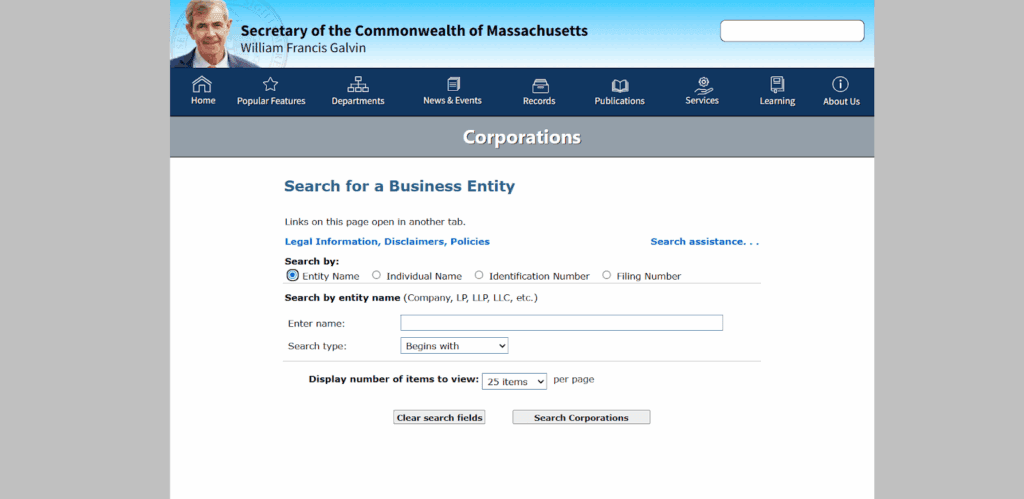
Open the CorpSearch portal, pick one of four radio-button search methods, type your term, and run it. To check if a business is registered in Massachusetts, search its name or an officer’s name, then read the status on the record. The four methods are Entity Name, Individual Name, Identification Number, and Filing Number.
| Search method | What it finds |
|---|---|
| Entity Name | A business by its name or one word within it |
| Individual Name | Businesses tied to a person, such as an officer or director |
| Identification Number | An entity directly by its ID number |
| Filing Number | A specific filed document |
Both name searches offer four match modes on the live CorpSearch form: Begins With, Exact Match, Full Text, and Soundex. Use Full Text to catch a term anywhere inside a name. Identification numbers must be exactly nine digits; the portal enforces this. A results-per-page dropdown shows 25, 50, or 100 results, defaulting to 25. Results list four columns, Entity Name, ID Number, Old ID Number, and Address; click the name to open the full record.
What Does Each Massachusetts Entity Status Mean?
Read the status first, because it drives your due-diligence conclusion. An entity marked Active is registered and authorized, but Active alone does not prove good standing. Good standing requires current annual reports and is proven by a Corporations Division certificate, not the results screen. A dissolved, forfeited, or revoked entity is a red flag.
| Status | What it means |
|---|---|
| Active | Registered and authorized; does not by itself prove good standing |
| Involuntarily Dissolved / Revoked | Administratively terminated by the state, often for missed annual reports |
| Voluntarily Dissolved | Wound down by its owners; no longer exists under Massachusetts law |
| Forfeited | Lost authority to operate; common for non-compliant foreign entities |
| Withdrawn | Foreign entity that ended its Massachusetts registration |
| Merged | Absorbed into another entity; no longer independent |
Streamline your global entity management in one place
Stay on top of filings, records, and governance across every jurisdiction
What Entity Types Appear in the Massachusetts Entity Search?
The search returns every registered entity type, each identified by the formation document it filed. Massachusetts uses Articles of Organization for both LLCs (limited liability companies) and corporations, unlike states that reserve Articles of Incorporation for corporations. The table below maps each type to the document that the Filing Number search locates.
| Entity type | Formation document |
|---|---|
| LLC (limited liability company) | Articles of Organization |
| Corporation | Articles of Organization |
| LLP (limited liability partnership) | Registration as an LLP |
| LP (limited partnership) | Certificate of Limited Partnership |
| PLLC (professional limited liability company) / professional corporation | Articles of Organization |
| Massachusetts Business Trust | Declaration of Trust |
| Foreign entities | Application / Certificate of Registration |
A PLLC or professional corporation is the form licensed professionals use, and it files Articles of Organization like a standard LLC or corporation. A Massachusetts business trust is the historic common-law form used by real estate investment trusts (REITs) and investment funds. It comes into existence when its trustees file a declaration of trust with the Secretary of the Commonwealth under Massachusetts General Laws chapter 182, section 2, and it appears in the search with its own ID number, formation date, and status.
How Do You Check if a Business Name Is Available in Massachusetts?
Search your desired name using the Full Text match mode, which catches the term anywhere inside a registered name. Massachusetts requires a new name to be distinguishable from every registered and reserved name under Massachusetts General Laws chapter 156D, section 4.01. For an LLC name search, run the same Full Text query before you file your Articles of Organization.
How Do You Reserve a Business Name in Massachusetts?
File a name reservation with the Corporations Division to hold your name while you prepare formation documents. A name reservation costs $30 and holds the name for 60 days, per the Corporations Division fee schedule. That window covers the time needed to finish and file your Articles of Organization. For the full formation path, see the Commenda Massachusetts business registration guide.
How Do You Look Up a Massachusetts Business’s Filing History?
Open the entity record from the results table, then scroll to the filing history section, which lists every filed document with direct links to view or order it from the same screen. Filings received before 2001 were microfilmed, not digitized, and are available only in the Corporations Division Public Room, per the fee schedule’s records note.
How Do You Get a Certificate of Good Standing in Massachusetts?
Order it from the Corporations Division online, by mail, or in person for a per-entity fee; the search screen shows status, but formal proof of good standing is the certificate. Two offices issue two certificates: the Corporations Division issues the Certificate of Good Standing or Certificate of Legal Existence, and the Department of Revenue (DOR) issues a separate tax good standing certificate.
| Certificate | Entity type | Fee | Source |
|---|---|---|---|
| Certificate of Good Standing | Corporation (domestic/foreign) | $12.00; +$3.00 expedite if electronic | Corporations Division fee schedule |
| Certificate of Good Standing | LLC, LP, LLP | $25.00; +$6.00 expedite if electronic | Corporations Division fee schedule |
| Certificate of Legal Existence | Corporation | $7.00 | Corporations Division fee schedule |
| Certificate of Legal Existence | LLC, LP, LLP | $12.00 | Corporations Division fee schedule |
Banks opening accounts, lenders arranging financing, states processing a foreign qualification, and buyers closing an acquisition commonly require one or both certificates. A corporate Certificate of Good Standing confirms the entity’s name, that all annual reports and fees are current, and that no dissolution is pending, under Massachusetts General Laws chapter 156D, section 1.28.
How Does Foreign Qualification Work in Massachusetts?
Out-of-state and out-of-country entities doing business in Massachusetts must register with the Secretary of the Commonwealth, a process called foreign qualification. Here “foreign” means formed under any law other than Massachusetts, so a UK or Indian company qualifies the same way a Delaware one does. The entity search is step one: confirm your name is distinguishable before you file.
Massachusetts law defines a foreign corporation as one incorporated under a law other than the Commonwealth’s, which reaches companies formed in another country as well as another US state. You supply a good standing certificate from the home jurisdiction and appoint a Massachusetts resident agent. Once registered, the foreign entity appears in the search like a domestic one.
Expanding across New England? Run the same check in neighboring states with the New York business entity search, the Connecticut business entity search, and the Rhode Island business entity search.
What Should You Do After Your Massachusetts Entity Search?
Your next step depends on your situation. New businesses file formation documents and lock in the name; existing businesses verify standing and clear any outstanding filings. The core fees sit in one table below, each drawn from the Corporations Division fee schedule.
| Filing | Fee | Condition | Source |
|---|---|---|---|
| Corporation Articles of Organization | $275.00 minimum | +$100.00 per additional 100,000 authorized shares | Corporations Division fee schedule |
| Name reservation | $30.00 | Holds the name 60 days | Corporations Division fee schedule |
| Corporation annual report | $125.00 ($150.00 if late) | Due within 2.5 months of fiscal year end | Corporations Division fee schedule |
| LLC annual report | $500.00 | Due on the anniversary of the Certificate of Organization filing | Corporations Division fee schedule |
What Should a New Business Do Next?
File your formation documents with the Corporations Division, then set up compliance reminders. Every domestic and foreign corporation must file an annual report within two and one-half months after its fiscal year end, under Massachusetts General Laws chapter 156D, section 16.22. Registering a business is not the same as licensing it, so review the Commenda Massachusetts business license guide next, secure any trademarks, and calendar every deadline.
What Should an Existing Business Do Next?
Verify your current standing in the entity search before you renew registrations or licenses. Clear any outstanding filings and fees to avoid penalties or administrative dissolution. Request certified copies of official documents from the Corporations Division when a bank, lender, or auditor asks for them.
What Are Common Problems With Massachusetts Business Entity Searches?
Most failed searches trace to spelling, name designators, or timing. Drop designators like LLC or Corp, try a partial name, and switch to Full Text mode before concluding an entity does not exist. The portal can also lag recent filings, so cross-check a suspicious record against a recent annual report.
- No results found: Check spelling, drop designators like LLC or Corp, and try a partial name. The portal treats designators separately.
- Similar or confusing names: Use the Full Text match mode to capture your term anywhere inside a name.
- Data lag: The portal can trail recent filings, so verify a stale-looking record against a recent annual report.
How We Help With Massachusetts Entity Management
The search is free; formation and ongoing compliance are the real work. Commenda’s entity management and incorporation platform handles Massachusetts formation filings, provisions your registered agent, tracks every filing, and sends annual report reminders so your status never lapses. Keep deadlines visible with the Commenda compliance calendar, and confirm a name is clear before you file with the Commenda company name checker.
Book a demo to get a free Massachusetts compliance assessment covering formation, annual reports, and good standing in every state you operate in.
About the author

Ishwar is a serial entrepreneur and Y Combinator alum who has founded multiple venture-backed companies across global markets. Based in Bangalore, he brings a founder’s perspective to the complexities of international operations, with deep expertise in transfer pricing and cross-border structuring.
Disclaimer: Commenda and its affiliates do not provide tax, accounting, or legal advice. This material has been prepared for informational purposes only, and is not intended to provide or be relied on for tax, accounting, or legal advice. You should consult your own tax, accounting, and legal advisors before engaging in any related activities or transactions.