















Why Sales Tax Compliance Breaks Down in Financial Force
Financial Force, while very good and even better at managing revenue recognition, project billing, and consolidated financials, is not the system designed for U.S. sales tax compliance from start to finish. The main points where the risk for Financial Force users is created entail:
- The tax rules are upheld manually with static tax logic, which needs to be changed whenever a state’s or locality’s rules change.
- No native economic nexus tracking is done among states to identify registration obligations beforehand.
- Spreadsheets and exports are used to prepare and file tax returns manually.
- There is limited visibility on the financial impact of county/city liabilities as opposed to overall financial roll-ups.
- It is hard to reconcile sales from multiple channels, such as marketplaces, e-commerce, and POS, with Financial Force invoices for a single compliance view.
- The storage of exemption certificates and audit documentation is decentralized.
These gaps create a lot of manual work, errors in reconciliation, loss of registration, and other problems, such as fines that companies expanding in the U.S. have to deal with.
Who is This Sales Tax Integration for?
The Financial Force sales tax integration is for companies looking for top-class automation and compliance workflows that are easy to defend:
- SaaS, eCommerce, subscription, and service businesses using Financial Force for billing and accounting.
- Professional services and project-based firms that bill across multiple U.S. states.
- The finance and tax departments are the ones that have to deal with multi-state filings and the responses to the audits during the whole process.
- Companies that have several legal entities or branches and also have revenue streams that are all in one place can be found in Financial Force.
- International companies that are doing business in the U.S. or exporting to the U.S. and using Financial Force as their ERP.
- Accounting firms and shared-services centers that are working with several Financial Force clients or accounts.
If your company is increasing revenue, introducing taxable offerings, or preparing for audits, then having a dedicated automation layer will help you reduce manual work and, at the same time, eliminate business risk.
Common Sales Tax Challenges for Financial Force Users
The finance teams working with the Financial Force system often encounter the same problems again and again.
- One of the major problems is the missing registrations after crossing the economic nexus thresholds in the different states where the company has extended its operations.
- Another problem is manually tracking liabilities across dozens of counties, cities, and special districts.
- The mapping of the product, service, and revenue codes in the financial system to the taxability categories is not always done consistently.
- The management of the customer exemption certificates and resale documentation across the different jurisdictions is done poorly.
- One more problem is reconciling the sales made through marketplaces or channels with the invoices generated by Financial Force to be able to file accurate returns.
- Therefore, the financial team ends up preparing audit-ready supporting documentation without having a centralized repository, which is time-consuming and inefficient.
On the other hand, an automated compliance engine can centralize these functions and distribute scattered data into precise filings and proof-ready records.
What Is Sales Tax Automation Software for Financial Force?
Sales tax automation software is an external compliance engine that establishes a connection with Financial Force and takes over the management of the tax lifecycle that the ERP system was not initially designed to handle. When the system is integrated, it will perform the following tasks:
- It calculates the sales tax at the level of each transaction and applies the current jurisdiction rules.
- The economic nexus threshold is monitored continuously, and alerts are issued for registration whenever necessary.
- Aggregates liabilities by jurisdiction to prepare accurate returns.
- Automates return filing and, where desired, payment remittance.
- Retains audit-ready documentation – calculation rationale, supporting invoices, exemption certificates, and filing receipts.
This methodology does away with spreadsheets and manual operations and adopts finance-grade processes that are consistent and grow along with your state presence.
How Commenda Integrates With Financial Force
Commenda connects with Financial Force using secure API connectors and configurable ETL workflows that require no engineering effort:
- Transaction data (invoices, credit memos, adjustments), customer master records, ship-to/bill-to addresses, and item/service codes are securely synced from Financial Force into Commenda.
- Pre-built mapping templates align Financial Force revenue and product/service codes with Commenda tax categories to cut setup time.
- Continuous synchronization ensures new invoices or post-billing credits flow to Commenda for recalculation, nexus checks, and return preparation.
- Typically, minimal custom development is required; guided onboarding and best-practice mappings streamline implementation and maintain Financial Force as the system of record.
This setup allows Finance to manage the transactions within Financial Force while transferring the tax complexity to Commenda’s specialized engine.
Real-Time Sales Tax Calculation
Commenda does transaction-level sales tax computations using a constantly updated rule base. The significant inputs are:
- Customer location (ship-to vs. bill-to) for identifying the appropriate jurisdictions.
- Taxability of product or service assigned from the Financial Force item or revenue codes.
- State and local sourcing rules (origin vs. destination), district levies, and special local rules.
- Applicable exemptions, resale certificates, and tax statuses at the customer level.
- Stored against the originating Financial Force invoice is the time-stamped calculation reason.
Every calculation is auditable: the platform demonstrates the reason for a tax result being chosen, the applicable rules, and the Financial Force reference, which is vital for supporting positions in the course of audits.
Monitoring of Economic Nexus and Alerts
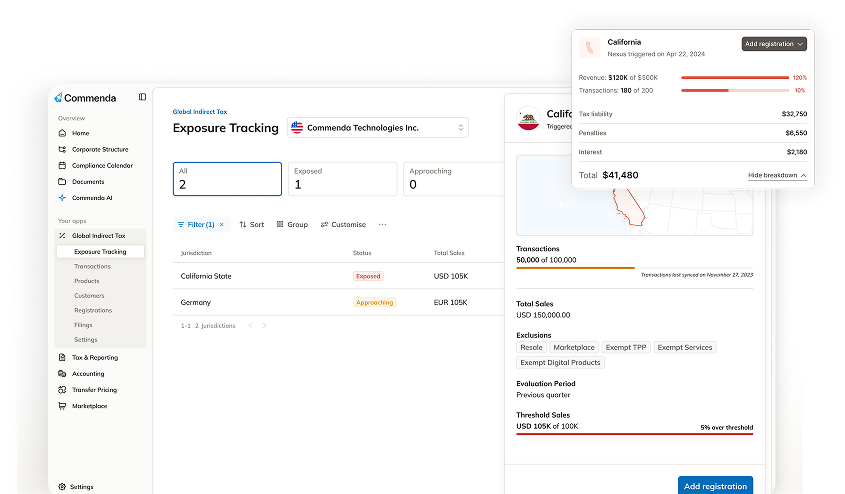
Nexus laws compel companies to register and collect taxes when the revenue or transaction limits set by law are exceeded; these limits are different for each state, and they also change over time. The nexus monitoring provided by Commenda for Financial Force users consists of the following:
- The gross sales and transaction counts by state are aggregated using rolling windows according to the jurisdictional rules.
- Finance and tax teams receive alerts both before and after the threshold is crossed so that the registrations can be started proactively.
- Past exposure assessments are done to measure the amount of possible past-due liabilities and the extent of the necessary remediation.
- The tracking of the states where taxes are registered (e.g., state tax IDs, filing frequencies) and renewal obligations is done through a centralized interface.
The proactive nexus monitoring helps in turning a compliance surprise into a manageable operational workflow, and this subsequently reduces the risk of incurring retroactive penalties.
Automated Sales Tax Filing and Remittance
Commenda employs the data from Financial Force to automate the filing lifecycle:
- Liabilities are totaled up into return-ready amounts along with the Cost-of-Goods, discounts, and adjustments being correctly mapped to the return lines.
- Financial-grade review and approval workflows give controllers the opportunity to reconcile the differences and give their approval for the submission before filing.
- Returns are filed electronically where it is allowed; for the jurisdictions that do not have e-filing, Commenda prepares reconciled, print-ready returns and filing packages.
- In case of need, Commenda will carry out payment scheduling and remittance, and payment confirmations will be recorded and associated with the respective invoices back in Financial Force.
- Returns filed, receipts, and communication are kept and linked to the original Financial Force transactions for preparing audits.
A unified strategy minimizes, consequently, the occurrence of missed deadlines, late payments, and errors in manual compilation.
Centralized Compliance Dashboard
Commenda’s dashboard accumulates all Financial Force tax-related information in one location:
- State, county, and city liability summaries with the option to view details on transactions.
- Filing calendars and forthcoming deadlines across jurisdictions and legal entities.
- An archive of historical returns, remittance receipts, and exemption certificates.
- Nexus status and alert history per entity and state.
- Direct links to the specific Financial Force invoice, credit memo, or journal that initiated each liability.
This one-stop shop for information streamlines month-end close, tax audits, and executive reporting by eliminating spreadsheet fragmentation.
Multi-Entity and Multi-Channel Support
Companies that utilize Financial Force typically have intricate entity structures and distribute their products through different channels. Commenda recognizes this situation and, therefore, takes the following actions:
- Filings are done for all legal entities combined or entity-level returns are generated as the tax authorities require.
- Sales data is integrated from external channels (marketplaces, e-commerce platforms, and POS), and those transactions are aligned with Financial Force invoices for the one universal compliance model.
- Intercompany allocations, pass-through billing, and project-based tax treatments typical for service and subscription businesses are handled as well.
This promotes uniform compliance across the board, even in dispersed, multi-channel settings.
Time to Value and Ongoing Maintenance
Commenda is designed for a fast onboarding process and low maintenance cost:
- The use of already existing Financial Force mappings and the provided setup eliminates a big part of the initial configuration work.
- The updates concerning tax rules, rates, and local taxability are performed centrally by Commenda’s tax engine – your team does not have to keep the rate tables updated manually.
- Workflows based on exceptions bring to light those transactions that need human review (the ones where mixed shipments occurred, the taxability is not clear, or a big discount is given).
- Most of the maintenance work is limited to handling exceptions; the core rule and rate upkeep are managed by Commenda.
This paradigm brings forth a faster ROI and less operating expense for tax teams in the long run.
Commenda vs. Generic Sales Tax Tools
Why go for a high-end automation layer over a simple tax plug-in or spreadsheets?
- Wide-ranging coverage: Commenda takes care of calculation, perpetual nexus monitoring, filing, remittance, and audit documentation- not just point-of-sale computing.
- Finance-targeted controls: Integrated review, approval gates, and unchangeable audit trails fit for accounting and auditing teams.
- Flexibility: The platform expands along with your state location, entities, and channel mix without increasing manual processes.
- Defensible audit stance: Exemption certificates, nexus evidence, and transaction-level support are centralized and linked to Financial Force.