

Tackling the business environment in New Mexico requires careful attention to state regulations and compliance. The New Mexico Business Entity Search is a vital tool for entrepreneurs, investors, and legal professionals seeking to verify essential details about registered entities.
From confirming business name availability to checking an entity’s status, ownership, or filing history, this resource helps reduce risks and supports informed decision-making. Whether you’re forming a new venture, evaluating a potential partner, or expanding operations into the state, using the business entity search ensures clarity and compliance.
In this blog, we’ll explore how the New Mexico Business Entity Search works, its key benefits, and the critical insights it provides.
What is a New Mexico Business Entity Search?
The New Mexico business entity search is the official database managed by the New Mexico Secretary of State that houses records of all registered business entities in the jurisdiction. It’s an essential starting point for anyone looking to confirm name availability or gather key details about existing businesses in New Mexico.
Below are some common uses for the business entity search:
- Name Availability Check: Helps ensure your proposed business name isn’t already taken or too similar to another registered entity, avoiding formation rejection.
- Legal Risk Mitigation: Prevents potential trademark or infringement issues by identifying confusingly similar names before filing.
- Entity Verification: Lets you confirm a business’s current status (e.g., active, dissolved), entity type, and formation details.
- Detailed Insight Retrieval: Offers deeper visibility into registered agents, officers/managers, filing history, and more.
- Support for Due Diligence & Expansion: Aids startups, mid-market companies, large enterprises, and international firms in assessing business legitimacy and competitive environment.
By making the New Mexico business entity search part of your due diligence, you gain clarity on naming guidelines, entity status, and ownership structure in the State.
Importance of Conducting a New Mexico Entity Search
Ensuring you conduct a business entity search in New Mexico is a fundamental step when you’re launching a new venture, partnering with local entities, or expanding into the state. Below are some of the crucial advantages of running a business entity search:
Checking Name Availability
Before filing formation documents, it’s essential to confirm your proposed business name is legally available in New Mexico. The name must be distinguishable; not just identical, but also not confusingly similar to existing entities registered in the state.
The Secretary of State’s portal lets users filter by “Name Availability” and other criteria to conduct accurate searches. Failing to verify this can lead to filing rejections, wasted fees, and significant delays in launching operations.
Due Diligence & Risk Mitigation
Beyond name availability, conducting a search ensures you understand the legal and operational background of businesses you may work with. Running a search helps:
- Ensure you view a prospective partner’s or vendor’s legal status, which helps avoid tying up with noncompliant or defunct entities.
- Preempt trademark conflicts by encouraging a comprehensive search across both state and federal registries before finalizing your name or branding strategy.
- Save time and money: catching naming issues early prevents costly revisions or re-filing down the road.
Legal Compliance
Compliance with state naming and registration rules is another key reason to perform a business entity search in New Mexico. It helps businesses:
- Comply with New Mexico’s naming rules, such as including designators like “LLC,” “Limited Liability Company,” or other accepted variants.
- Stay within regulated naming boundaries and avoid prohibited terms such as “Government,” “Bank,” or “Insurer” that could mislead the public.
- Ensure the name meets state criteria around punctuation, filler words, and plurals, which don’t necessarily create sufficient distinction.
Types of Business Entities in New Mexico
In the state of New Mexico, business entity search results will typically contain various entity types registered with the Secretary of State. Here’s a concise overview of the main structures commonly available:
- Limited Liability Company (LLC): A flexible entity that provides limited liability for owners, pass-through taxation, and relatively simple administrative requirements, making it popular among startups and SMEs.
- Corporations (For-Profit, S-Corp, Nonprofit): Separate legal entities offering strong liability protection. For-profit corporations may elect C-Corp or S-Corp tax status; nonprofits serve charitable or public purposes.
- Partnerships (General, Limited, RLLP, LLLP): Includes general partnerships (unlimited shared liability), limited partnerships (LPs, with both general and limited partners), registered limited liability partnerships (RLLPs), and limited liability limited partnerships (LLLPs); each offering different combinations of liability protection and management flexibility.
- Sole Proprietorships: Businesses owned and operated by a single individual, without formal registration in New Mexico. While easy to set up, the owner assumes full personal liability.
How to Perform a New Mexico Business Entity Search
Businesses can use the official Secretary of State portal to conduct a New Mexico SOS business entity search and access accurate, up-to-date information about registered entities. The following steps outline the process of running the search using the online tool:
Step 1: Visit the SOS portal
Go to the New Mexico Secretary of State online filing/search portal.
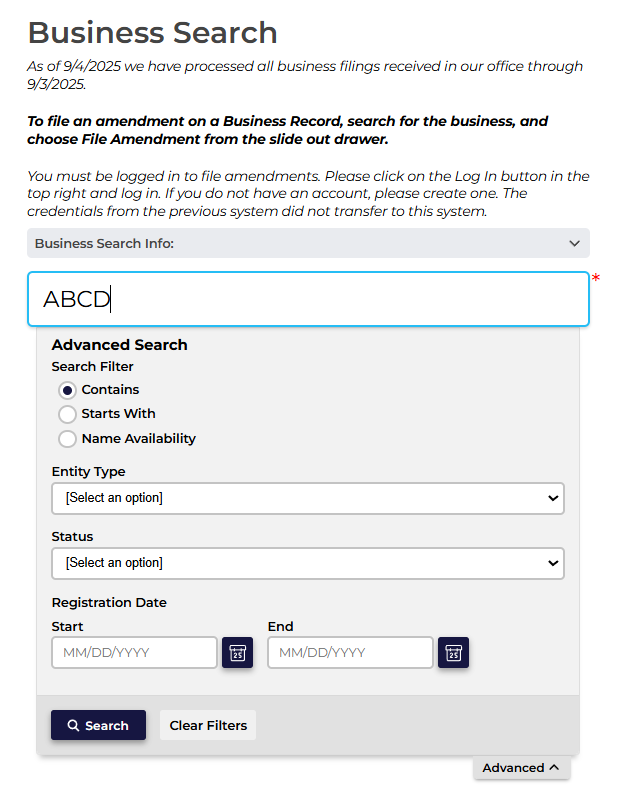
Step 2: Enter search criteria
Type an entity name, business ID number, registered agent, or officer name into the search box. The advanced search option lets you filter by Contains, Starts With, and Name Availability options. You can also search by Entity Type, Status, and Registration.
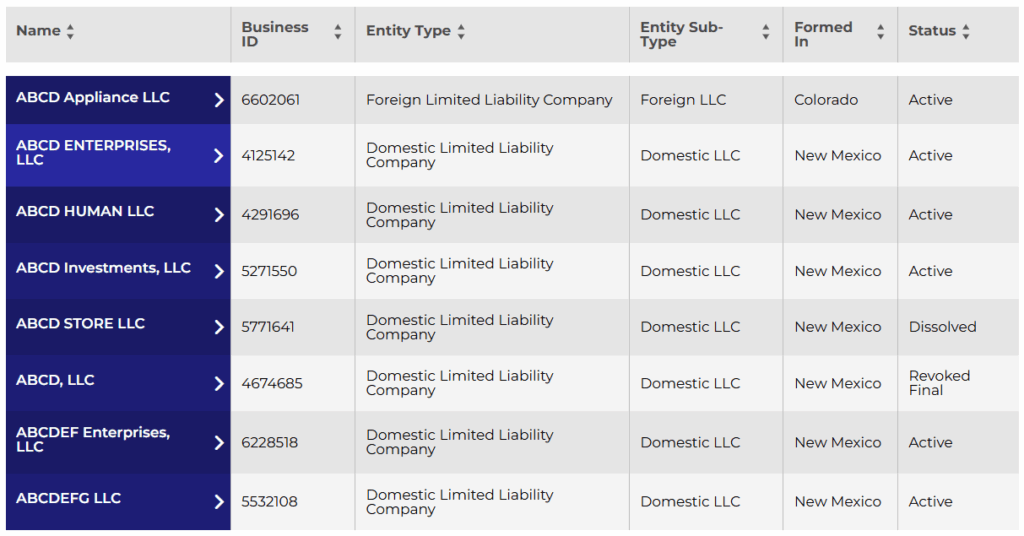
Step 3: Review search results
The results will list all entities based on your search criteria. You can scan results by name, business ID, entity type, entity subtype, formation date, and legal status (Active, Dissolved, etc.). The result list helps you short-list matches quickly.
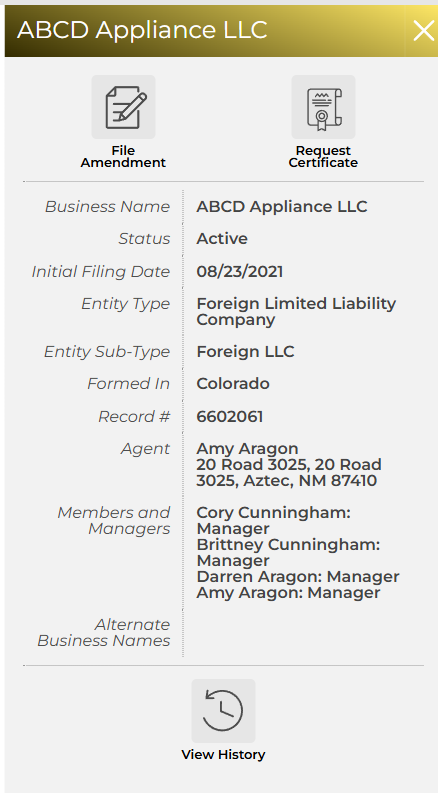
Step 4: Open the entity record
Click an entry to view detailed filings, registered agent info, officers, and filing history in the slide-out record view.
Step 5: Request official documents (optional)
From the portal, you can order certified copies, certificates (or request authentication/apostilles) and other official records. Fees and online payment apply.
Understanding New Mexico Entity Search Results
When you perform a New Mexico Secretary of State business entity search, the search results will include a variety of status designations. These statuses are critical for understanding whether an entity is active, compliant, or has undergone administrative changes.
Here’s what each one typically means:
- Active: The entity is currently in good standing and authorized to conduct business in New Mexico.
- Inactive: The business is temporarily not active or not participating in filings; it may be eligible for reinstatement.
- Dissolved: The entity has been formally closed, either voluntarily or administratively, and is no longer valid.
- Forfeited: The business has lost its rights (like the ability to legally operate) due to noncompliance, such as nonpayment or missing reports.
- Revoked: The state has withdrawn the entity’s authority to operate, often for serious compliance failures.
- Suspended: Filing or reporting requirements haven’t been met, temporarily halting the company’s legal operating status.
- Good Standing: While not always explicitly labeled in the portal, this term means the entity has met all filing and fee obligations; it may also be referred to as “Current” in some contexts.
- Expired: Applicable to registrations or filings that have passed their valid period and have not been renewed.
Common Issues with New Mexico Business Entity Searches
When conducting a New Mexico business entity search, users, especially those new to the process, often face several common challenges. Below are typical issues along with concise troubleshooting tips to help guide you:
Search Result Overload or Zero Results
- Too many results: Searching broad or common terms may return an overwhelming list. Use more specific inputs, like full names or partial keywords, and filter by entity type or status.
- No results found: Typos, alternate spellings, or overly narrow search terms can hide valid matches. Try variations and confirm spelling accuracy.
Name Similarity Confusion
New Mexico requires business names to be “distinguishable”, but subtle differences like punctuation, articles, or abbreviations may not count as unique. Always search for potential look-alikes, as even variations are often disallowed for new registrations.
System Functionality & Technical Hurdles
The SOS portal relies on JavaScript and may use pop-ups for downloads. If you encounter download or page load issues, ensure your browser is updated, your cache is cleared, and pop-up blockers are disabled for the site.
Misinterpretation of Entity Status
Status labels like “Forfeited” or “Suspended” don’t mean the entity no longer exists; they indicate compliance issues. Be sure to interpret the status carefully to understand if reinstatement is possible before proceeding.
Timing & System Availability
Though the SOS site operates year-round, scheduled maintenance or updates may temporarily disrupt access. It’s wise to perform searches earlier in the day or on business days.
Steps After Completing Your New Mexico Entity Search
After conducting your New Mexico business entity search, the next steps depend on your goal, whether you are forming a new business entity or researching/investigating an existing one. The following outlines the key actions to take in each scenario to ensure proper registration and compliance.
For New Businesses
- Reserve Your Business Name (Optional): If the desired business name is available, consider reserving it for 120 days by filing an Application for Name Reservation. The filing fee is $20.
- Register Your Entity: File the Articles of Organization (for LLCs) or Articles of Incorporation (for corporations) with the New Mexico Secretary of State for a filing fee of $52.
- Obtain a Business Tax Identification Number (TIN): Register with the New Mexico Taxation and Revenue Department to obtain a Business Tax Identification Number.
- Apply for an Employer Identification Number (EIN): If your business has employees or operates as a corporation or partnership, apply for an EIN through the IRS.
- Obtain Necessary Licenses and Permits: Depending on the business type and location, obtain relevant state and local licenses or permits. Fees vary based on the specific license or permit.
For Existing Business Research
- Document Your Findings: Save or print search results for your records. This information can be useful for future reference or legal purposes.
- Request Official Documents: If you need certified copies of documents or a Certificate of Good Standing, you can request these through the New Mexico Secretary of State’s online portal.
- Address and Clear Status Issues: If the entity shows a non-compliant status (e.g., forfeited, suspended, or dissolved), take steps to resolve outstanding filings, fees, or other requirements to restore good standing with the state.
Simplify Your New Mexico Business Setup with Commenda
Meeting New Mexico’s business registration and compliance requirements demands accuracy and careful planning. Commenda simplifies this by helping businesses with the process of entity formation and compliance.
Through centralized entity management, Commenda streamlines formation, monitors compliance deadlines, and provides AI-driven alerts for status changes or upcoming fees. Our platform reduces errors, prevents name conflicts with state and federal checks, and ensures all filings are completed on time.
Whether starting a new venture or expanding operations, Commenda makes managing New Mexico business requirements seamless, saving time and minimizing risk. Book a free demo today to simplify your New Mexico business setup.
FAQs on New Mexico Business Entity Search
Q. How do I verify if my chosen business name is available in New Mexico?
Use the New Mexico Secretary of State online portal to search the business name. Ensure it is distinguishable from existing entities.
Q. Can I reserve a business name in New Mexico after my entity search?
Yes, businesses can file a Name Reservation Request for 120 days for a $20 fee to secure the name while preparing formation documents.
Q. What does it mean if a business entity in New Mexico is listed as “forfeited”?
“Forfeited” indicates the entity failed to meet compliance requirements, such as missing filings or unpaid fees, and cannot legally operate until reinstated.
Q. How frequently is the New Mexico business entity database updated?
The database is updated regularly, but there may be slight delays in reflecting recent filings or status changes.
Q. Can sole proprietorships be found through New Mexico’s entity search tool?
No. Sole proprietorships and general partnerships are typically not registered with the state unless operating under a DBA name.
Q. Are official business documents available directly via New Mexico’s entity search platform?
Yes, certified copies, Certificates of Good Standing, and other official filings can be requested online for a fee.
Q. Why might my New Mexico entity search return no results for an existing business?
Possible reasons include spelling errors, searching for a DBA instead of the legal name, or the entity being recently formed and not yet reflected in the database.