

Understanding Kansas’s business environment requires careful attention to state compliance and access to accurate company records. The Kansas business entity search is a vital tool for entrepreneurs, investors, and legal professionals who need to verify registered businesses and make informed decisions. From confirming name availability to reviewing an entity’s legal status, ownership structure, or filing history, this search equips you with essential details for evaluating opportunities and minimizing risks.
Whether you’re launching a new startup, forming valuable partnerships, or expanding operations into Kansas, understanding how to utilize this resource is crucial for smooth operations. In this guide, you’ll learn how to conduct a Kansas business entity search, its advantages, and how it simplifies key steps in compliance and business setup.
What is a Kansas Business Entity Search
A Kansas business entity search allows you to look up registered business records maintained by the Kansas Secretary of State. The Kansas Corporations, Limited Liability Companies, Partnerships, and other businesses registered to operate within the state are listed in this official database. The Kansas business entity search serves as the primary resource for verifying business registrations, checking name availability, and confirming entity status. Business professionals rely on this system to conduct due diligence, verify compliance status, and ensure their chosen business names meet state requirements before filing formation documents.
Importance of Conducting a Kansas Entity Search
Performing a business entity search Kansas is a foundational step for any organization, be it a startup, mid-market firm, large enterprise, or cross-border entity, looking to establish or expand operations in the state. Below are the key reasons why every business should prioritize this step.
Checking Name Availability
The search confirms whether your desired business name is already registered in Kansas, preventing legal conflicts and rejected filings. This step saves time and costly rebranding efforts later.
Verifying Entity Status
You can determine if existing businesses are active, dissolved, or forfeited, which helps assess potential partners or competitors. This information supports informed decision-making for partnerships and acquisitions.
Due Diligence Activities
The Kansas SOS business entity search enables thorough research on companies before entering into contracts, investments, or business relationships. Access to formation dates, registered agents, and compliance history reduces business risks.
Compliance Monitoring
Regular searches help businesses maintain good standing by tracking filing deadlines and ensuring all state requirements are met. This prevents administrative dissolution and associated penalties.
Market Research
Understanding the competitive environment becomes easier when you can identify similar businesses, their formation dates, and their current status within your industry.
These searches form the foundation for successful business operations in Kansas, whether you’re starting a new company or expanding existing operations.
Types of Business Entities in Kansas
Kansas offers a diverse array of business entity structures, each tailored to different operational needs, liability concerns, and tax considerations. Understanding these options is crucial for entrepreneurs, investors, and legal professionals navigating the state’s business landscape. Here are the primary entity types you can look up:
- Limited Liability Companies (LLCs): Single-member and multi-member LLCs registered under Kansas law, providing liability protection while maintaining operational flexibility.
- Corporations: Both C-corporations and S-corporations formed in Kansas, including domestic entities and foreign corporations authorized to conduct business in the state.
- Limited Partnerships (LPs): Business partnerships where some partners have limited liability while others maintain full management responsibility.
- Limited Liability Partnerships (LLPs): Professional partnerships commonly used by law firms, accounting practices, and other service businesses.
- General Partnerships: While not required to register with the state, some partnerships file statements of partnership authority or other documents.
- Nonprofit Organizations: Tax-exempt entities registered to operate for charitable, educational, or other nonprofit purposes in Kansas.
- Professional Associations: Entities formed by licensed professionals such as doctors, lawyers, and architects.
These entity types represent the majority of searchable business records in the Kansas business entity search database, each with specific formation requirements and ongoing compliance obligations.
How to Perform a Kansas Business Entity Search
Follow these detailed steps to conduct a thorough state of Kansas business entity search using the official Secretary of State portal.
Step 1: Visit the Kansas Secretary of State Website
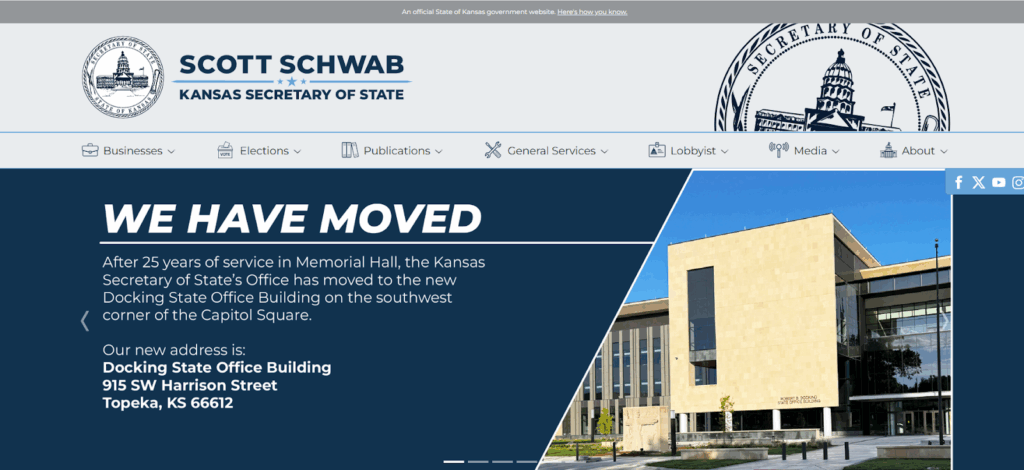
Navigate to sos.ks.gov and locate the Business Services section. Click on “Business Entity Search” to access the official search portal.
Step 2: Enter entity name, number, or officer details
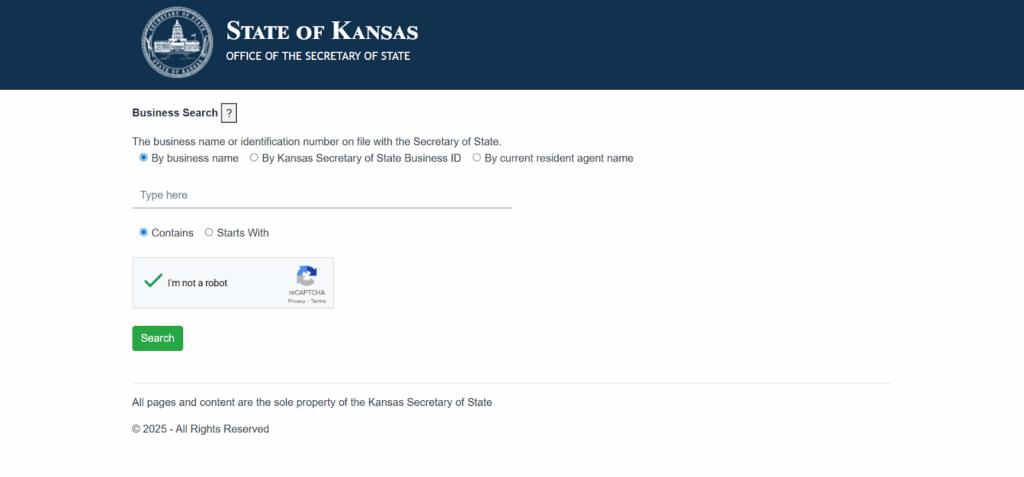
The Kansas SOS business entity search offers three primary search options: business name search, Kansas Secretary of State Business ID search, and registered agent name search.
Step 3: Review Search Results
The system displays matching entities in a table format showing business names, entity ID numbers, business types, status, and formation dates.
Step 4: Click into Individual Entity Details
Click “Select Business” next to any entity to view comprehensive details including registered agent information, principal office address, filing history, and compliance status.
The Kansas Secretary of State business entity search provides real-time access to current business information, making it a reliable resource for verification and compliance activities.
Understanding Kansas Entity Search Results
When conducting a business entity search in Kansas, it is crucial to interpret the status indicators accurately to assess a company’s operational standing and legal compliance. Here’s a breakdown of the most common statuses you’ll encounter:
- Active Status: Indicates the business entity is in good standing with the Kansas Secretary of State and authorized to conduct business operations. These entities have met all filing requirements and paid necessary fees.
- Forfeited Status: This document shows that the business did not comply with state regulations such as filing annual reports or paying fees due to the state. Forfeited entities lose their good standing and may face restrictions on business activities.
- Dissolved Status: Means the business entity has been formally terminated and is no longer authorized to operate. This can result from voluntary dissolution or administrative action by the state.
- Inactive Status: Represents entities that have ceased operations but may not be formally dissolved. These businesses typically cannot conduct normal business activities.
- Cancelled Status: Indicates foreign entities that have withdrawn their authority to operate in Kansas or had their registration cancelled by the state.
Understanding these status designations helps you make informed decisions about potential business partners, competitors, or acquisition targets based on their current legal standing with the state.
Common Issues with Kansas Business Entity Searches
Users may face common challenges when performing a Kansas business entity search, but most issues have simple solutions. Understanding these problems helps ensure successful searches.
- No Results Found: This often occurs when search terms are entered incorrectly or when searching for sole proprietorships that aren’t required to register with the Secretary of State. Try variations of the business name or partial searches.
- Too Many Results: Overly broad search terms can return hundreds of matches. Narrow your search by using “starts with” instead of “contains” or adding more specific terms.
- Similar Business Names: Multiple entities may have nearly identical names that are still legally distinguishable under Kansas law. Carefully review entity details to identify the correct business.
- Outdated Information: While the database updates regularly, some information may lag behind recent filings. Check the last update date and contact the Secretary of State for the most current information.
- Missing Sole Proprietorships: Individual businesses operating under their owner’s name typically don’t appear in searches unless they’ve filed a DBA (doing business as) registration.
- Technical Search Limitations: The system may not recognize certain special characters or formatting. Try searching without punctuation, abbreviations, or corporate designators.
Being aware of these common issues helps you conduct more effective searches and troubleshoot problems when they arise.
Steps After Completing Your Kansas Entity Search
Following the completion of your Kansas business entity search, the next steps will depend on what your specific goals are and what you have discovered during the process of conducting your search. Here’s a concise guide to help you proceed:
For New Businesses
- Register Your Business Name: If your desired name is available, promptly file your formation documents with the Kansas Secretary of State to secure the name.
- Reserve Your Name: Consider reserving your name for $30 (online) or $35 (mailed) to hold your preferred name for 120 days while you prepare other formation documents.
- Check Federal Trademarks: Conduct additional searches through the USPTO database to ensure your name doesn’t conflict with existing trademarks.
- Secure Domain Names: Register matching website domains to establish your online presence before competitors claim similar names.
For Existing Businesses
- Verify Compliance Status: Confirm your entity maintains good standing and address any outstanding filing requirements or fees.
- Update Business Information: File amendments if your registered agent, business address, or other key information has changed.
- Obtain Certificates: Request certificates of good standing if needed for banking, contracts, or expansion into other states.
- Monitor Competitors: Set up regular searches to track new businesses entering your market or changes in existing competitor status.
If you’re starting a new business or evaluating an existing one, the Kansas business entity search can be very helpful. For assistance with formation and compliance, consider partnering with experienced professionals to ensure all requirements are met accurately and efficiently.
Simplify Your Kansas Business Setup with Commenda
Managing Kansas business formation and ongoing compliance requirements can be complex and time-consuming. Commenda streamlines the entire process through their comprehensive platform designed specifically for startups and cross-border enterprises. Their services include entity management, registered agent services, compliance monitoring, and automated filing reminders to keep your Kansas business in good standing.
Book a free demo with Commenda to discover how their integrated solutions can simplify your Kansas business setup while ensuring full compliance with state requirements. Commenda’s expertise helps businesses navigate Kansas regulations efficiently, allowing you to focus on growing your operations rather than managing administrative burdens.
FAQs on Kansas Business Entity Search
Q. How do I verify if my chosen business name is available in Kansas?
Use the Kansas Secretary of State business entity search tool and enter your desired name to check if it’s already registered. No search results typically indicate availability.
Q. Can I reserve a business name in Kansas after my entity search?
Yes, Kansas allows name reservations for $30 (online) or $35 (mailed), which holds your chosen name for 120 days while you prepare formation documents.
Q. What does it mean if a business entity in Kansas is listed as “forfeited”?
Forfeited status indicates the business failed to meet state filing requirements or pay required fees, resulting in loss of good standing.
Q. How frequently is the Kansas business entity database updated?
The database receives real-time updates, typically reflecting new filings and changes within one to two business days.
Q. Can sole proprietorships be found through Kansas’s entity search tool?
Most sole proprietorships don’t appear unless they’ve registered a DBA or fictitious name with the state.
Q. Are official business documents available directly via Kansas’s entity search platform?
Yes, the “View Documents” section provides access to formation papers, annual reports, and amendments for registered entities.
Q. Why might my Kansas entity search return no results for an existing business?
This could result from incorrect search terms, businesses registered in other states, or sole proprietorships not required to register with Kansas.