















Why Sales Tax Compliance Breaks Down in Priority ERP
Priority ERP is built to support structured financial workflows, but U.S. sales tax operates under a fragmented regulatory system. State, county, city, and district rules change independently, creating gaps when tax is managed manually or through basic tools.
Several pressure points tend to emerge, including:
- Tax rates that rely on manual updates and gradually fall out of alignment with current rules.
- Limited awareness of economic nexus exposure as sales activity spreads across states.
- Filing processes that depend on manual preparation and increase the chance of mistakes.
- Jurisdiction coverage that stops short of local or special district requirements.
Over time, these gaps introduce risk and increase the operational load on finance teams trying to keep compliance under control.
Who This Sales Tax Integration Is Built For
Sales tax automation for Priority ERP is intended for teams that need dependable compliance without adding daily administrative work. The solution fits a wide range of business models, including:
- SaaS companies billing customers across multiple U.S. states.
- Ecommerce businesses operating through websites, marketplaces, or blended sales channels.
- Product-based companies managing taxable goods and inventory movement.
- Service providers offering digital or professional services subject to tax.
- Organizations running multiple legal entities under one financial structure.
- International businesses building or expanding a U.S. presence.
Different business models are supported while allowing teams to continue working within Priority ERP without changing existing financial processes.
Common Sales Tax Challenges for Priority ERP Users
Sales tax issues often surface gradually and become more noticeable once operations scale beyond a single state. Priority ERP users commonly deal with challenges such as:
- Increased audit exposure due to inconsistent filings or incomplete records.
- Heavy reliance on spreadsheets to track liabilities and filing obligations.
- Difficulty coordinating compliance timelines across multiple states.
- Limited visibility into upcoming filing deadlines and registration needs.
- Additional complexity introduced by selling across multiple channels or entities.
These issues tend to pull finance teams into reactive workflows, making compliance harder to manage proactively.
What Is Sales Tax Automation Software for Priority ERP?
Sales tax automation software for Priority ERP connects externally to manage sales tax from calculation through filing. Manual processes are replaced by a dedicated tax engine that applies jurisdiction-specific rules automatically. Typical functionality includes:
- Automatic sales tax calculation on invoices and transactions.
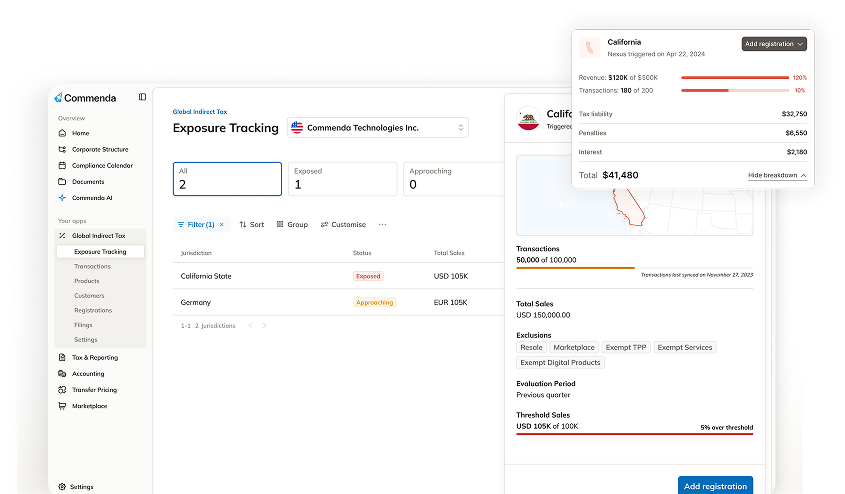
- Continuous tracking of economic nexus thresholds by state.
- Automated preparation, filing, and remittance of sales tax returns.
- A centralized view of liabilities, filings, and compliance status.
Priority ERP remains the financial system of record, while specialized tax logic operates alongside it in a more scalable structure.
How Commenda Integrates With Priority ERP
Commenda connects to Priority ERP through secure API connections designed for finance teams rather than developers. Integration aligns smoothly with existing financial processes and does not require engineering resources. After setup, relevant data flows automatically between systems, keeping sales tax activity out of daily operations. The integration synchronizes:
- Transaction and invoice data to ensure calculations reflect actual sales activity.
- Customer and location details so jurisdiction rules are applied correctly.
- Product and service taxability information to support accurate treatment across regions.
Sales tax automation runs quietly in the background while Priority ERP continues to handle core operations.
Real-Time Sales Tax Calculation
Sales tax calculations for Priority ERP occur at the transaction level using current jurisdiction rules. Each calculation reflects multiple inputs that influence how tax applies. Those inputs include:
- Customer location and sourcing rules that determine taxing authority.
- Product or service classification under state and local regulations.
- State, county, city, and special district tax rates.
- Applicable exemptions or resale certificates when present.
Accurate calculations at the point of sale reduce downstream adjustments and improve reporting confidence.
Economic Nexus Monitoring and Alerts
Economic nexus rules require registration and tax collection once sales or transaction thresholds are exceeded in a state. Tracking those thresholds manually becomes increasingly difficult as sales activity expands.
Commenda monitors economic nexus for Priority ERP users by analyzing transaction data across jurisdictions on an ongoing basis. Advance alerts notify teams before thresholds are crossed, giving time to register and prepare. This visibility reduces unexpected exposure and supports controlled market expansion.
Automated Sales Tax Filing and Remittance
Sales tax filing for Priority ERP is simplified through automation that covers the entire filing cycle. Commenda manages filings across states and local jurisdictions from a centralized workflow. That workflow includes:
- Preparing returns using synchronized transaction data.
- Submitting filings according to state and local deadlines.
- Coordinating payments and remittances across jurisdictions.
- Tracking confirmations and maintaining filing records.
Centralized filing reduces administrative effort and lowers the risk of penalties tied to missed or incorrect filings.
Centralized Compliance Dashboard
A centralized dashboard provides Priority ERP users with a consolidated view of sales tax obligations. Key compliance information is available from one interface. Finance teams gain visibility into:
- Sales tax liabilities by state and jurisdiction.
- Upcoming filing deadlines across active registrations.
- Filing progress and payment history.
- Historical records useful for audits and internal reviews.
Clear visibility supports consistent compliance management and improves audit readiness without adding unnecessary stress.
Multi-Entity and Multi-Channel Support
Priority ERP users often manage multiple entities or sell through several channels. Sales tax automation software brings those data sources together under one compliance framework. Support typically includes:
- Multiple legal entities managed within a single account.
- Sales data captured from ecommerce platforms, billing systems, and marketplaces.
- Unified reporting across entities and channels.
Consolidation helps maintain consistent tax treatment while reducing reconciliation work as operations expand.
Time to Value and Ongoing Maintenance
Sales tax automation for Priority ERP is designed to deliver results quickly without extensive configuration. After connection, jurisdiction updates and regulatory changes are handled automatically. Ongoing maintenance managed by Commenda includes:
- Tax rate updates when jurisdictions make changes.
- Adjustments reflecting new or revised regulations.
- Filing rule updates as obligations evolve.
This approach allows finance teams to focus on review and oversight instead of system upkeep.
Commenda vs. Generic Sales Tax Tools
Generic sales tax tools often focus on calculation alone, leaving businesses responsible for filing and remittance. Commenda follows an end-to-end compliance approach built for growing operations. Compared to basic tools, Commenda provides:
- Filing and remittance support across the full compliance lifecycle.
- Finance-grade workflows designed for accuracy and review.
- Centralized visibility into liabilities, filings, and deadlines.
- Reduced operational risk as compliance requirements increase.
Spreadsheets and lightweight plugins highlight these differences further, as they struggle to scale and introduce higher error risk over time.
Security, Accuracy, and Compliance Standards
Sales tax compliance systems must meet high standards for security and reliability. Commenda is built with secure data handling, detailed audit trails, and dependable reporting. These safeguards help ensure:
- Filings remain consistent and defensible across jurisdictions.
- Records remain accessible during audits or regulatory reviews.
- Compliance operations stay reliable over time.
Every integration prioritizes data protection while maintaining accurate and trustworthy records.