You need to confirm a business name is free before you file, or verify a company is real before you sign with it. Both jobs start in the same free tool.
That tool is the Business Name Search run by the New Jersey Division of Revenue and Enterprise Services (DORES), the state’s corporate registry. Use the DORES Business Name Search at njportal.com to look up any registered New Jersey entity or check whether a new name is available. Searching and browsing are free. Only official reports, certificates, and certified copies cost money.
What Is the New Jersey Business Entity Search?
The New Jersey business entity search is a free public lookup of every registered entity in the state, maintained by the Division of Revenue and Enterprise Services (DORES) under the New Jersey Department of the Treasury. New Jersey has no Secretary of State business registry. The New Jersey Department of State confirms modern corporate filings sit with “the Division of Revenue in the Department of the Treasury” per the nj.gov state archives.
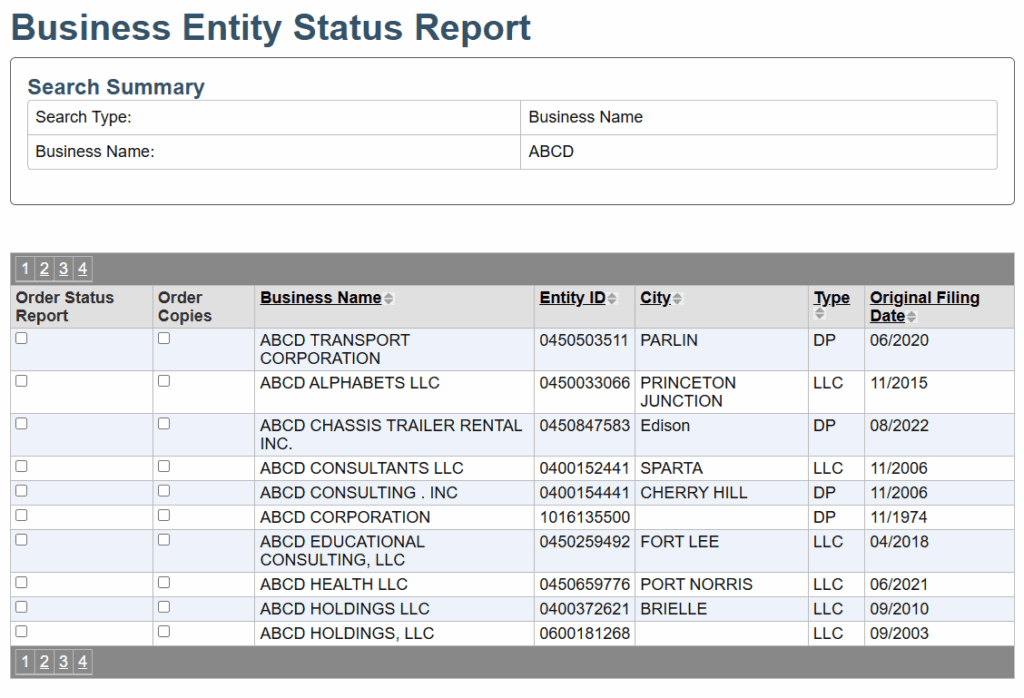
Each result returns the entity’s name, status, entity type, 10-digit entity ID, formation date, registered agent, and address. It shows registered agent and principals only. It never discloses ownership, members, or shareholders.
What Is the Difference Between the Registered Business Search and the Name Availability Search?
The portal splits into two modes that answer two different questions. The Registered Businesses search tells you whether a name exists in the database regardless of status. The Name Availability search tells you whether you can legally register that name for a new entity. Anyone forming a business checks availability first, before any filing.
| Question you are asking | Use this mode | Search inputs | What it answers | Source |
|---|---|---|---|---|
| Does this company exist? | Registered Businesses | Name keyword or entity ID | Any matching entity, returned regardless of status | DORES portal |
| Can I register this name? | Name Availability | Proposed new name | Whether the name is distinguishable enough to form a new entity | DORES portal |
How Do You Run a New Jersey Business Entity Search Step by Step?
Open the DORES portal, pick the mode, enter partial terms, and review the results. The lookup is free and takes under a minute. A wildcard auto-appends to the end of every search. Spacing and punctuation change results, so be exact per the DORES name-availability page.
- Open the DORES Business Name Search.
- Pick the mode: Registered Businesses for lookups, Name Availability before formation.
- Enter terms: partial names work, a wildcard is auto-appended, and you can type `%` manually. Leave off “Inc.” and “LLC” designators for broader matches.
- Review results: name, status, entity type, entity ID, formation date, registered agent, and address.
- Order paid documents if needed: status report, Standing Certificate, or certified copies.
How Do You Check if a Business Name Is Available in New Jersey Before Forming an LLC?
Run the Name Availability search before you file anything. “New Jersey law requires a new public business entity to have a name which is not the same (or similar) as another active entity,” per the DORES name-availability page. Ignore that rule and the cost falls on you.
The state warns plainly: “Should you begin forming your business with a name already in use, the registration will be denied and any expense to correct the filing will be borne by the business entity.” Free Name Browsing lets you scan names on file first. A foreign (out-of-state) business must match its exact home-state formation name, because spacing and punctuation count. The state’s own example treats “A. B. C. North Boulevard” as different from “A B C N Boulevard,” “A B C North Blvd.,” and “ABC N Blvd.” Pre-check a name with the Commenda company name checker, then confirm it inside the official DORES search.
Streamline your global entity management in one place
Stay on top of filings, records, and governance across every jurisdiction
How Do You Search a New Jersey Business by Entity ID?
Use the Entity Id Search to pull one definitive record with no near-match noise. The New Jersey entity ID is the 10-digit number DORES assigns at registration, confirmed on the New Jersey business portal. It prints on formation documents and appears in every search result. Searching by ID beats a name search for due diligence.
A name keyword search returns every near match, which is useful for discovery but noisy for verification. When you already hold the ID from a contract, invoice, or certificate, the Entity Id Search returns the exact entity in one step.
Can You Search by Registered Agent or Principal Name in New Jersey?
Yes. You can look up entities by principal name (officer, director, or manager) or by registered agent, per the New Jersey State Library business research guide. These axes help when you know a person but not the exact company name.
This matters for due diligence. If a contract names an individual signatory, you can work backward to the entities tied to that person or agent, then confirm each one’s status and entity ID in the main search. Always verify the current record directly in the DORES portal, since person-based lookups surface leads, not proof.
What Do New Jersey Business Entity Statuses Mean?
Status tells you whether an entity can legally operate and contract in New Jersey. Read it before you rely on any counterparty. “Active” in the search is not a certificate of good standing. Good standing is a separate affirmative certification covering tax and annual-report compliance.
| Status | What it means | What it signals for a counterparty |
|---|---|---|
| Active | Filings and fees are current | Safe to contract; still confirm good standing |
| Inactive | Required filings or fees lapsed | Possible pending administrative dissolution |
| Revoked | Charter annulled for non-compliance | Cannot legally operate until reinstated |
| Dissolved | Entity formally ceased to exist | No longer an operating legal entity |
| Forfeited | Lost the right to do business in NJ | Reinstatement required before contracting |
| Merged | Combined into another entity | Separate existence has ended |
| Converted | Changed legal structure | Same entity, new form; verify current record |
| Suspended | Operations temporarily halted | Unresolved compliance issue outstanding |
Search results never disclose ownership, members, or shareholders. Those are internal records.
Is the New Jersey Business Entity Search Free?
Searching, browsing, and the availability check are free. Official reports, certificates, and certified copies cost money, because not every document is viewable online. The state confirms “you may browse the names/10-digit IDs of business entities online free of charge” on the DORES standing-certificate page. Current DORES fees are below.
| Item | Fee | Source |
|---|---|---|
| Name or entity ID search | Free | DORES portal |
| Name browsing | Free | DORES name-availability page |
| Business status report | $5.00 plus $1.25 online convenience fee | DORES fee schedule |
| Standing Certificate (corporation or LP) | $25.00 | DORES standing certificates |
| Standing Certificate (LLC/LLP, short form) | $50.00 | DORES standing certificates |
| Standing Certificate (LLC/LLP, long form) | $100.00 | DORES standing certificates |
| Certified copy (corporation, nonprofit, LP) | $25.00 per document plus $0.10 per page | DORES certified copies |
| Certified copy (LLC) | $50.00 per document plus $0.10 per page | DORES certified copies |
| No Record Certificate | $25.00; $50.00 for LLCs | DORES certified copies |
You need certified copies to open bank accounts, foreign-qualify in another state, or complete merger and acquisition (M&A) due diligence. Only DORES issues certified copies of New Jersey entity documents.
How Do You Get a Certificate of Good Standing in New Jersey?
Order a Standing Certificate through the DORES Business Records Service after locating the entity. In New Jersey it certifies the entity is registered and current on its filings and fees. Banks, lenders, M&A buyers, and other states’ foreign-qualification filings require it. Fees run from $25.00, per the DORES standing-certificate page.
| Service | Fee | Source |
|---|---|---|
| Standing Certificate (corporation or LP) | $25.00 | DORES standing certificates |
| Standing Certificate (LLC/LLP, short form) | $50.00 | DORES standing certificates |
| Standing Certificate (LLC/LLP, long form) | $100.00 | DORES standing certificates |
| Expedited processing (within 8.5 business hours) | $15.00 per transaction (corporations, nonprofits, LPs); $25.00 per filing (LLCs/LLPs) | DORES standing certificates |
For the full walkthrough, see the Commenda New Jersey Certificate of Good Standing guide.
How Do You Verify a New Jersey Company Before Signing a Contract?
Pull status, formation date, registered agent, and entity ID, then order the Business Status Report or Standing Certificate for anything you need to rely on. The record never shows ownership, cap tables, financials, or bylaws, which are internal documents in the United States. Confirm the exact legal name on the contract matches an Active entity.
One timing caveat matters. DORES updates electronic filings “by 10:00 AM the next business day,” per the DORES standing-certificate page. A change filed today may not appear until then, so a very recent status update can be missing when you look. For high-value deals, order a current Standing Certificate as affirmative proof rather than relying on the free lookup alone.
Which Business Types Appear in New Jersey Search Results?
Registered entities appear: LLCs, corporations, nonprofits, limited partnerships, and foreign-qualified entities. Sole proprietorships and general partnerships do not appear unless they file a trade name, or doing-business-as (DBA), which registers at the county clerk rather than with DORES. Each registered type files a distinct formation document.
| Entity type | Formation document |
|---|---|
| LLC | Certificate of Formation |
| C-corporation | Certificate of Incorporation |
| Nonprofit corporation | Certificate of Incorporation |
| Limited partnership (LP) | Certificate of Limited Partnership |
| Foreign entity qualifying in NJ | Certificate of Authority |
How Do You Go From Name Search to a Registered New Jersey Business?
Run the Name Availability search, reserve the name, file the formation document, register for taxes with Form NJ-REG, get an Employer Identification Number (EIN), then file annual reports. The formation filing and NJ-REG are separate, sequential steps. Every registered entity must list a New Jersey registered agent.
| Step | Action | Fee | Source |
|---|---|---|---|
| 1 | Reserve the available name (exclusive for 120 days) | $50.00 | DORES fee schedule |
| 2 | File the formation document (Certificate of Formation or Incorporation) | $100.00 | DORES fee schedule |
| 3 | Register with Form NJ-REG for the Business Registration Certificate (BRC) | Registration filing | DORES business registration |
| 4 | Obtain an Employer Identification Number (EIN) | Free | IRS EIN application |
| 5 | File the annual report each year | $75.00 for-profit; $30.00 nonprofit | DORES fee schedule |
New Jersey requires the formation document before you can file NJ-REG. See the Commenda New Jersey business registration guide and the Commenda New Jersey LLC formation guide for the steps that follow.
Does an Out-of-State Company Need to Register in New Jersey?
Yes. A company formed elsewhere that does business in New Jersey must foreign-qualify with DORES before operating, and its New Jersey name must clear the same availability check against its exact home-state formation name. Foreign qualification files a Certificate of Authority for $100.00, per the DORES fee schedule.
Maintaining an office or employees in the state triggers qualification. The same New Jersey registered agent requirement applies. The entity search confirms the name is clear before you qualify and later proves your standing to other parties.
How We Help With New Jersey Entity Formation and Compliance
Commenda handles New Jersey incorporation end to end and keeps the entity compliant afterward. Commenda’s incorporation service forms your entity through the same standardized workflow in every jurisdiction, so country 12 behaves like country 1. Commenda’s entity management platform tracks your filings, deadlines, registered agent, and documents in one place, with registered agent coverage across most US states so you always hold an official New Jersey address of record.
Stay ahead of every due date with the Commenda compliance calendar, and pre-check any name with the Commenda company name checker before you file. Book a demo to get every New Jersey formation and annual filing handled for you.
About the author

Ishwar is a serial entrepreneur and Y Combinator alum who has founded multiple venture-backed companies across global markets. Based in Bangalore, he brings a founder’s perspective to the complexities of international operations, with deep expertise in transfer pricing and cross-border structuring.
Disclaimer: Commenda and its affiliates do not provide tax, accounting, or legal advice. This material has been prepared for informational purposes only, and is not intended to provide or be relied on for tax, accounting, or legal advice. You should consult your own tax, accounting, and legal advisors before engaging in any related activities or transactions.