You need to confirm a Nevada company is real, active, and safe to deal with before you sign, wire money, or file your own name. The Nevada Secretary of State (SOS) gives you a free tool for exactly that. The Nevada Business Entity Search lets anyone look up any entity registered with the state, no account required.
This guide shows how to run the search, read an entity’s status, verify an LLC is active, and order a certificate of good standing in 2026. Every fee below is sourced to the Nevada SOS or the Nevada Revised Statutes (NRS).
What Is the Nevada Business Entity Search?
The Nevada Business Entity Search is a free official Nevada Secretary of State (SOS) tool for looking up any entity registered with the state. You can search by name, entity number, NV Business ID, officer name, or registered agent, per the SOS entity search portal. It needs no login. It covers state-registered entities only, not county-level fictitious names.
Three Nevada portals get confused constantly. This table separates them so you land on the right one.
| Portal | URL | What it does | Source |
|---|---|---|---|
| Business entity search | esos.nv.gov | Look up entities, status, filings | Nevada SOS |
| SilverFlume | nvsilverflume.gov | Register, license, and file for a business | SilverFlume |
| Nevada SOS site | nvsos.gov | Informational and fee schedules | nvsos.gov |
SilverFlume is Nevada’s official business portal, a service of the Secretary of State under Francisco V. Aguilar, per the SilverFlume home page. Doing business as (DBA) names are excluded from all three because they file with the county clerk.
How Do I Search a Nevada Business Entity Step by Step?
Open the SOS search page, enter your term, choose a match type, review the results, then open a record for detail. The whole search takes under a minute and works the same statewide, whether you are in Las Vegas, Reno, or out of state. Follow the five steps below.
Step 1: Open the search page
Go to the Nevada Business Entity Search on esos.nv.gov. This is the SOS search tool, not the SilverFlume filing portal.
Step 2: Enter your search criteria
Enter the entity name, entity number, NV Business ID, officer name, or registered agent name. Use match filters like “Starts With,” “Contains,” or “Exact Match” to control precision.
Step 3: Review the results
The results list shows each matching entity’s name, prior names, status, business type, NV Business ID, and entity number.
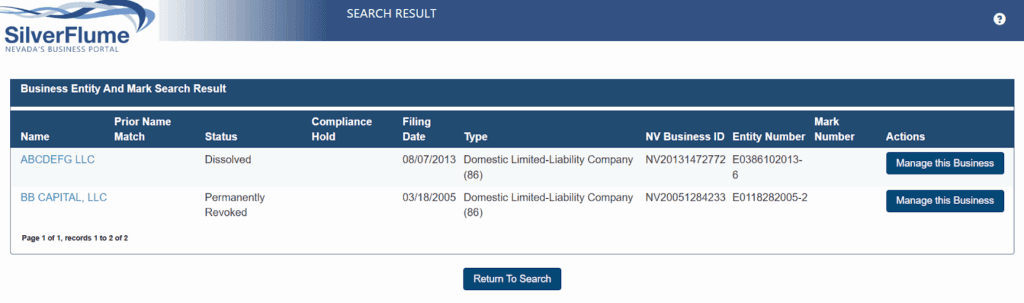
Step 4: Open the entity record
Select a business name to view the registered agent, officers, formation date, annual list history, name changes, mergers, and conversions.
Step 5: Order official documents
From the record you can order certified copies or a certificate of good standing for a fee. See the certificate and certified-copy sections below for the exact amounts.
What Is the Difference Between an Entity Number and an NV Business ID?
The NV Business ID is a statewide identifier assigned to every Nevada business entity; the entity number is the SOS filing number for one specific registration. SilverFlume defines the NV Business ID as “a unique number assigned to every business entity in the State of Nevada,” per its official FAQ. Both appear on the search result.
| Identifier | Issuer and issuance | Where it is used | Source |
|---|---|---|---|
| NV Business ID | SOS; assigned at filing for Title 7 entities, or with the State Business License for non-Title 7 (NT7) entities | Across Nevada agencies, including the Department of Taxation | SilverFlume FAQ |
| Entity number | SOS; assigned to the specific registration | SOS filings and the entity record | Nevada SOS |
What Do Nevada Business Entity Statuses Mean?
Status tells you whether an entity may legally operate and whether a lapse can be fixed. Active means filings are current. Default and Revoked mean the entity missed required filings. Permanently Revoked means it can never be reinstated. Use the table below to read any status, then check the notes for the edge cases.
| Status | Meaning | Reinstatable? | Source |
|---|---|---|---|
| Active | Filings and fees current | N/A | Nevada SOS |
| Default | Missed an initial or annual list, or license, filing (Title 7 entity) | Yes, before revocation | SilverFlume FAQ |
| Revoked | Charter revoked after prolonged default | Yes, within 5 years | NRS 78.180 |
| Permanently Revoked | Revoked 5 consecutive years | No | NRS 78.180 |
| Dissolved | Wound down voluntarily or by state action | No | NRS 78 |
| Withdrawn | Foreign entity ended its Nevada registration | No | NRS 80 |
| Merged | Absorbed into a surviving entity | No | NRS 92A |
| Converted | Transformed into another entity type | No | NRS 92A |
| Expired | NT7 business (e.g. sole proprietor) did not renew its State Business License | Yes, by renewing the license | SilverFlume FAQ |
Merged and Converted are not failures. The entity was absorbed into or transformed into another; follow the surviving entity, and nothing lapsed so there is nothing to reinstate. Expired applies to non-Title 7 (NT7) businesses whose State Business License term ran out, per the SilverFlume FAQ. One nuance matters most: Active is not the same as in good standing.
How Do I Verify a Nevada LLC Is Active and Registered?
Search the exact legal name, open the record, and confirm the status reads Active with a current annual list. Then check four fields: status, formation date, annual list history, and registered agent. A recent annual list and a listed Nevada agent are the strongest signals the LLC is real and operating. A stale list is a red flag worth questioning.
Out-of-state companies registered to do business in Nevada appear here as foreign entities. A company with no Nevada registration will not appear at all; search its home state’s registry instead. The search confirms registration and status, not tax compliance, which sits with the Nevada Department of Taxation.
What Does “In Good Standing” Mean in Nevada?
In good standing means the entity is current on its annual list, its State Business License, and its fees. It is stricter than the Active label. An entity can read Active in the search while a license lapse or a pending fee quietly breaks good standing, which is what banks and buyers actually check.
A missed annual list moves a Title 7 entity to Default, per the SilverFlume filing FAQ. A lapsed State Business License breaks standing too. Only the SOS certificate, not the search label, proves good standing to a third party.
How Do I Get a Nevada Certificate of Good Standing Online?
Order it through SilverFlume under Existing Business, Certificate of Good Standing. Nevada defines it as a document certifying “that your corporation legally exists and that it is up to date on all required documents and fees,” per the SilverFlume FAQ. Banks, lenders, foreign qualification filings, and mergers and acquisitions (M&A) due diligence commonly demand it.
| Document | Fee | Source |
|---|---|---|
| Certificate of Good Standing (standard) | $50 | Nevada SOS fee schedule |
| Ceremonial Certificate of Good Standing | $100 | Nevada SOS fee schedule |
The search shows a status; the certificate is a purchasable, signed document that proves it. Expedited processing is available from the SOS for an additional fee.
How Do I Order Certified Copies and View Filing History?
Filing history is free on the entity record; certified copies are ordered from the SOS for a fee. The record lists formation, annual lists, amendments, name changes, mergers, and conversions at no cost. A certified copy is the SOS-authenticated version you submit to a bank, court, or another state.
| Copy type | Fee | Source |
|---|---|---|
| Certified copy | $30.00 per document | Nevada SOS Commercial Recordings |
| Plain copy | $2.00 per page | Nevada SOS Commercial Recordings |
| Notarized document | $2.50 per document | Nevada SOS Commercial Recordings |
A plain copy is for reference; a certified copy carries the state’s seal. Expedited handling is available from the SOS for an added fee.
Can I Search Nevada Businesses by Officer or Registered Agent Name?
Yes, both officer name and registered agent name are supported search fields, per the SOS search portal. Results show officer and manager names and titles from the annual list, plus the registered agent’s name and Nevada street address. This lets you find every entity tied to one person or one agent.
Every Nevada entity must maintain a registered agent with a physical Nevada address. Nevada markets limited disclosure, yet the names on the annual list are public. If privacy matters, that trade-off is worth knowing before you file.
How Do I Check Nevada Business Name Availability and Reserve a Name?
Search your exact desired name; if no distinguishable match appears, it is likely available. Nevada requires names to be distinguishable from existing entities and to carry the right identifier, such as “LLC” or “Inc.” Restricted words like “bank,” “insurance,” or “trust” need state approval. Our company name checker runs the first pass for you.
To hold a name, file a Name Reservation Request through the SOS for $25, which reserves the exact name for 90 days for entity formation, per the Nevada SOS fee schedule. At expiry the reservation lapses and the name becomes available to anyone. Search results are advisory; final approval happens at filing.
Do DBAs and Sole Proprietorships Appear in the Nevada Search?
No. Fictitious firm names, or doing business as (DBA) names, file with the county clerk, not the SOS. So sole proprietorships and general partnerships without an SOS filing never appear in the state tool. For Las Vegas, that means the Clark County Clerk.
Search the relevant county clerk’s fictitious firm name records to find a DBA. The state search and the county search complement each other; a business can exist in one and not the other.
What Business Entity Types Are Registered in Nevada?
The search covers every formal entity registered with the SOS. Corporations fall under Nevada Revised Statutes (NRS) Chapter 78, including profit, nonprofit, close, professional, and cooperative forms, both domestic and foreign. Limited liability companies (LLCs), limited partnerships (LPs), limited liability partnerships (LLPs), limited liability limited partnerships (LLLPs), and business trusts are all searchable.
Foreign (out-of-state) registrants appear alongside domestic ones. Nevada levies no state corporate or personal income tax, a factual draw for holding companies and expanding firms. Compare state choices in our Delaware vs Nevada guide.
What Are Nevada LLC Requirements After Formation?
A Nevada LLC stays compliant by filing its annual list and renewing its State Business License every year by the end of its anniversary month. Formation runs in sequence: Articles of Organization, then the Initial List, then the State Business License. After that, the annual list is the recurring obligation, and missing it moves the entity to Default.
| Filing | Fee | Source |
|---|---|---|
| Articles of Organization (LLC) | $75 | Nevada SOS fee schedule |
| Initial or Annual List | $150 | Nevada SOS fee schedule |
| State Business License (LLC) | $200 | Nevada SOS fee schedule |
| State Business License (corporation) | $500 | Nevada SOS fee schedule |
The annual list is due within 90 days after the end of your anniversary month, per the SilverFlume FAQ. Amendments to agent, officers, or address are filed through SilverFlume. Separately, Nevada’s Commerce Tax applies to businesses with Nevada gross revenue above roughly $4 million, filed annually with the Nevada Department of Taxation. See our Nevada annual filing requirements guide for the full calendar.
How Do You Reinstate a Nevada Entity in Default or Revoked Status?
File the missed annual lists, renew the State Business License, and pay back fees plus a reinstatement penalty through SilverFlume. For corporations the reinstatement fee is $300 on top of delinquent amounts, per NRS 78.180. Reinstatement, once granted, relates back to the forfeiture date so the entity is treated as continuous.
A defaulting corporate charter is revoked on the first day of the first anniversary of the month following the month the filing was due, roughly 13 months later, per NRS 78.175. LLCs follow the parallel rule in NRS 86.276. The hard stop: a charter revoked 5 consecutive years is Permanently Revoked and cannot be reinstated. A lapsed entity’s name can also become available to others.
Is There a Separate Las Vegas Secretary of State Business Search?
No. Las Vegas businesses register with the statewide Nevada SOS, so the same entity search covers them. There is no city-level Secretary of State. Las Vegas and Clark County only add local business licenses on top of the state registration.
That means one search works no matter where in Nevada the company operates. For a Las Vegas business, expect a state entity record plus a separate Clark County or city license that the SOS tool does not show.
How Commenda Keeps Your Nevada Entity in Good Standing
Running the search tells you where a Nevada entity stands today. Staying in good standing is the harder job, and it is where lapses turn into Default. Commenda’s entity management platform tracks your Nevada annual list and State Business License deadlines so filings never lapse, and handles formation through ongoing compliance in one place. You know what is due, when, and that it got done.
Pair it with our compliance calendar to see every Nevada deadline at a glance, our Nevada annual filing requirements guide for the recurring obligations, and our Nevada business license guide for the license layer the entity search does not show. Book a demo to keep your Nevada entity out of Default status.